<?xml version="1.0" encoding="utf-8"?>
<feed xmlns="http://www.w3.org/2005/Atom">
    <id>https://tcb.cloud.tencent.com/en/blog</id>
    <title>CloudBase - AI-native Backend Platform Blog</title>
    <updated>2026-08-28T18:00:00.000Z</updated>
    <generator>https://github.com/jpmonette/feed</generator>
    <link rel="alternate" href="https://tcb.cloud.tencent.com/en/blog"/>
    <subtitle>CloudBase - AI-native Backend Platform Blog</subtitle>
    <icon>https://tcb.cloud.tencent.com/en/img/favicon.png</icon>
    <entry>
        <title type="html"><![CDATA[CloudBase Is Now an Official Curated Plugin on Kimi Code & Kimi Work]]></title>
        <id>https://tcb.cloud.tencent.com/en/blog/2026/08/28/kimi-cloudbase</id>
        <link href="https://tcb.cloud.tencent.com/en/blog/2026/08/28/kimi-cloudbase"/>
        <updated>2026-08-28T18:00:00.000Z</updated>
        <summary type="html"><![CDATA[CloudBase is now an official curated plugin on Kimi Code (CLI) and Kimi Work (desktop app). One-click install from the plugin marketplace brings 29+ skills and full MCP access.]]></summary>
        <content type="html"><![CDATA[<blockquote>
<p>Moonshot AI's Kimi Code and Kimi Work are now part of the CloudBase ecosystem. Two products, two interaction models, one plugin.</p>
</blockquote>
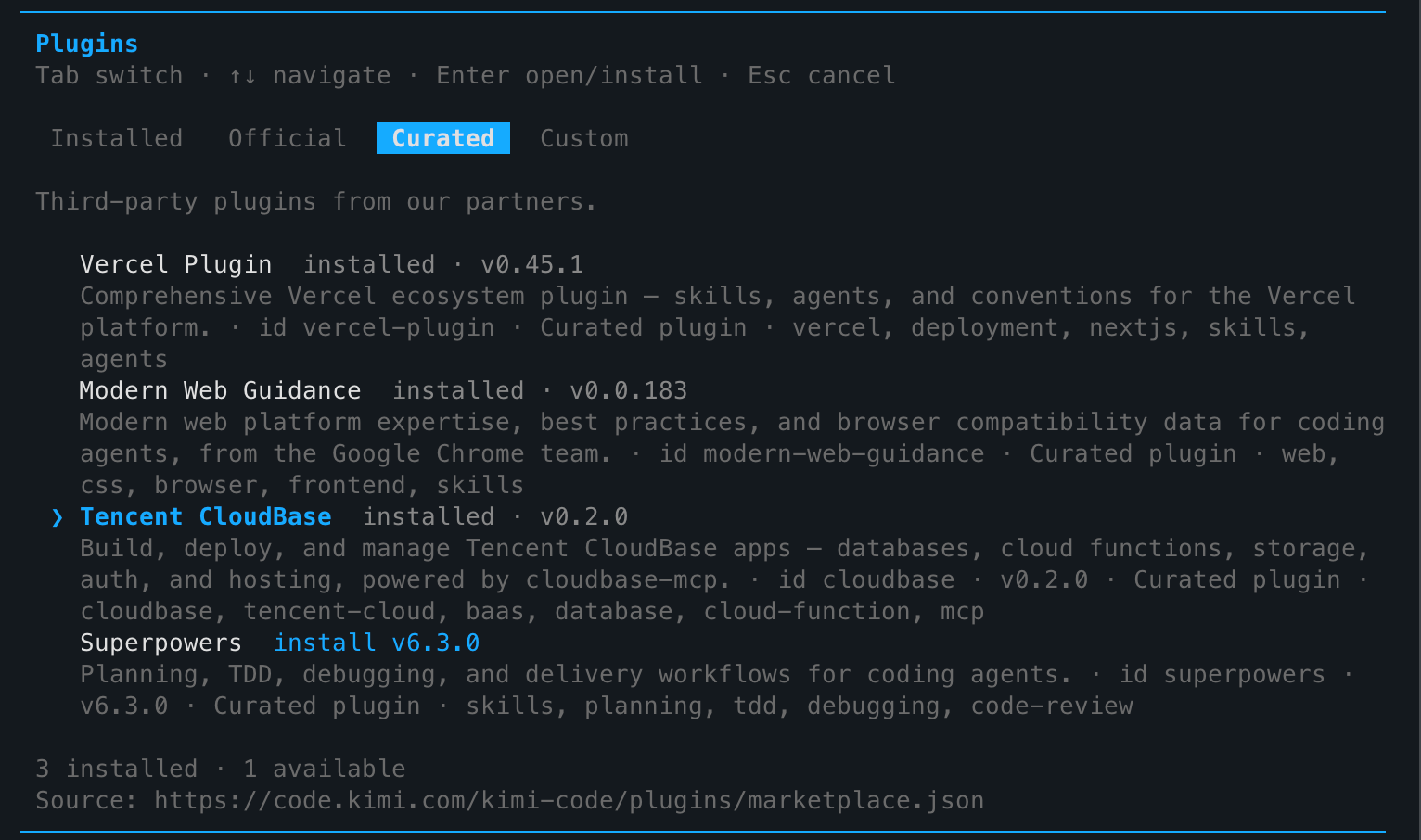
<p><img decoding="async" loading="lazy" alt="Kimi Code Plugin Panel" src="https://tcb.cloud.tencent.com/en/assets/images/kimi-code-plugins-3d884c200dbfd5e5c14ed986a6730dbd.png" width="1532" height="906" class="img_ev3q"></p>
<h2 class="anchor anchorTargetStickyNavbar_Vzrq" id="why-kimi">Why Kimi<a href="https://tcb.cloud.tencent.com/en/blog/2026/08/28/kimi-cloudbase#why-kimi" class="hash-link" aria-label="Direct link to Why Kimi" title="Direct link to Why Kimi" translate="no">​</a></h2>
<p>Kimi is one of the fastest-growing players in China's AI coding space. From conversational AI to code generation, Moonshot AI has expanded into two distinct product lines: <strong>Kimi Code</strong> (a terminal-first CLI client) and <strong>Kimi Work</strong> (a desktop agent for knowledge workers).</p>
<p>For CloudBase users, this means two more entry points for operating cloud resources with natural language.</p>
<h2 class="anchor anchorTargetStickyNavbar_Vzrq" id="two-products-two-use-cases">Two Products, Two Use Cases<a href="https://tcb.cloud.tencent.com/en/blog/2026/08/28/kimi-cloudbase#two-products-two-use-cases" class="hash-link" aria-label="Direct link to Two Products, Two Use Cases" title="Direct link to Two Products, Two Use Cases" translate="no">​</a></h2>
<h3 class="anchor anchorTargetStickyNavbar_Vzrq" id="kimi-code-for-terminal-users">Kimi Code: For Terminal Users<a href="https://tcb.cloud.tencent.com/en/blog/2026/08/28/kimi-cloudbase#kimi-code-for-terminal-users" class="hash-link" aria-label="Direct link to Kimi Code: For Terminal Users" title="Direct link to Kimi Code: For Terminal Users" translate="no">​</a></h3>
<p>Kimi Code is a command-line-first AI programming client, similar to Claude Code or Codex CLI, but deeply integrated with Kimi's model capabilities.</p>
<p><strong>Installation is straightforward:</strong></p>
<ol>
<li class="">Type <code>/plugins</code> in Kimi Code to open the plugin panel</li>
<li class="">Switch to the <strong>Curated</strong> tab</li>
<li class="">Find <strong>Tencent CloudBase</strong>, press Enter, select <strong>install</strong></li>
</ol>
<p><img decoding="async" loading="lazy" alt="Kimi Code Curated Plugins" src="https://tcb.cloud.tencent.com/en/assets/images/kimi-code-plugins-3d884c200dbfd5e5c14ed986a6730dbd.png" width="1532" height="906" class="img_ev3q"></p>
<p>After restarting Kimi Code, CloudBase's <strong>29 skills + 1 MCP service</strong> load automatically. You can directly say:</p>
<ul>
<li class="">"Create a PostgreSQL table for user data"</li>
<li class="">"Deploy a cloud function for file upload"</li>
<li class="">"Check today's environment usage"</li>
</ul>
<p>Everything happens in your terminal — no browser switching needed.</p>
<h3 class="anchor anchorTargetStickyNavbar_Vzrq" id="kimi-work-the-desktop-productivity-tool">Kimi Work: The Desktop Productivity Tool<a href="https://tcb.cloud.tencent.com/en/blog/2026/08/28/kimi-cloudbase#kimi-work-the-desktop-productivity-tool" class="hash-link" aria-label="Direct link to Kimi Work: The Desktop Productivity Tool" title="Direct link to Kimi Work: The Desktop Productivity Tool" translate="no">​</a></h3>
<p>Kimi Work is a macOS / Windows desktop app designed for a broader audience of knowledge workers — not just coders, but anyone doing document organization, data analysis, scheduled tasks, and more.</p>
<p><strong>Equally simple setup:</strong></p>
<ol>
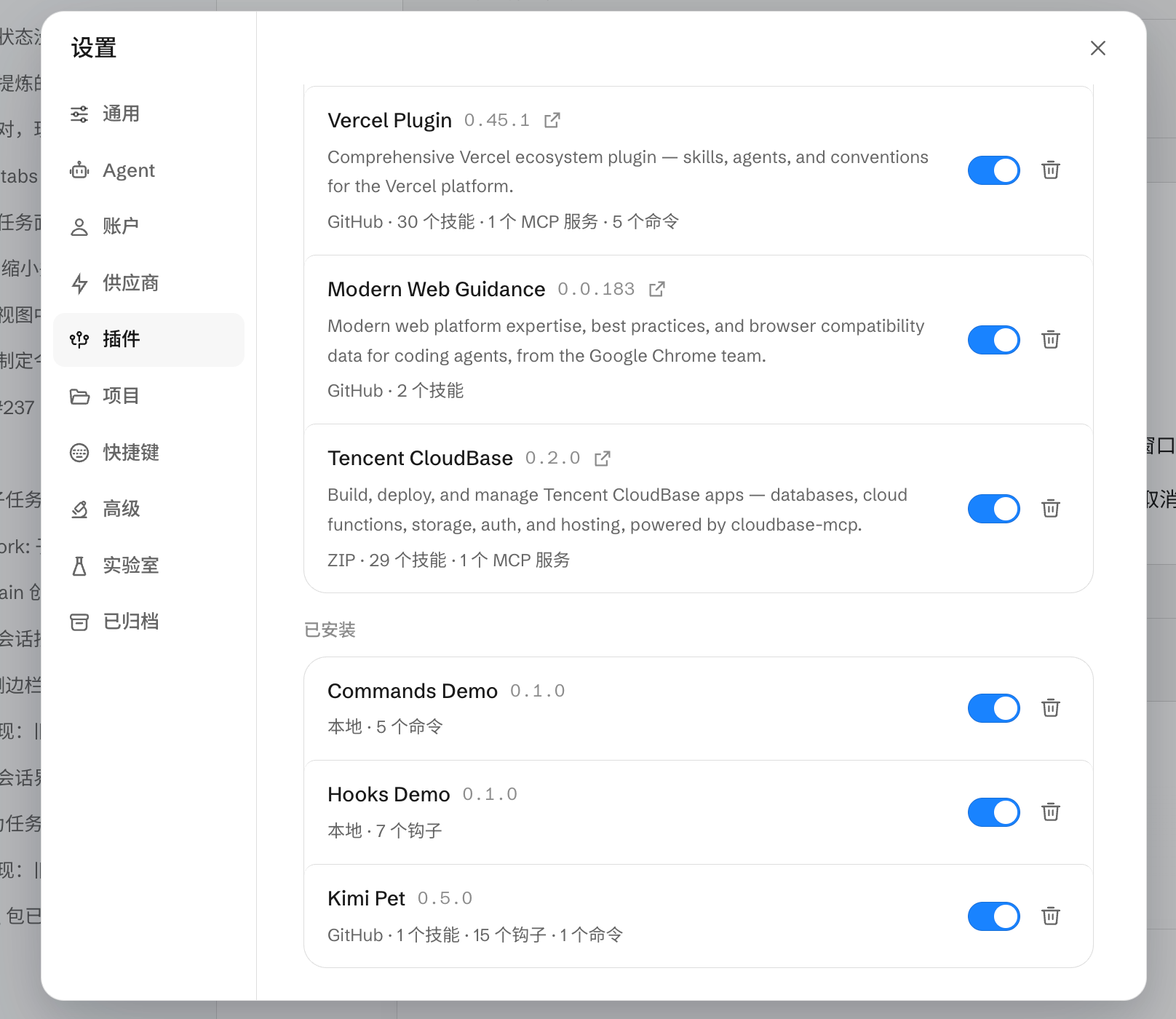
<li class="">Open Kimi Work → <strong>Settings</strong> (gear icon) → <strong>Plugins</strong></li>
<li class="">Find <strong>Tencent CloudBase</strong>, toggle the switch</li>
<li class="">Panel shows <code>v0.2.0 · 29 skills · 1 MCP service</code></li>
</ol>
<p><img decoding="async" loading="lazy" alt="Kimi Work Plugin Panel" src="https://tcb.cloud.tencent.com/en/assets/images/kimi-work-plugins-ad7aa1a7de13135e2e26125e2f2830f2.png" width="1616" height="1400" class="img_ev3q"></p>
<h2 class="anchor anchorTargetStickyNavbar_Vzrq" id="technical-details-one-plugin-both-ends">Technical Details: One Plugin, Both Ends<a href="https://tcb.cloud.tencent.com/en/blog/2026/08/28/kimi-cloudbase#technical-details-one-plugin-both-ends" class="hash-link" aria-label="Direct link to Technical Details: One Plugin, Both Ends" title="Direct link to Technical Details: One Plugin, Both Ends" translate="no">​</a></h2>
<p>The CloudBase Kimi plugin (<code>cloudbase-kimi-plugin.zip</code>) is packaged via Open Plugin Spec and includes:</p>
<table><thead><tr><th>Capability</th><th>Count</th><th>Description</th></tr></thead><tbody><tr><td>Skills</td><td>29</td><td>Database, cloud functions, auth, storage, web dev, etc.</td></tr><tr><td>MCP Tools</td><td>1</td><td>Unified MCP entry point aggregating all CloudBase APIs</td></tr><tr><td>Model Compatibility</td><td>Full Kimi series</td><td>Auto-adapts via INTEGRATION_IDE env var</td></tr></tbody></table>
<p>The plugin identifies its source via <code>INTEGRATION_IDE=Kimi</code> (Code) or <code>INTEGRATION_IDE=Kimi Work</code>, and the CloudBase MCP Server optimizes prompts and default config paths accordingly.</p>
<h2 class="anchor anchorTargetStickyNavbar_Vzrq" id="next-steps">Next Steps<a href="https://tcb.cloud.tencent.com/en/blog/2026/08/28/kimi-cloudbase#next-steps" class="hash-link" aria-label="Direct link to Next Steps" title="Direct link to Next Steps" translate="no">​</a></h2>
<ul>
<li class=""><a href="https://docs.cloudbase.net/ai/cloudbase-ai-toolkit/ide-setup/kimi-code">Kimi Setup Guide</a> — Kimi Code marketplace install and manual MCP config, plus Kimi Work plugin panel and ZIP install</li>
<li class=""><a href="https://docs.cloudbase.net/ai/cloudbase-ai-toolkit/">CloudBase Overview</a> — All supported IDEs and capabilities</li>
</ul>]]></content>
        <author>
            <name>CloudBase Team</name>
            <uri>https://tcb.cloud.tencent.com</uri>
        </author>
        <category label="Kimi" term="Kimi"/>
        <category label="AI IDE" term="AI IDE"/>
        <category label="MCP" term="MCP"/>
        <category label="plugin" term="plugin"/>
    </entry>
    <entry>
        <title type="html"><![CDATA[Is your workbench still running on localhost?]]></title>
        <id>https://tcb.cloud.tencent.com/en/blog/2026/08/26/workbench-localhost</id>
        <link href="https://tcb.cloud.tencent.com/en/blog/2026/08/26/workbench-localhost"/>
        <updated>2026-08-26T18:00:00.000Z</updated>
        <summary type="html"><![CDATA[Build a real, usable workbench with CloudBase from 0 to 1, then grow it with media sync, per-user permissions, shareable links, scheduled jobs, and payments.]]></summary>
        <content type="html"><![CDATA[<blockquote>
<p>In this post: building a genuinely usable workbench on CloudBase from 0 to 1, then growing it to handle images and video, permissions and collaboration, shareable links, scheduled jobs, and payments. No code writing — everything runs inside WorkBuddy.</p>
</blockquote>
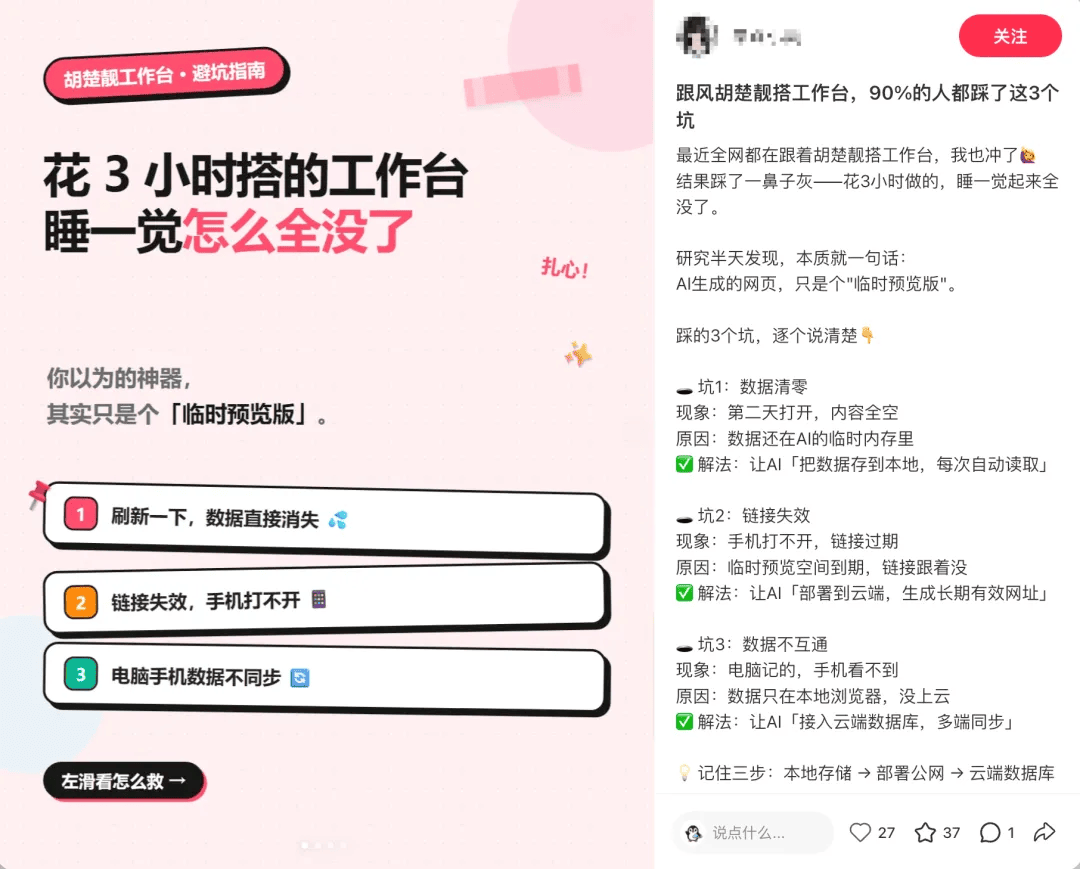
<p>First, some context. Two waves of "homework submissions" recently made AI-built workbenches go viral: one started when a creator posted videos on Xiaohongshu teaching people to build personal workbenches with AI and showing off submissions, igniting a platform-wide trend. The other was WorkBuddy's AI workbench template contest, with a lively comment section.</p>
<p>Among the comments, alongside the "it finally runs!" wins, deeper questions started to surface: the page opens empty on another device, images won't sync, links sent to others can't be filled in, family members want to share it but each see only their own stuff.</p>
<p>These are all signals that the workbench wants to grow up.</p>
<p><img decoding="async" loading="lazy" alt="Image" src="https://tcb.cloud.tencent.com/en/assets/images/workbench-01-6a16c6968caea7b7fef3c737c766fd2f.png" width="1080" height="869" class="img_ev3q"></p>
<p><strong>Workbenches grow. The base that felt smooth at the start often can't keep up.</strong></p>
<p>So this post covers two things: <strong>first, walking you from 0 to 1 building the workbench on CloudBase</strong>, then <strong>how to bolt on capabilities that keep it growing</strong> (media, permissions, sharing, payments, scheduled jobs, AI...).</p>
<hr>
<h2 class="anchor anchorTargetStickyNavbar_Vzrq" id="1-when-do-you-know-its-time-to-switch-bases">1. When do you know it's time to switch bases?<a href="https://tcb.cloud.tencent.com/en/blog/2026/08/26/workbench-localhost#1-when-do-you-know-its-time-to-switch-bases" class="hash-link" aria-label="Direct link to 1. When do you know it's time to switch bases?" title="Direct link to 1. When do you know it's time to switch bases?" translate="no">​</a></h2>
<p>Watch for these four signals. Hit any one of them, and your base needs an upgrade.</p>
<p><strong>Signal 1 — You want images, video, PDFs — not just text</strong></p>
<blockquote>
<p>"Can it sync images? I'm making a notebook workbench, adding photo-and-text notes daily… but new notes never sync."</p>
</blockquote>
<p>Browser localStorage can't hold images; a few base64-encoded ones blow the quota.</p>
<p><strong>Signal 2 — You want to share it with family or a team, but everyone sees only their own</strong></p>
<blockquote>
<p>"Can one account be shared with my daughter? Could we collaborate on one interface from different computers, create family projects, help her with homework, track daily plans…"</p>
</blockquote>
<p>Multi-device login on one account is the bare minimum. Real collaboration means "everyone logs in as themselves, shares selected data, keeps their private space." That requires a full identity + permission system.</p>
<p><strong>Signal 3 — You want to send a link to outsiders who can read and write</strong></p>
<blockquote>
<p>"The published link can't interact with the data table (internal links can)…"</p>
</blockquote>
<p>This is the natural boundary of spreadsheet-style sync solutions: the built-in editor maintains associations for you, but once published as an external link outside the editor, the read/write channel breaks. A cloud database doesn't have this problem — no matter where you open it from, it's the same set of APIs.</p>
<p><strong>Signal 4 — You want to go further: websites, mini programs, online payments, a backend that runs itself</strong></p>
<blockquote>
<p>"Hoping for lightweight website / app / mini program features, with online payment support… so a true beginner can build a compliant website and app."</p>
</blockquote>
<p>That's full-stack application territory. The workbench is the entry point; to hook up more capabilities later, the base has to carry them.</p>
<p><strong>Hit any one of these, and it's time to upgrade the base.</strong></p>
<hr>
<h2 class="anchor anchorTargetStickyNavbar_Vzrq" id="2-from-0-to-1-build-a-genuinely-usable-workbench-on-cloudbase">2. From 0 to 1: build a genuinely usable workbench on CloudBase<a href="https://tcb.cloud.tencent.com/en/blog/2026/08/26/workbench-localhost#2-from-0-to-1-build-a-genuinely-usable-workbench-on-cloudbase" class="hash-link" aria-label="Direct link to 2. From 0 to 1: build a genuinely usable workbench on CloudBase" title="Direct link to 2. From 0 to 1: build a genuinely usable workbench on CloudBase" translate="no">​</a></h2>
<p>No code. Everything runs in WorkBuddy. Follow these 7 steps and you'll end up with a workbench that syncs between desktop and phone, stores images, and keeps data no matter who visits.</p>
<h3 class="anchor anchorTargetStickyNavbar_Vzrq" id="what-youll-have">What you'll have<a href="https://tcb.cloud.tencent.com/en/blog/2026/08/26/workbench-localhost#what-youll-have" class="hash-link" aria-label="Direct link to What you'll have" title="Direct link to What you'll have" translate="no">​</a></h3>
<ul>
<li class="">A <strong>content-creation workbench</strong> (or swap in your own scenario) — with "Today's focus / Topic ideas / Content progress / Publishing calendar / Weekly review"</li>
<li class="">Data lives in <strong>Tencent CloudBase</strong>, auto-synced between local and cloud</li>
<li class="">Open the same URL on desktop and phone, see <strong>the same thing</strong></li>
<li class="">Images and files sync too</li>
</ul>
<h3 class="anchor anchorTargetStickyNavbar_Vzrq" id="what-you-need">What you need<a href="https://tcb.cloud.tencent.com/en/blog/2026/08/26/workbench-localhost#what-you-need" class="hash-link" aria-label="Direct link to What you need" title="Direct link to What you need" translate="no">​</a></h3>
<ul>
<li class="">The <strong>WorkBuddy client</strong>: chats, connectors, and Skills all live in it</li>
<li class="">A <strong>Tencent Cloud account</strong>: for a free-tier CloudBase environment</li>
<li class=""><strong>Desktop + phone</strong>: that's how we verify cross-device</li>
<li class="">Once the environment is created you'll have an <strong>environment ID</strong> — connectors, deployment checks, and domain binding all use it</li>
</ul>
<h3 class="anchor anchorTargetStickyNavbar_Vzrq" id="step-1-generate-the-workbench">Step 1: Generate the workbench<a href="https://tcb.cloud.tencent.com/en/blog/2026/08/26/workbench-localhost#step-1-generate-the-workbench" class="hash-link" aria-label="Direct link to Step 1: Generate the workbench" title="Direct link to Step 1: Generate the workbench" translate="no">​</a></h3>
<p>Open WorkBuddy and pick one of three ways to start:</p>
<ul>
<li class="">
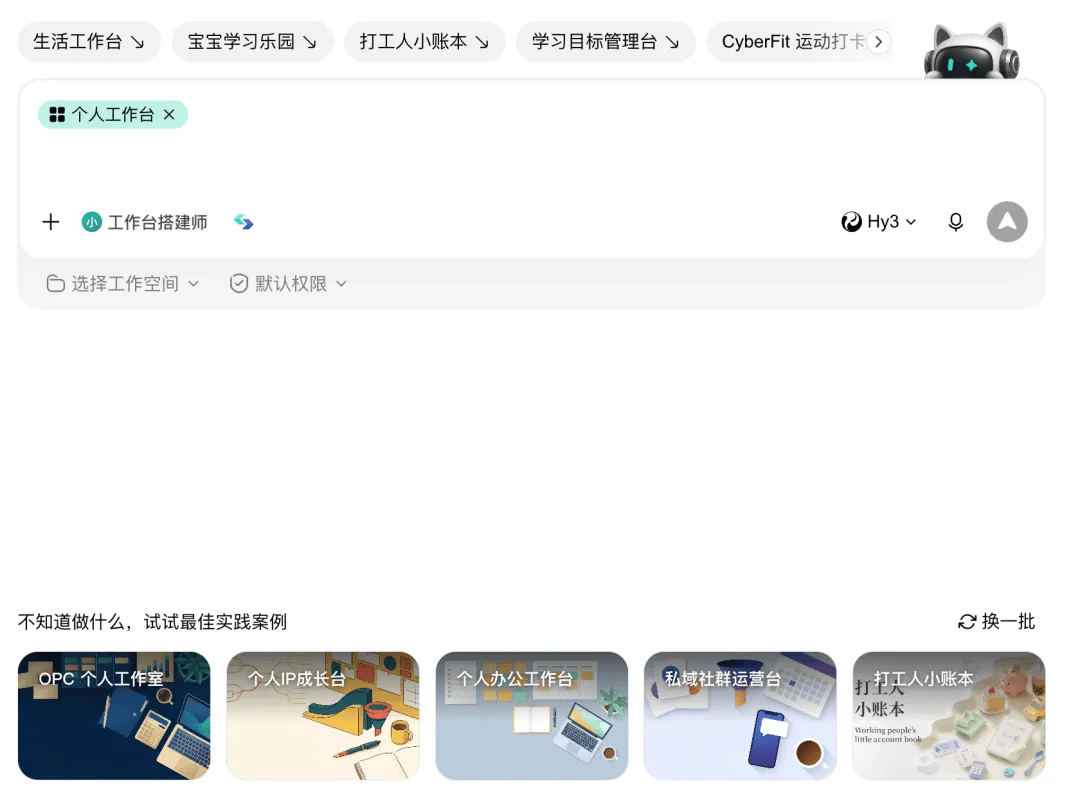
<p><strong>Use a template</strong>: below the chat box, "Not sure what to build? Try a best-practice case" — pick the closest one and apply it with the official or open-source prompt</p>
<p><img decoding="async" loading="lazy" alt="Image" src="https://tcb.cloud.tencent.com/en/assets/images/workbench-02-74ed1d254cb01eb6f37c8015a5fdc420.png" width="1080" height="801" class="img_ev3q"></p>
</li>
<li class="">
<p><strong>Write it yourself</strong>: one sentence (goal + modules + constraints)</p>
</li>
</ul>
<blockquote>
<p>Build a content-creation workbench with five modules: today's focus, topic ideas, content progress, publishing calendar, weekly review. Start with a locally runnable version; adapt it for mobile.</p>
</blockquote>
<p>It won't start writing immediately — it clarifies requirements with you first: scenario / modules / devices / navigation / what shows on the home page / visual style. <strong>The clearer this step, the less rework later.</strong></p>
<p>Once requirements line up, hit "Start building" and let it run in the background. A preview appears on the right when done; "Open in external browser" at the top right is easier to look at.</p>
<p>Don't rush to the cloud — click through the local version by hand first:</p>
<p>• Try add / edit / delete / check on every module</p>
<p>• Home page numbers should update with the modules</p>
<p>• Press F12 to switch to the mobile view; screenshot any layout breakage and send it back to WorkBuddy to fix</p>
<p>While you're at it, have WorkBuddy remove the "Reset sample data" button so you never wipe everything by accident. Next: move the data layer from local to cloud.</p>
<h3 class="anchor anchorTargetStickyNavbar_Vzrq" id="step-2-create-a-cloudbase-environment">Step 2: Create a CloudBase environment<a href="https://tcb.cloud.tencent.com/en/blog/2026/08/26/workbench-localhost#step-2-create-a-cloudbase-environment" class="hash-link" aria-label="Direct link to Step 2: Create a CloudBase environment" title="Direct link to Step 2: Create a CloudBase environment" translate="no">​</a></h3>
<p>CloudBase has a free trial tier. Go to the Tencent CloudBase console:</p>
<ol>
<li class="">
<p>Click "Free trial" — new users get free quota; learning and small-scale use cost essentially nothing</p>
</li>
<li class="">
<p>Complete "service authorization" on first entry</p>
</li>
<li class="">
<p>Give the environment a <strong>meaningful name</strong> (like <code>growth/rich</code> — logs, deployments, and domain binding all use it to identify you)</p>
</li>
<li class="">
<p>Region defaults to Shanghai</p>
</li>
<li class="">
<p>Pick the free-trial edition and <strong>choose "Document database (NoSQL)"</strong>. PostgreSQL / MySQL are also supported — choose per your workload.</p>
</li>
<li class="">
<p>Enter the redemption code and click "Buy now"</p>
</li>
</ol>
<p>Once created, the console shows cloud database, cloud functions, cloud storage, and authentication. Your workbench data lives in this environment.</p>
<h3 class="anchor anchorTargetStickyNavbar_Vzrq" id="step-3-connect-workbuddy-to-cloudbase">Step 3: Connect WorkBuddy to CloudBase<a href="https://tcb.cloud.tencent.com/en/blog/2026/08/26/workbench-localhost#step-3-connect-workbuddy-to-cloudbase" class="hash-link" aria-label="Direct link to Step 3: Connect WorkBuddy to CloudBase" title="Direct link to Step 3: Connect WorkBuddy to CloudBase" translate="no">​</a></h3>
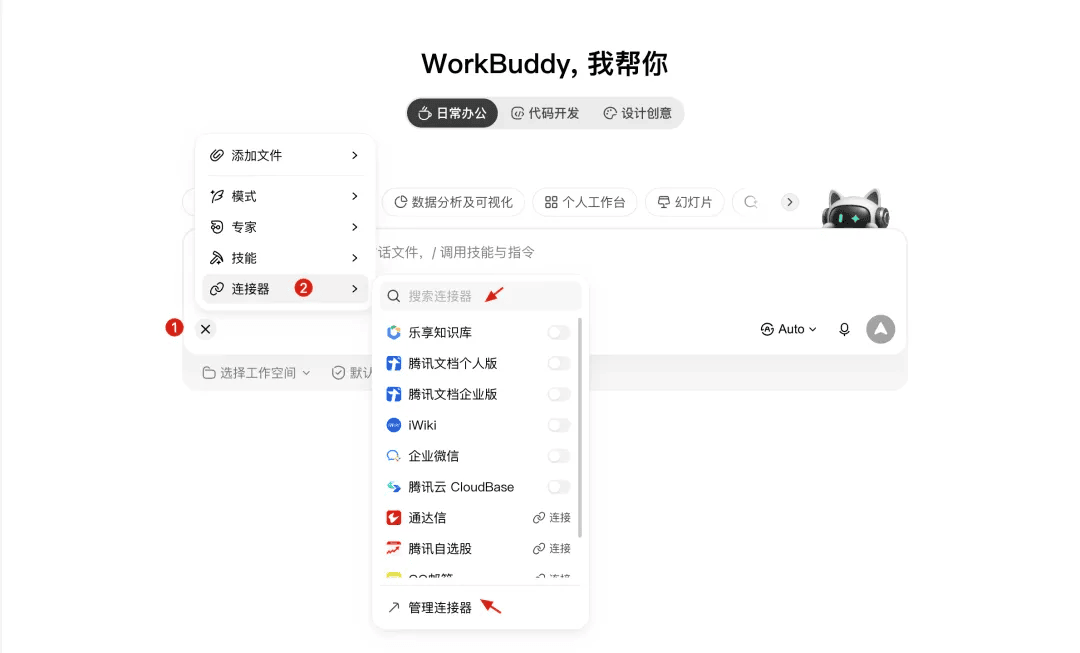
<p>Back in WorkBuddy, open connectors, search "Tencent CloudBase" in the connector manager, and click + to install. Select it and it takes effect in your session.</p>
<p><img decoding="async" loading="lazy" alt="Image" src="https://tcb.cloud.tencent.com/en/assets/images/workbench-03-7c6bd7379c2b546c003cf72ffd2a0cb5.png" width="1080" height="653" class="img_ev3q"></p>
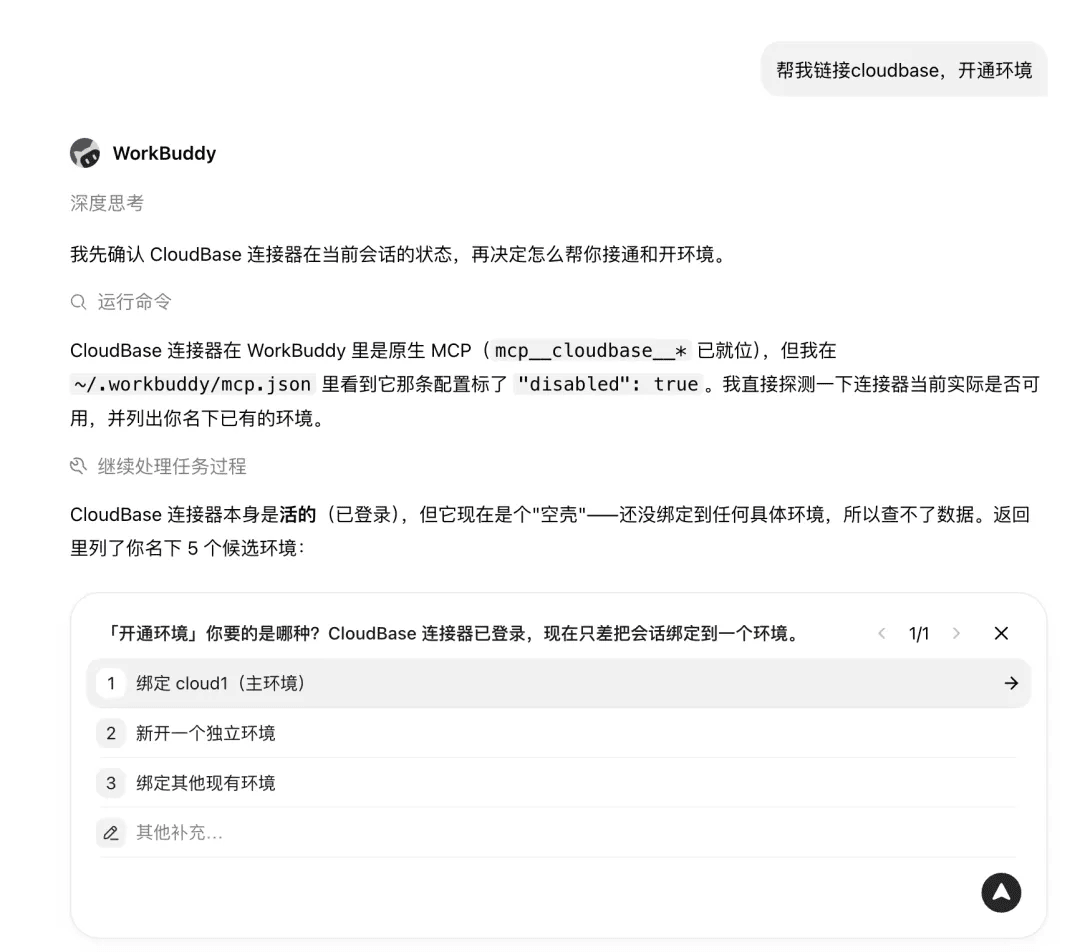
<p>When authorization succeeds, the connector turns green. At this point WorkBuddy can actually read the environment you just created — it has upgraded from "only edits local code" to "can operate cloud resources".</p>
<p><img decoding="async" loading="lazy" alt="Image" src="https://tcb.cloud.tencent.com/en/assets/images/workbench-04-645e7d2643c8583deff2369b3e8dea6e.png" width="1080" height="952" class="img_ev3q"></p>
<p>From now on you can ask WorkBuddy in chat to query the database, deploy sites, or manage cloud functions — no need to open the console yourself.</p>
<p><img decoding="async" loading="lazy" alt="Image" src="https://tcb.cloud.tencent.com/en/assets/images/workbench-05-f40dfc8a87e12ed515fbd43a7e56e842.png" width="1080" height="720" class="img_ev3q"></p>
<h3 class="anchor anchorTargetStickyNavbar_Vzrq" id="step-4-move-the-data-layer-to-the-cloud-and-publish-a-preview">Step 4: Move the data layer to the cloud and publish a preview<a href="https://tcb.cloud.tencent.com/en/blog/2026/08/26/workbench-localhost#step-4-move-the-data-layer-to-the-cloud-and-publish-a-preview" class="hash-link" aria-label="Direct link to Step 4: Move the data layer to the cloud and publish a preview" title="Direct link to Step 4: Move the data layer to the cloud and publish a preview" translate="no">​</a></h3>
<p>Go back to the chat that generated the workbench and just say:</p>
<blockquote>
<p>Store the workbench data in CloudBase; I need multi-device sync.</p>
</blockquote>
<p>Copy that sentence or use your own words. The core: <strong>data to the cloud, multi-device sync</strong>.</p>
<p>It will first ask for authorization, then confirm where the data currently lives, which modules and fields exist, which files change, how old data gets backed up, and how to roll back on failure.</p>
<p><img decoding="async" loading="lazy" alt="Image" src="https://tcb.cloud.tencent.com/en/assets/images/workbench-06-50d85643eb0dc45aa56b28ffb765e22e.png" width="1080" height="358" class="img_ev3q"></p>
<p>Once the plan is agreed, let it execute: back up local data → create collections in CloudBase → switch reads/writes from local to cloud → deploy an access URL.</p>
<p><img decoding="async" loading="lazy" alt="Image" src="https://tcb.cloud.tencent.com/en/assets/images/workbench-07-8e9f18151f51ad26832c725f3c92222a.png" width="1080" height="883" class="img_ev3q"></p>
<blockquote>
<p><strong>Sync mode</strong>: the most robust is "local + cloud auto-sync" — keep a local copy for instant loads, cloud collections as the multi-device source of truth. The document database is schemaless, so adding new fields later needs no migration; writes just sync.</p>
<p><strong>Deployment mode</strong>: static hosting, URL like <code>https://&lt;env-id&gt;.webapps.tcloudbase.com</code>; you can bind a custom domain in the console for something memorable.</p>
</blockquote>
<ul>
<li class="">
<p>Open the URL on desktop, add a task, confirm it sticks; open the same URL on your phone — the data is there</p>
</li>
<li class="">
<p>Add an item on desktop, refresh on phone and it appears; check it off on phone, refresh on desktop and the state syncs</p>
</li>
<li class="">
<p>Upload an image, refresh on the other end, the image is there</p>
</li>
<li class="">
<p><img decoding="async" loading="lazy" alt="Image" src="https://tcb.cloud.tencent.com/en/assets/images/workbench-08-0d520853017e8c1bf7a16ed22b5a0fef.png" width="1080" height="785" class="img_ev3q"></p>
</li>
</ul>
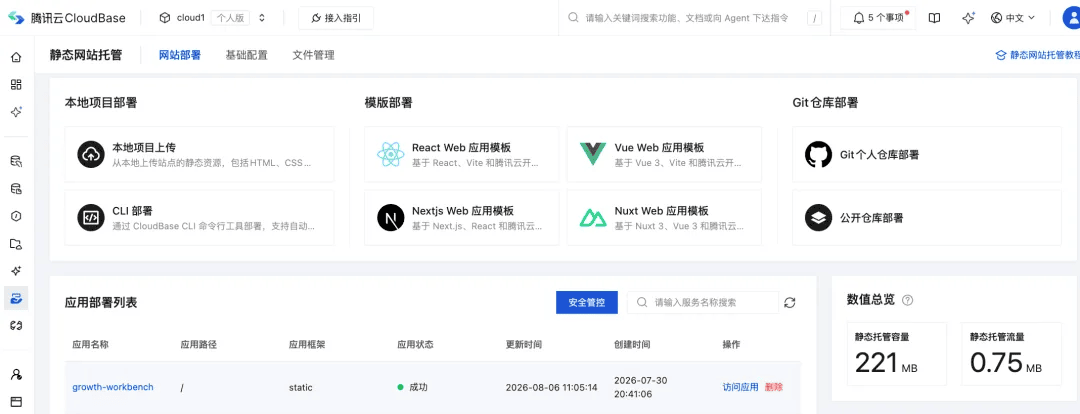
<p>At this point you have a workbench that <strong>syncs across devices, stores images, and has working shareable links</strong> — the starting point of "actually usable". You can also check the deployed app in the cloud console.</p>
<p><img decoding="async" loading="lazy" alt="Image" src="https://tcb.cloud.tencent.com/en/assets/images/workbench-09-99b0d10b27cbb8bf3645c55e42d5bfd5.png" width="1080" height="414" class="img_ev3q"></p>
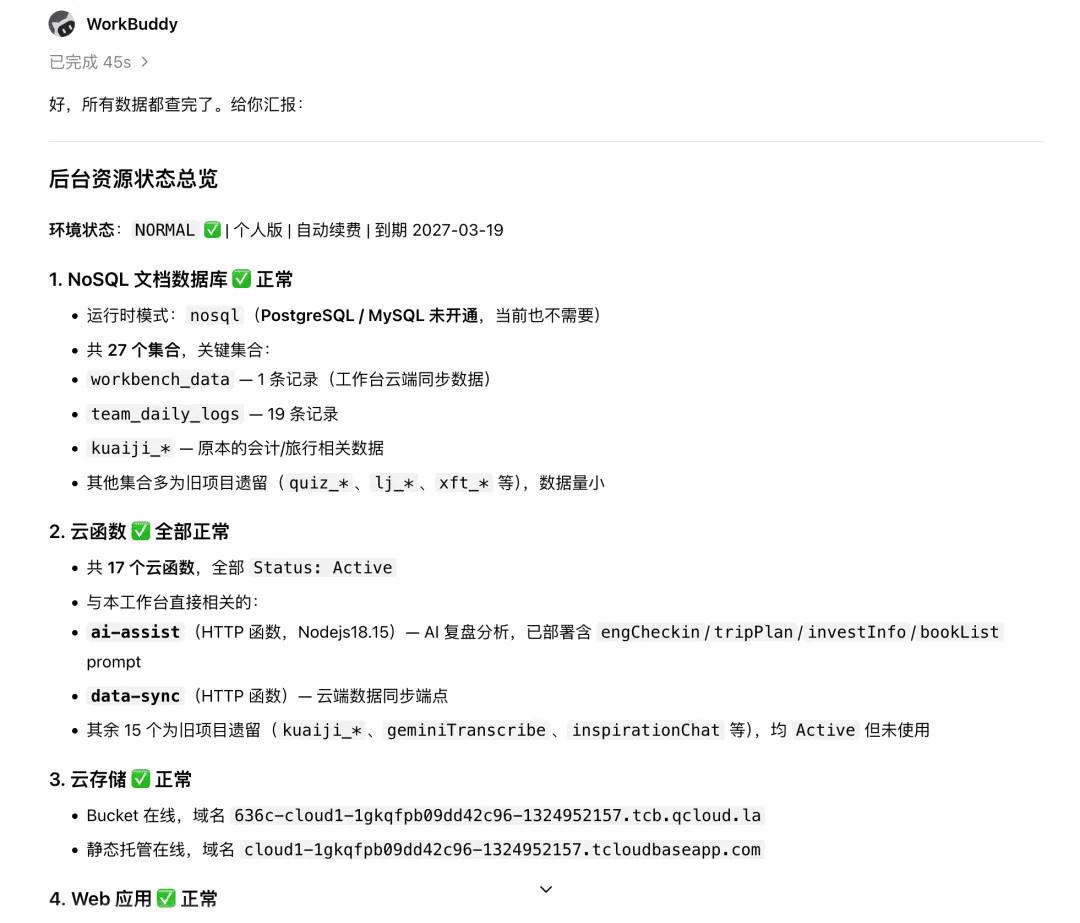
<p>You can also just tell the AI: check whether the backend database is working normally — it will query all your cloud resource usage.</p>
<p><img decoding="async" loading="lazy" alt="Image" src="https://tcb.cloud.tencent.com/en/assets/images/workbench-10-d94942fc79ae1bb80fa9f506f2de68f6.png" width="1080" height="923" class="img_ev3q"></p>
<hr>
<h2 class="anchor anchorTargetStickyNavbar_Vzrq" id="3-leveling-up-four-watershed-capabilities-that-turn-usable-into-great">3. Leveling up: four "watershed" capabilities that turn "usable" into "great"<a href="https://tcb.cloud.tencent.com/en/blog/2026/08/26/workbench-localhost#3-leveling-up-four-watershed-capabilities-that-turn-usable-into-great" class="hash-link" aria-label="Direct link to 3. Leveling up: four &quot;watershed&quot; capabilities that turn &quot;usable&quot; into &quot;great&quot;" title="Direct link to 3. Leveling up: four &quot;watershed&quot; capabilities that turn &quot;usable&quot; into &quot;great&quot;" translate="no">​</a></h2>
<p>After the deployment above, the workbench is already in the cloud. These next four moves each push it one step closer to "practical".</p>
<h3 class="anchor anchorTargetStickyNavbar_Vzrq" id="31-images-video-and-big-files-all-sync">3.1 Images, video, and big files all sync<a href="https://tcb.cloud.tencent.com/en/blog/2026/08/26/workbench-localhost#31-images-video-and-big-files-all-sync" class="hash-link" aria-label="Direct link to 3.1 Images, video, and big files all sync" title="Direct link to 3.1 Images, video, and big files all sync" translate="no">​</a></h3>
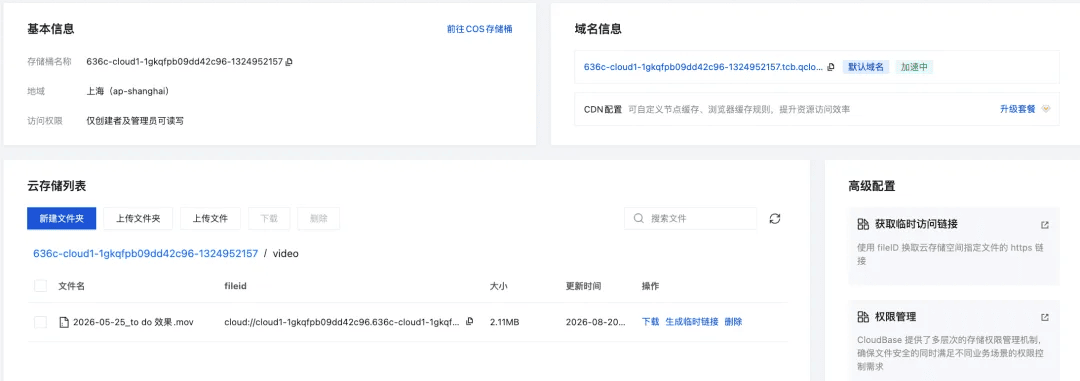
<p>Text goes into the database; images and video go to cloud storage; a single record links the two. That's CloudBase's basic setup — you already got image sync along the way in step six. Video follows the same logic; files are just bigger, which makes them even more worth putting in the cloud. Local video stuffed into a project folder uploads slowly and doesn't belong in a code repository.</p>
<p><strong>How video-to-cloud + in-app playback lands, in two parts:</strong></p>
<p><strong>A. Create cloud storage (one time)</strong></p>
<ol>
<li class="">In your environment, under "Cloud storage", create a bucket. <strong>A separate bucket for video is recommended</strong> — don't mix it with images, so you can control permissions and clean old files independently.</li>
</ol>
<p><img decoding="async" loading="lazy" alt="Image" src="https://tcb.cloud.tencent.com/en/assets/images/workbench-11-8ec89d16b5439301c79022964475809f.png" width="1080" height="381" class="img_ev3q"></p>
<p><strong>B. Upload video and wire it into the workbench (each new video)</strong></p>
<ol>
<li class="">
<p>With the connector set up, just tell WorkBuddy in chat "upload this video to cloud storage" — no manual console uploading</p>
</li>
<li class="">
<p>A cloud access URL comes back on success</p>
</li>
<li class="">
<p>Tell WorkBuddy: "generate a page in the workbench that plays the video from that cloud URL" — it produces a page with a <code>&lt;video&gt;</code> tag pointing at the cloud URL</p>
</li>
</ol>
<p><strong>The benefit is direct</strong>: the project folder stays light, yet video plays on demand. No worrying about browser storage limits.</p>
<p>Images, video, PDFs — any static asset works the same way.</p>
<h3 class="anchor anchorTargetStickyNavbar_Vzrq" id="32-tiered-permissions-everyone-sees-only-their-own-while-collaborating">3.2 Tiered permissions: everyone sees only their own while collaborating<a href="https://tcb.cloud.tencent.com/en/blog/2026/08/26/workbench-localhost#32-tiered-permissions-everyone-sees-only-their-own-while-collaborating" class="hash-link" aria-label="Direct link to 3.2 Tiered permissions: everyone sees only their own while collaborating" title="Direct link to 3.2 Tiered permissions: everyone sees only their own while collaborating" translate="no">​</a></h3>
<p>This is the core of family and team collaboration. CloudBase natively supports two layers:</p>
<p><strong>Layer 1: role tiers</strong> (decides "who gets in, what they can touch")</p>
<p>Have the AI design the full role-and-permission scheme for your system; subdivide by project or team as needed.</p>
<p><strong>Layer 2: row-level permissions</strong> (this is what makes "each person sees only their own" work)</p>
<p>Each role can have separate read/write scopes on the same data:</p>
<ul>
<li class="">
<p><code>me</code> = read/write only rows <strong>they created</strong></p>
</li>
<li class="">
<p><code>all</code> = read/write <strong>everyone's</strong> rows</p>
</li>
</ul>
<p>A concrete example: the admin gets <code>rw:all + rw:me</code> — can edit everyone's data; a family member gets <code>rw:me</code> — reads and writes only their own, sees nobody else's; an outside guest gets <code>r:all + rw:me</code> — sees the shared info and can edit their own entry.</p>
<p><strong>One workbench, multiple roles collaborating, each seeing their own, admin seeing all.</strong> The homework-tutoring scenario in a family lands exactly this way. For web/mini-program code you write yourself: use database security rules and judge "is this row mine" with <code>doc._openid == auth.openid</code>.</p>
<p>Either way, you never build an account system yourself.</p>
<h3 class="anchor anchorTargetStickyNavbar_Vzrq" id="33-shareable-links-anyone-who-opens-them-can-read-and-write">3.3 Shareable links: anyone who opens them can read and write<a href="https://tcb.cloud.tencent.com/en/blog/2026/08/26/workbench-localhost#33-shareable-links-anyone-who-opens-them-can-read-and-write" class="hash-link" aria-label="Direct link to 3.3 Shareable links: anyone who opens them can read and write" title="Direct link to 3.3 Shareable links: anyone who opens them can read and write" translate="no">​</a></h3>
<p>On a CloudBase-deployed site, <strong>data and pages are parts of the same application</strong> — no matter where it's opened from, reads and writes hit the same APIs.</p>
<p>Layer identity on top and you can do more:</p>
<p><img decoding="async" loading="lazy" alt="Image" src="https://tcb.cloud.tencent.com/en/assets/images/workbench-12-840df0d3795486bb2d6e9e8b1a7e673e.png" width="1080" height="738" class="img_ev3q"></p>
<ul>
<li class="">
<p><strong>Anonymous mode</strong>: anyone who opens the link can submit an entry (customer feedback forms, event sign-ups)</p>
</li>
<li class="">
<p><strong>Write after login</strong>: when you need accountability, require phone or WeChat login</p>
</li>
<li class="">
<p><strong>Login + permissions</strong>: after login, roles decide how much is visible</p>
</li>
</ul>
<p>Three levels, switched on demand — no rewriting code.</p>
<h3 class="anchor anchorTargetStickyNavbar_Vzrq" id="34-from-workbench-to-full-stack-app">3.4 From workbench to full-stack app<a href="https://tcb.cloud.tencent.com/en/blog/2026/08/26/workbench-localhost#34-from-workbench-to-full-stack-app" class="hash-link" aria-label="Direct link to 3.4 From workbench to full-stack app" title="Direct link to 3.4 From workbench to full-stack app" translate="no">​</a></h3>
<p>The workbench is the entry point; on the same CloudBase environment you can also grow:</p>
<table><thead><tr><th>What you want</th><th>How CloudBase delivers</th></tr></thead><tbody><tr><td>Website</td><td>Static hosting + custom domain (done in this tutorial)</td></tr><tr><td>Mini program</td><td>WeChat CloudBase SDK into the same environment, data shared</td></tr><tr><td>Online payment</td><td>Official WeChat Pay APIs, cloud functions as the backend for callbacks</td></tr><tr><td>Automated backend</td><td>Cloud functions + scheduled jobs — e.g. auto weekly review</td></tr><tr><td>AI capabilities</td><td>Cloud functions calling LLMs — add an "AI reviewer" to your workbench</td></tr><tr><td>Compliance</td><td>ICP-filed domain + HTTPS configured in the console</td></tr></tbody></table>
<p><strong>From workbench to full-stack app there's no cliff — capabilities keep stacking on the same layer of data.</strong></p>
<p>That's the real value of choosing the base wisely: what starts as a workbench grows into a complete product.</p>
<hr>
<h2 class="anchor anchorTargetStickyNavbar_Vzrq" id="official-call-for-submissions">Official call for submissions<a href="https://tcb.cloud.tencent.com/en/blog/2026/08/26/workbench-localhost#official-call-for-submissions" class="hash-link" aria-label="Direct link to Official call for submissions" title="Direct link to Official call for submissions" translate="no">​</a></h2>
<p>The workbench keeps growing. Need media, family sharing without interference, links for outsiders to fill in, payments, or turning it into a mini program or app that compounds over time — upgrade with CloudBase in one click.</p>
<hr>
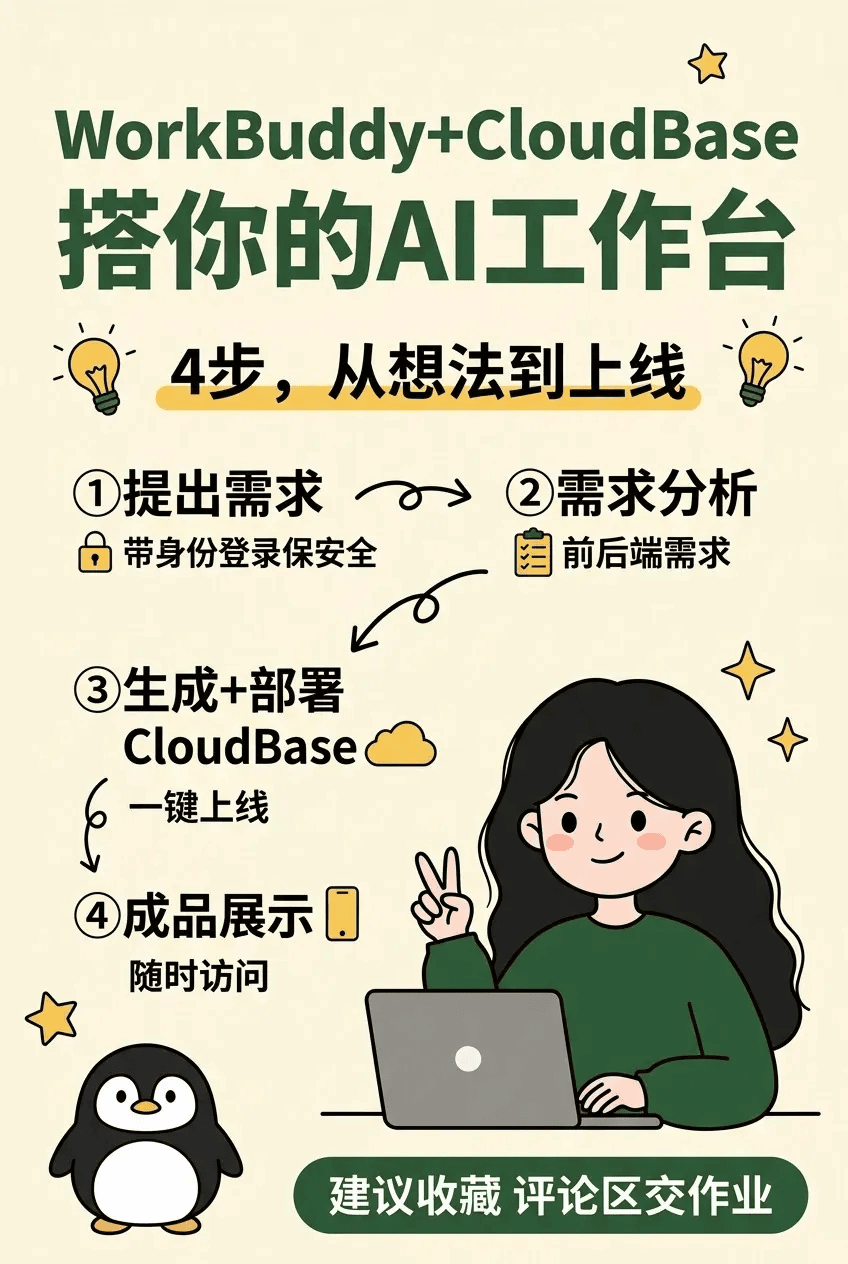
<p><strong>📮 We're collecting your workbenches on Xiaohongshu</strong></p>
<p>If you've built a workbench on CloudBase — whether it just started running (your 0-to-1) or it's already wired up with cloud functions, storage, permissions, scheduled jobs, AI assistants, payments… <strong>we'd love your submission</strong>.</p>
<p><img decoding="async" loading="lazy" alt="Image" src="https://tcb.cloud.tencent.com/en/assets/images/workbench-13-1e2d2d6f105a0625990a728b03ad200b.png" width="848" height="1264" class="img_ev3q"></p>
<p>We want to see more real user cases:</p>
<ul>
<li class="">
<p>What problem your workbench solves</p>
</li>
<li class="">
<p>Which CloudBase skills you used (functions / storage / permissions / scheduled jobs / AI / payments…)</p>
</li>
<li class="">
<p>Pitfalls you hit and how you got around them</p>
</li>
<li class="">
<p>What it looks like now</p>
</li>
</ul>
<p><strong>How to participate</strong>:</p>
<ol>
<li class="">
<p>Search and follow <strong>"CloudBase 和它的朋友们"</strong> on Xiaohongshu</p>
</li>
<li class="">
<p>Post a note about your workbench with #CloudBase and @ the official account, or drop a screenshot under the official tutorial — you'll receive resource credits</p>
</li>
<li class="">
<p>We'll also pick cases to feature on official channels</p>
</li>
</ol>
<p>Feel free to send over pitfalls and questions too — future case studies may start from your sharing. Forward this to friends who are also figuring out how to land a "workbench" 🐧</p>]]></content>
        <author>
            <name>CloudBase Team</name>
            <uri>https://tcb.cloud.tencent.com</uri>
        </author>
        <category label="practice" term="practice"/>
        <category label="AI" term="AI"/>
    </entry>
    <entry>
        <title type="html"><![CDATA[GLM 5.3 is now live on CloudBase]]></title>
        <id>https://tcb.cloud.tencent.com/en/blog/2026/08/17/glm-5-3-cloudbase</id>
        <link href="https://tcb.cloud.tencent.com/en/blog/2026/08/17/glm-5-3-cloudbase"/>
        <updated>2026-08-17T16:34:00.000Z</updated>
        <summary type="html"><![CDATA[GLM 5.3 is live on CloudBase: +50% coding capability, ship right after writing, and switch models by changing one parameter.]]></summary>
        <content type="html"><![CDATA[<p>GLM 5.3 is live on CloudBase.</p>
<p>For building mini programs on your own, or vibe apps with your team, CloudBase is the place.</p>
<h2 class="anchor anchorTargetStickyNavbar_Vzrq" id="whats-better-than-glm-52">What's better than GLM 5.2?<a href="https://tcb.cloud.tencent.com/en/blog/2026/08/17/glm-5-3-cloudbase#whats-better-than-glm-52" class="hash-link" aria-label="Direct link to What's better than GLM 5.2?" title="Direct link to What's better than GLM 5.2?" translate="no">​</a></h2>
<ul>
<li class=""><strong>Coding +50%</strong>: a 50% improvement over 5.2 on Z.ai Code Bench, and open-source leader on public benchmarks like Terminal Bench 3.0 and Agents' Last Exam</li>
<li class=""><strong>Security upgrades</strong>: white-box code review and vulnerability discovery on par with Mythos 5</li>
<li class=""><strong>CloudBase</strong>: ship right after writing, no separate AI account needed, switching models is just one parameter. Cloud database (with PostgreSQL support), cloud functions, domain filing and tokens all in the same plan — AI writes the code and you ship it.</li>
</ul>
<h2 class="anchor anchorTargetStickyNavbar_Vzrq" id="two-ways-to-use-ai">Two ways to use AI<a href="https://tcb.cloud.tencent.com/en/blog/2026/08/17/glm-5-3-cloudbase#two-ways-to-use-ai" class="hash-link" aria-label="Direct link to Two ways to use AI" title="Direct link to Two ways to use AI" translate="no">​</a></h2>
<h3 class="anchor anchorTargetStickyNavbar_Vzrq" id="1-plug-it-into-the-ai-dev-tool-you-already-use">1. Plug it into the AI dev tool you already use<a href="https://tcb.cloud.tencent.com/en/blog/2026/08/17/glm-5-3-cloudbase#1-plug-it-into-the-ai-dev-tool-you-already-use" class="hash-link" aria-label="Direct link to 1. Plug it into the AI dev tool you already use" title="Direct link to 1. Plug it into the AI dev tool you already use" translate="no">​</a></h3>
<p>CloudBase console → AI → enable the text-generation model. Copy the Base URL and API Key, and plug the model into WorkBuddy, CodeBuddy or Codex as an ordinary OpenAI-compatible model.</p>
<h3 class="anchor anchorTargetStickyNavbar_Vzrq" id="2-call-it-directly-in-a-full-stack-app">2. Call it directly in a full-stack app<a href="https://tcb.cloud.tencent.com/en/blog/2026/08/17/glm-5-3-cloudbase#2-call-it-directly-in-a-full-stack-app" class="hash-link" aria-label="Direct link to 2. Call it directly in a full-stack app" title="Direct link to 2. Call it directly in a full-stack app" translate="no">​</a></h3>
<p>When building a mini program, web app, official account or support bot, a few lines of SDK code give you streaming output — no separate backend needed.</p>
<p>Token usage is charged automatically from your resource points, visible in real time on the plan usage page.</p>
<p>Come try GLM 5.3 on CloudBase now.</p>]]></content>
        <author>
            <name>CloudBase Team</name>
            <uri>https://tcb.cloud.tencent.com</uri>
        </author>
        <category label="AI" term="AI"/>
        <category label="CloudBase" term="CloudBase"/>
    </entry>
    <entry>
        <title type="html"><![CDATA[The database agents love is here: CloudBase now supports PostgreSQL]]></title>
        <id>https://tcb.cloud.tencent.com/en/blog/2026/08/10/cloudbase-postgresql</id>
        <link href="https://tcb.cloud.tencent.com/en/blog/2026/08/10/cloudbase-postgresql"/>
        <updated>2026-08-10T18:00:00.000Z</updated>
        <summary type="html"><![CDATA[CloudBase now supports PostgreSQL — standard SQL table creation, auto-generated APIs, second-level Database Branch cloning, idle compute suspension, and high Supabase compatibility. Tencent's own agents already run on it.]]></summary>
        <content type="html"><![CDATA[<p>Every mature AI application needs a solid database behind it.</p>
<p>Today, Tencent Cloud CloudBase officially supports PostgreSQL (commonly shortened to PG). As one of the most widely used open-source databases, PG is mature, standard in its usage, and a natural fit for agent operations. Once integrated with CloudBase, everything an AI needs when generating an app — creating tables, configuring permissions, generating APIs — can be done in one place.</p>
<p>CloudBase PG has been specially adapted on top of Tencent Cloud's database capabilities to match the new demands of agent-driven development, so the database can keep pace with the rapid, iterative rhythm of agent development. At the same time, CloudBase PG is highly compatible with Supabase, so developers already on Supabase can migrate at low cost.</p>
<h2 class="anchor anchorTargetStickyNavbar_Vzrq" id="agents-can-read-it-tables-permissions-and-apis-in-one-step">Agents can read it: tables, permissions and APIs in one step<a href="https://tcb.cloud.tencent.com/en/blog/2026/08/10/cloudbase-postgresql#agents-can-read-it-tables-permissions-and-apis-in-one-step" class="hash-link" aria-label="Direct link to Agents can read it: tables, permissions and APIs in one step" title="Direct link to Agents can read it: tables, permissions and APIs in one step" translate="no">​</a></h2>
<p>PostgreSQL has a quality that suits agents perfectly: <strong>standard enough, and explicit enough</strong>.</p>
<p>Table structure, field constraints, database functions and permission policies can all be defined in standard SQL. An agent reads the schema and understands how data is stored, who can access it, and what it can do.</p>
<p>Take a collaborative document app as an example — with a few lines of SQL you complete data modeling, identity binding and permission control all at once.</p>
<p>In CloudBase, creating a table also lets you define the data structure, user identity and access permissions at the same time. Once the table is created, a <strong>RESTful API is generated automatically</strong> — CRUD works immediately, no separate server-side endpoints to develop.</p>
<p>More complex needs like full-text search, scheduled jobs and RAG semantic search can be done through database functions, transactions and capabilities like <code>pgvector</code>. The MCP Server, Agent Skills and plugin system CloudBase released earlier are also adapted for PG mode — from creating tables and configuring permissions to calling APIs, agents can not only read it, but do it themselves.</p>
<h2 class="anchor anchorTargetStickyNavbar_Vzrq" id="agents-can-experiment-freely-second-level-cloning-of-tb-scale-databases">Agents can experiment freely: second-level cloning of TB-scale databases<a href="https://tcb.cloud.tencent.com/en/blog/2026/08/10/cloudbase-postgresql#agents-can-experiment-freely-second-level-cloning-of-tb-scale-databases" class="hash-link" aria-label="Direct link to Agents can experiment freely: second-level cloning of TB-scale databases" title="Direct link to Agents can experiment freely: second-level cloning of TB-scale databases" translate="no">​</a></h2>
<p>While developing an app, agents frequently need to modify table structure, adjust permission policies and try different query logic. Code can be changed freely — now the database can be "branched" freely too.</p>
<p>CloudBase PostgreSQL supports <strong>Database Branch</strong>. When an agent needs to try a new approach, it can clone an independent database environment, modify schema, functions and permission policies inside it, publish after validation succeeds, and drop the branch on failure without affecting production data.</p>
<p>Backing this is Tencent Cloud Database. On Tencent Cloud's self-developed underlying architecture, cloning a 1TB database shrinks from hours to seconds, so every agent experiment can quickly get a database environment with the same structure as production, yet isolated.</p>
<h2 class="anchor anchorTargetStickyNavbar_Vzrq" id="agents-on-demand-second-level-creation-no-idle-resource-waste">Agents on demand: second-level creation, no idle resource waste<a href="https://tcb.cloud.tencent.com/en/blog/2026/08/10/cloudbase-postgresql#agents-on-demand-second-level-creation-no-idle-resource-waste" class="hash-link" aria-label="Direct link to Agents on demand: second-level creation, no idle resource waste" title="Direct link to Agents on demand: second-level creation, no idle resource waste" translate="no">​</a></h2>
<p>The number of apps an agent generates and the frequency of calls aren't fixed, so the database also needs to start, stop and scale flexibly with the app.</p>
<p>CloudBase PostgreSQL cuts database environment creation from minutes to seconds. When an agent generates a new app, the database keeps up, with no need to wait for a traditional database instance to finish creation and initialization.</p>
<p>When the app goes idle, the system automatically suspends compute resources while keeping data, permission policies and APIs intact, and recovers quickly when requests return. When load surges, compute resources scale up quickly — available the moment you need them, not occupying resources when you don't.</p>
<p>This capability is already running stably on Tencent's own agents:</p>
<ul>
<li class="">
<p><strong>CloudBase connects to the WorkBuddy connector</strong> — once connected, users can use CloudBase directly as their app's database and backend.</p>
</li>
<li class="">
<p><strong>Tusi</strong>, built on CloudBase, lets users complete app development and deployment from a prompt, with generated apps automatically getting an independent database, data isolation and an account system.</p>
</li>
</ul>
<h2 class="anchor anchorTargetStickyNavbar_Vzrq" id="already-on-supabase-migration-is-almost-code-free">Already on Supabase? Migration is almost code-free<a href="https://tcb.cloud.tencent.com/en/blog/2026/08/10/cloudbase-postgresql#already-on-supabase-migration-is-almost-code-free" class="hash-link" aria-label="Direct link to Already on Supabase? Migration is almost code-free" title="Direct link to Already on Supabase? Migration is almost code-free" translate="no">​</a></h2>
<p>CloudBase PG is highly compatible with Supabase. The two are largely aligned in database, user authentication, permissions and interfaces, so most projects can migrate with only minor changes — a seamless move.</p>
<p>Your AI app's front end is already polished. Come pair it with a solid backend on Tencent Cloud CloudBase.</p>]]></content>
        <author>
            <name>CloudBase Team</name>
            <uri>https://tcb.cloud.tencent.com</uri>
        </author>
        <category label="CloudBase" term="CloudBase"/>
        <category label="AI" term="AI"/>
    </entry>
    <entry>
        <title type="html"><![CDATA[Platform-grade multi-tenancy, built-in auth and production hosting: Tusi gets it all with CloudBase]]></title>
        <id>https://tcb.cloud.tencent.com/en/blog/2026/08/04/tusi-cloudbase</id>
        <link href="https://tcb.cloud.tencent.com/en/blog/2026/08/04/tusi-cloudbase"/>
        <updated>2026-08-04T11:00:00.000Z</updated>
        <summary type="html"><![CDATA[Tusi uses CloudBase to get platform-grade multi-tenancy, built-in auth and production hosting in one go, generating an independent app for every user.]]></summary>
        <content type="html"><![CDATA[<p>When a platform needs to generate thousands of apps for its users, what happens to the backend? Tencent Tusi's answer is CloudBase.</p>
<p>Tusi is an "app generation and idea co-creation platform" from the Tencent App Store team. Users type any prompt, AI handles development, deployment and launch, and produces an app they can download and install directly.</p>
<p>Once you serve thousands of users and generate thousands of apps, the backend becomes the real bottleneck. A downloadable, installable app is backed by a full backend stack — database, login, storage, hosting. If every generated app required the agent to rewrite the DDL, reconfigure Nginx and re-stand-up a login system, generation would slow down and break, and the platform would have to keep patching things at the application layer. With CloudBase, the platform gets:</p>
<ul>
<li class="">Every user-generated app automatically receives an independent cloud database instance, with data isolated at the tenant level by nature</li>
<li class="">Built-in WeChat, phone number, email and anonymous login — apps carry an account system from the very first line of code</li>
<li class="">Database, cloud functions, cloud storage, static hosting and container hosting all wrapped as MCP, invoked declaratively by the agent</li>
<li class="">Generation and runtime share the same data path</li>
</ul>
<h2 class="anchor anchorTargetStickyNavbar_Vzrq" id="multi-tenant-data-isolation">Multi-tenant data isolation<a href="https://tcb.cloud.tencent.com/en/blog/2026/08/04/tusi-cloudbase#multi-tenant-data-isolation" class="hash-link" aria-label="Direct link to Multi-tenant data isolation" title="Direct link to Multi-tenant data isolation" translate="no">​</a></h2>
<p>Every user-generated app that involves a backend automatically creates an independent cloud database instance, with data isolated at the tenant level by nature — the platform doesn't need to write multi-tenant logic again at the application layer.</p>
<p>During generation, the agent can declare data models and write test data directly through MCP; after launch, real users' business data lands in the same database — generation and runtime share one data path, with no "one database at generation, migrate again after launch" seam.</p>
<h2 class="anchor anchorTargetStickyNavbar_Vzrq" id="authentication">Authentication<a href="https://tcb.cloud.tencent.com/en/blog/2026/08/04/tusi-cloudbase#authentication" class="hash-link" aria-label="Direct link to Authentication" title="Direct link to Authentication" translate="no">​</a></h2>
<p>Identity is another easily overlooked cost. If the agent is asked to write OAuth and session management on the fly in the prompt, it's neither stable nor reusable.</p>
<p>CloudBase has WeChat, phone number, email and anonymous login built in. Apps generated by Tusi can "log in, identify users and distinguish data ownership" by default. Users don't need to explicitly ask for "a login system" in the prompt, and the agent doesn't need to write OAuth/session management from scratch — identity is a platform default, so apps carry an account system from line one and can support account-heavy features like favorites, personal space and social sharing right away.</p>
<h2 class="anchor anchorTargetStickyNavbar_Vzrq" id="mcpskills-a-shorter-agent-loop">MCP/Skills: a shorter agent loop<a href="https://tcb.cloud.tencent.com/en/blog/2026/08/04/tusi-cloudbase#mcpskills-a-shorter-agent-loop" class="hash-link" aria-label="Direct link to MCP/Skills: a shorter agent loop" title="Direct link to MCP/Skills: a shorter agent loop" translate="no">​</a></h2>
<p>What really determines generation quality is how many low-level details the agent has to handle.</p>
<p>CloudBase wraps backend resources — database, cloud functions, cloud storage, static hosting, container hosting — into standard MCP tools, and has distilled a batch of reusable Skills for common scenarios (user system, content storage, AI calls, payments, etc.). When generating an app, Tusi's agent doesn't write DDL, configure Nginx or manage HTTPS certificates — it calls MCP declaratively, and CloudBase handles resource creation, config publishing and runtime maintenance. This shortens the agent loop noticeably, shrinks the error surface, and gives generated apps production-grade engineering quality from launch.</p>
<p>With these three layers combined, a platform can use the agent to declaratively obtain a full set of production-grade capabilities by default. Click "Read more" for the complete solution.</p>
<h2 class="anchor anchorTargetStickyNavbar_Vzrq" id="about-tusi">About Tusi<a href="https://tcb.cloud.tencent.com/en/blog/2026/08/04/tusi-cloudbase#about-tusi" class="hash-link" aria-label="Direct link to About Tusi" title="Direct link to About Tusi" translate="no">​</a></h2>
<p>Tusi is an app generation and idea co-creation platform from the Tencent App Store team. Users type prompts, AI handles development, deployment and launch, and produces a downloadable, installable app. The backend runs primarily on CloudBase.</p>
<p>Try it: <a href="https://tusi.qq.com/">https://tusi.qq.com</a></p>]]></content>
        <author>
            <name>CloudBase Team</name>
            <uri>https://tcb.cloud.tencent.com</uri>
        </author>
        <category label="practice" term="practice"/>
        <category label="AI" term="AI"/>
    </entry>
    <entry>
        <title type="html"><![CDATA[OpenAgentKernel is open source: the framework layer for agent development, written for you]]></title>
        <id>https://tcb.cloud.tencent.com/en/blog/2026/08/03/open-agent-kernel</id>
        <link href="https://tcb.cloud.tencent.com/en/blog/2026/08/03/open-agent-kernel"/>
        <updated>2026-08-03T15:30:00.000Z</updated>
        <summary type="html"><![CDATA[OpenAgentKernel is open source: an agent framework natively built for CloudBase, with session persistence, tool orchestration and human-in-the-loop built in.]]></summary>
        <content type="html"><![CDATA[<p>AI agent development today resembles web development before frameworks — every developer builds the same underlying layer, handling a lot of repetitive logic:</p>
<ul>
<li class="">Session history and compression</li>
<li class="">Disconnection and reconnection</li>
<li class="">Sandbox integration</li>
<li class="">MCP/Skills integration</li>
<li class="">Human in the Loop</li>
<li class="">Multi-turn model loops</li>
<li class="">……</li>
</ul>
<p>Only a small fraction of the code is actually related to the developer's own business; 70% of the work goes into these low-level details.</p>
<p>This is much like web development's "slash-and-burn" era: every team repeated the wheel from routing, ORM and session management, until full-stack frameworks like Django and Rails standardized the infrastructure and developers' energy finally returned to business logic.</p>
<p>Agent development now stands at that same dividing line. Although code is still the main way to build agents, developers clearly no longer need to hand-write session persistence and tool orchestration.</p>
<p>To solve these agent-developer pain points, we're pleased to release <strong>OpenAgentKernel</strong>:</p>
<ul>
<li class="">GitHub: <a href="https://github.com/TencentCloudBase/OpenAgentKernel">https://github.com/TencentCloudBase/OpenAgentKernel</a></li>
<li class="">CNB: <a href="https://cnb.cool/tencent/cloud/cloudbase/OpenAgentKernel">https://cnb.cool/tencent/cloud/cloudbase/OpenAgentKernel</a></li>
</ul>
<p>This is an agent framework natively built for CloudBase, with session persistence, tool orchestration and human-in-the-loop (HITL) built in, letting developers focus on business logic instead of infrastructure details.</p>
<h2 class="anchor anchorTargetStickyNavbar_Vzrq" id="try-it-now">Try it now<a href="https://tcb.cloud.tencent.com/en/blog/2026/08/03/open-agent-kernel#try-it-now" class="hash-link" aria-label="Direct link to Try it now" title="Direct link to Try it now" translate="no">​</a></h2>
<div class="language-bash codeBlockContainer_Ckt0 theme-code-block" style="--prism-color:#F8F8F2;--prism-background-color:#282A36"><div class="codeBlockContent_QJqH"><pre tabindex="0" class="prism-code language-bash codeBlock_bY9V thin-scrollbar" style="color:#F8F8F2;background-color:#282A36"><code class="codeBlockLines_e6Vv"><div class="token-line" style="color:#F8F8F2"><span class="token function" style="color:rgb(80, 250, 123)">npm</span><span class="token plain"> </span><span class="token function" style="color:rgb(80, 250, 123)">install</span><span class="token plain"> @cloudbase/open-agent-kernel@beta</span><br></div></code></pre></div></div>
<p>Prerequisites: Node.js 22+, a CloudBase environment's envId, and the environment's server-side API Key.</p>
<h3 class="anchor anchorTargetStickyNavbar_Vzrq" id="minimal-example-understand-the-core-api-in-thirty-seconds">Minimal example: understand the core API in thirty seconds<a href="https://tcb.cloud.tencent.com/en/blog/2026/08/03/open-agent-kernel#minimal-example-understand-the-core-api-in-thirty-seconds" class="hash-link" aria-label="Direct link to Minimal example: understand the core API in thirty seconds" title="Direct link to Minimal example: understand the core API in thirty seconds" translate="no">​</a></h3>
<div class="language-js codeBlockContainer_Ckt0 theme-code-block" style="--prism-color:#F8F8F2;--prism-background-color:#282A36"><div class="codeBlockContent_QJqH"><pre tabindex="0" class="prism-code language-js codeBlock_bY9V thin-scrollbar" style="color:#F8F8F2;background-color:#282A36"><code class="codeBlockLines_e6Vv"><div class="token-line" style="color:#F8F8F2"><span class="token keyword" style="color:rgb(189, 147, 249);font-style:italic">import</span><span class="token plain"> </span><span class="token punctuation" style="color:rgb(248, 248, 242)">{</span><span class="token plain"> createAgent </span><span class="token punctuation" style="color:rgb(248, 248, 242)">}</span><span class="token plain"> </span><span class="token keyword" style="color:rgb(189, 147, 249);font-style:italic">from</span><span class="token plain"> </span><span class="token string" style="color:rgb(255, 121, 198)">"@cloudbase/open-agent-kernel"</span><span class="token punctuation" style="color:rgb(248, 248, 242)">;</span><span class="token plain"></span><br></div><div class="token-line" style="color:#F8F8F2"><span class="token plain" style="display:inline-block"></span><br></div><div class="token-line" style="color:#F8F8F2"><span class="token plain">process</span><span class="token punctuation" style="color:rgb(248, 248, 242)">.</span><span class="token plain">env</span><span class="token punctuation" style="color:rgb(248, 248, 242)">.</span><span class="token constant" style="color:rgb(189, 147, 249)">TCB_API_KEY</span><span class="token plain"> </span><span class="token operator">=</span><span class="token plain"> </span><span class="token string" style="color:rgb(255, 121, 198)">"your-cloudbase-api-key"</span><span class="token punctuation" style="color:rgb(248, 248, 242)">;</span><span class="token plain"></span><br></div><div class="token-line" style="color:#F8F8F2"><span class="token plain" style="display:inline-block"></span><br></div><div class="token-line" style="color:#F8F8F2"><span class="token plain"></span><span class="token comment" style="color:rgb(98, 114, 164)">// Create an agent</span><span class="token plain"></span><br></div><div class="token-line" style="color:#F8F8F2"><span class="token plain"></span><span class="token keyword" style="color:rgb(189, 147, 249);font-style:italic">const</span><span class="token plain"> agent </span><span class="token operator">=</span><span class="token plain"> </span><span class="token function" style="color:rgb(80, 250, 123)">createAgent</span><span class="token punctuation" style="color:rgb(248, 248, 242)">(</span><span class="token punctuation" style="color:rgb(248, 248, 242)">{</span><span class="token plain"></span><br></div><div class="token-line" style="color:#F8F8F2"><span class="token plain">  </span><span class="token literal-property property">envId</span><span class="token operator">:</span><span class="token plain"> </span><span class="token string" style="color:rgb(255, 121, 198)">"your-env-id"</span><span class="token punctuation" style="color:rgb(248, 248, 242)">,</span><span class="token plain"></span><br></div><div class="token-line" style="color:#F8F8F2"><span class="token plain">  </span><span class="token literal-property property">model</span><span class="token operator">:</span><span class="token plain"> </span><span class="token string" style="color:rgb(255, 121, 198)">"deepseek-v4-pro"</span><span class="token punctuation" style="color:rgb(248, 248, 242)">,</span><span class="token plain"></span><br></div><div class="token-line" style="color:#F8F8F2"><span class="token plain">  </span><span class="token literal-property property">systemPrompt</span><span class="token operator">:</span><span class="token plain"> </span><span class="token string" style="color:rgb(255, 121, 198)">"你是一个智能助手，请帮我回答用户的问题"</span><span class="token punctuation" style="color:rgb(248, 248, 242)">,</span><span class="token plain"></span><br></div><div class="token-line" style="color:#F8F8F2"><span class="token plain"></span><span class="token punctuation" style="color:rgb(248, 248, 242)">}</span><span class="token punctuation" style="color:rgb(248, 248, 242)">)</span><span class="token punctuation" style="color:rgb(248, 248, 242)">;</span><span class="token plain"></span><br></div><div class="token-line" style="color:#F8F8F2"><span class="token plain" style="display:inline-block"></span><br></div><div class="token-line" style="color:#F8F8F2"><span class="token plain"></span><span class="token comment" style="color:rgb(98, 114, 164)">// Create a session</span><span class="token plain"></span><br></div><div class="token-line" style="color:#F8F8F2"><span class="token plain"></span><span class="token keyword" style="color:rgb(189, 147, 249);font-style:italic">const</span><span class="token plain"> session </span><span class="token operator">=</span><span class="token plain"> </span><span class="token keyword" style="color:rgb(189, 147, 249);font-style:italic">await</span><span class="token plain"> agent</span><span class="token punctuation" style="color:rgb(248, 248, 242)">.</span><span class="token function" style="color:rgb(80, 250, 123)">startSession</span><span class="token punctuation" style="color:rgb(248, 248, 242)">(</span><span class="token punctuation" style="color:rgb(248, 248, 242)">{</span><span class="token plain"> </span><span class="token literal-property property">userId</span><span class="token operator">:</span><span class="token plain"> </span><span class="token string" style="color:rgb(255, 121, 198)">"user-1"</span><span class="token plain"> </span><span class="token punctuation" style="color:rgb(248, 248, 242)">}</span><span class="token punctuation" style="color:rgb(248, 248, 242)">)</span><span class="token punctuation" style="color:rgb(248, 248, 242)">;</span><span class="token plain"></span><br></div><div class="token-line" style="color:#F8F8F2"><span class="token plain" style="display:inline-block"></span><br></div><div class="token-line" style="color:#F8F8F2"><span class="token plain"></span><span class="token comment" style="color:rgb(98, 114, 164)">// Send a message and receive the response</span><span class="token plain"></span><br></div><div class="token-line" style="color:#F8F8F2"><span class="token plain"></span><span class="token keyword" style="color:rgb(189, 147, 249);font-style:italic">for</span><span class="token plain"> </span><span class="token keyword" style="color:rgb(189, 147, 249);font-style:italic">await</span><span class="token plain"> </span><span class="token punctuation" style="color:rgb(248, 248, 242)">(</span><span class="token keyword" style="color:rgb(189, 147, 249);font-style:italic">const</span><span class="token plain"> event </span><span class="token keyword" style="color:rgb(189, 147, 249);font-style:italic">of</span><span class="token plain"> session</span><span class="token punctuation" style="color:rgb(248, 248, 242)">.</span><span class="token function" style="color:rgb(80, 250, 123)">send</span><span class="token punctuation" style="color:rgb(248, 248, 242)">(</span><span class="token string" style="color:rgb(255, 121, 198)">"一句话解释：什么是 Serverless？"</span><span class="token punctuation" style="color:rgb(248, 248, 242)">)</span><span class="token punctuation" style="color:rgb(248, 248, 242)">)</span><span class="token plain"> </span><span class="token punctuation" style="color:rgb(248, 248, 242)">{</span><span class="token plain"></span><br></div><div class="token-line" style="color:#F8F8F2"><span class="token plain">  </span><span class="token keyword" style="color:rgb(189, 147, 249);font-style:italic">if</span><span class="token plain"> </span><span class="token punctuation" style="color:rgb(248, 248, 242)">(</span><span class="token plain">event</span><span class="token punctuation" style="color:rgb(248, 248, 242)">.</span><span class="token plain">type </span><span class="token operator">===</span><span class="token plain"> </span><span class="token string" style="color:rgb(255, 121, 198)">"message_delta"</span><span class="token punctuation" style="color:rgb(248, 248, 242)">)</span><span class="token plain"> process</span><span class="token punctuation" style="color:rgb(248, 248, 242)">.</span><span class="token plain">stdout</span><span class="token punctuation" style="color:rgb(248, 248, 242)">.</span><span class="token function" style="color:rgb(80, 250, 123)">write</span><span class="token punctuation" style="color:rgb(248, 248, 242)">(</span><span class="token plain">event</span><span class="token punctuation" style="color:rgb(248, 248, 242)">.</span><span class="token plain">text</span><span class="token punctuation" style="color:rgb(248, 248, 242)">)</span><span class="token punctuation" style="color:rgb(248, 248, 242)">;</span><span class="token plain"></span><br></div><div class="token-line" style="color:#F8F8F2"><span class="token plain">  </span><span class="token keyword" style="color:rgb(189, 147, 249);font-style:italic">if</span><span class="token plain"> </span><span class="token punctuation" style="color:rgb(248, 248, 242)">(</span><span class="token plain">event</span><span class="token punctuation" style="color:rgb(248, 248, 242)">.</span><span class="token plain">type </span><span class="token operator">===</span><span class="token plain"> </span><span class="token string" style="color:rgb(255, 121, 198)">"session_idle"</span><span class="token punctuation" style="color:rgb(248, 248, 242)">)</span><span class="token plain"> </span><span class="token keyword" style="color:rgb(189, 147, 249);font-style:italic">break</span><span class="token punctuation" style="color:rgb(248, 248, 242)">;</span><span class="token plain"> </span><span class="token comment" style="color:rgb(98, 114, 164)">// this turn ends</span><span class="token plain"></span><br></div><div class="token-line" style="color:#F8F8F2"><span class="token plain"></span><span class="token punctuation" style="color:rgb(248, 248, 242)">}</span><br></div></code></pre></div></div>
<p>You can easily deploy the code above to a CloudBase HTTP cloud function and test it with curl or Postman.</p>
<h2 class="anchor anchorTargetStickyNavbar_Vzrq" id="features">Features<a href="https://tcb.cloud.tencent.com/en/blog/2026/08/03/open-agent-kernel#features" class="hash-link" aria-label="Direct link to Features" title="Direct link to Features" translate="no">​</a></h2>
<h3 class="anchor anchorTargetStickyNavbar_Vzrq" id="1-session-persistence-and-cross-process-recovery">1. Session persistence and cross-process recovery<a href="https://tcb.cloud.tencent.com/en/blog/2026/08/03/open-agent-kernel#1-session-persistence-and-cross-process-recovery" class="hash-link" aria-label="Direct link to 1. Session persistence and cross-process recovery" title="Direct link to 1. Session persistence and cross-process recovery" translate="no">​</a></h3>
<p>Session records persist to the cloud development database by default, not process memory.</p>
<div class="language-js codeBlockContainer_Ckt0 theme-code-block" style="--prism-color:#F8F8F2;--prism-background-color:#282A36"><div class="codeBlockContent_QJqH"><pre tabindex="0" class="prism-code language-js codeBlock_bY9V thin-scrollbar" style="color:#F8F8F2;background-color:#282A36"><code class="codeBlockLines_e6Vv"><div class="token-line" style="color:#F8F8F2"><span class="token keyword" style="color:rgb(189, 147, 249);font-style:italic">const</span><span class="token plain"> agent </span><span class="token operator">=</span><span class="token plain"> </span><span class="token function" style="color:rgb(80, 250, 123)">createAgent</span><span class="token punctuation" style="color:rgb(248, 248, 242)">(</span><span class="token punctuation" style="color:rgb(248, 248, 242)">{</span><span class="token plain"></span><br></div><div class="token-line" style="color:#F8F8F2"><span class="token plain">  </span><span class="token literal-property property">envId</span><span class="token operator">:</span><span class="token plain"> </span><span class="token string" style="color:rgb(255, 121, 198)">"your-env-id"</span><span class="token punctuation" style="color:rgb(248, 248, 242)">,</span><span class="token plain"></span><br></div><div class="token-line" style="color:#F8F8F2"><span class="token plain">  </span><span class="token literal-property property">model</span><span class="token operator">:</span><span class="token plain"> </span><span class="token string" style="color:rgb(255, 121, 198)">"deepseek-v4-pro"</span><span class="token punctuation" style="color:rgb(248, 248, 242)">,</span><span class="token plain"></span><br></div><div class="token-line" style="color:#F8F8F2"><span class="token plain">  </span><span class="token literal-property property">systemPrompt</span><span class="token operator">:</span><span class="token plain"> </span><span class="token string" style="color:rgb(255, 121, 198)">"你是一个智能助手，请帮我回答用户的问题"</span><span class="token punctuation" style="color:rgb(248, 248, 242)">,</span><span class="token plain"></span><br></div><div class="token-line" style="color:#F8F8F2"><span class="token plain"></span><span class="token punctuation" style="color:rgb(248, 248, 242)">}</span><span class="token punctuation" style="color:rgb(248, 248, 242)">)</span><span class="token punctuation" style="color:rgb(248, 248, 242)">;</span><span class="token plain"></span><br></div><div class="token-line" style="color:#F8F8F2"><span class="token plain" style="display:inline-block"></span><br></div><div class="token-line" style="color:#F8F8F2"><span class="token plain"></span><span class="token keyword" style="color:rgb(189, 147, 249);font-style:italic">const</span><span class="token plain"> session </span><span class="token operator">=</span><span class="token plain"> </span><span class="token keyword" style="color:rgb(189, 147, 249);font-style:italic">await</span><span class="token plain"> agent</span><span class="token punctuation" style="color:rgb(248, 248, 242)">.</span><span class="token function" style="color:rgb(80, 250, 123)">startSession</span><span class="token punctuation" style="color:rgb(248, 248, 242)">(</span><span class="token punctuation" style="color:rgb(248, 248, 242)">{</span><span class="token plain"> </span><span class="token literal-property property">userId</span><span class="token operator">:</span><span class="token plain"> </span><span class="token string" style="color:rgb(255, 121, 198)">"user-1"</span><span class="token plain"> </span><span class="token punctuation" style="color:rgb(248, 248, 242)">}</span><span class="token punctuation" style="color:rgb(248, 248, 242)">)</span><span class="token punctuation" style="color:rgb(248, 248, 242)">;</span><span class="token plain"></span><br></div><div class="token-line" style="color:#F8F8F2"><span class="token plain"></span><span class="token keyword" style="color:rgb(189, 147, 249);font-style:italic">const</span><span class="token plain"> conversationId </span><span class="token operator">=</span><span class="token plain"> session</span><span class="token punctuation" style="color:rgb(248, 248, 242)">.</span><span class="token plain">id</span><span class="token punctuation" style="color:rgb(248, 248, 242)">;</span><br></div></code></pre></div></div>
<p>In another process later (say, a second function invocation), use conversationId to restore the conversation context directly:</p>
<div class="language-js codeBlockContainer_Ckt0 theme-code-block" style="--prism-color:#F8F8F2;--prism-background-color:#282A36"><div class="codeBlockContent_QJqH"><pre tabindex="0" class="prism-code language-js codeBlock_bY9V thin-scrollbar" style="color:#F8F8F2;background-color:#282A36"><code class="codeBlockLines_e6Vv"><div class="token-line" style="color:#F8F8F2"><span class="token keyword" style="color:rgb(189, 147, 249);font-style:italic">const</span><span class="token plain"> resumed </span><span class="token operator">=</span><span class="token plain"> </span><span class="token keyword" style="color:rgb(189, 147, 249);font-style:italic">await</span><span class="token plain"> agent</span><span class="token punctuation" style="color:rgb(248, 248, 242)">.</span><span class="token function" style="color:rgb(80, 250, 123)">resumeSession</span><span class="token punctuation" style="color:rgb(248, 248, 242)">(</span><span class="token plain">conversationId</span><span class="token punctuation" style="color:rgb(248, 248, 242)">)</span><span class="token punctuation" style="color:rgb(248, 248, 242)">;</span><br></div></code></pre></div></div>
<h3 class="anchor anchorTargetStickyNavbar_Vzrq" id="2-mcp-integration">2. MCP integration<a href="https://tcb.cloud.tencent.com/en/blog/2026/08/03/open-agent-kernel#2-mcp-integration" class="hash-link" aria-label="Direct link to 2. MCP integration" title="Direct link to 2. MCP integration" translate="no">​</a></h3>
<p>MCP integration is nearly a must in agent development, so we built in several ways: in-process, local stdio, remote HTTP.</p>
<div class="language-js codeBlockContainer_Ckt0 theme-code-block" style="--prism-color:#F8F8F2;--prism-background-color:#282A36"><div class="codeBlockContent_QJqH"><pre tabindex="0" class="prism-code language-js codeBlock_bY9V thin-scrollbar" style="color:#F8F8F2;background-color:#282A36"><code class="codeBlockLines_e6Vv"><div class="token-line" style="color:#F8F8F2"><span class="token keyword" style="color:rgb(189, 147, 249);font-style:italic">import</span><span class="token plain"> </span><span class="token punctuation" style="color:rgb(248, 248, 242)">{</span><span class="token plain"> createSdkMcpServer</span><span class="token punctuation" style="color:rgb(248, 248, 242)">,</span><span class="token plain"> tool </span><span class="token punctuation" style="color:rgb(248, 248, 242)">}</span><span class="token plain"> </span><span class="token keyword" style="color:rgb(189, 147, 249);font-style:italic">from</span><span class="token plain"> </span><span class="token string" style="color:rgb(255, 121, 198)">"@anthropic-ai/claude-agent-sdk"</span><span class="token punctuation" style="color:rgb(248, 248, 242)">;</span><span class="token plain"></span><br></div><div class="token-line" style="color:#F8F8F2"><span class="token plain"></span><span class="token keyword" style="color:rgb(189, 147, 249);font-style:italic">import</span><span class="token plain"> </span><span class="token punctuation" style="color:rgb(248, 248, 242)">{</span><span class="token plain"> z </span><span class="token punctuation" style="color:rgb(248, 248, 242)">}</span><span class="token plain"> </span><span class="token keyword" style="color:rgb(189, 147, 249);font-style:italic">from</span><span class="token plain"> </span><span class="token string" style="color:rgb(255, 121, 198)">"zod"</span><span class="token punctuation" style="color:rgb(248, 248, 242)">;</span><span class="token plain"></span><br></div><div class="token-line" style="color:#F8F8F2"><span class="token plain" style="display:inline-block"></span><br></div><div class="token-line" style="color:#F8F8F2"><span class="token plain"></span><span class="token comment" style="color:rgb(98, 114, 164)">// In-process MCP</span><span class="token plain"></span><br></div><div class="token-line" style="color:#F8F8F2"><span class="token plain"></span><span class="token keyword" style="color:rgb(189, 147, 249);font-style:italic">const</span><span class="token plain"> localMCPServer </span><span class="token operator">=</span><span class="token plain"> </span><span class="token function" style="color:rgb(80, 250, 123)">createSdkMcpServer</span><span class="token punctuation" style="color:rgb(248, 248, 242)">(</span><span class="token punctuation" style="color:rgb(248, 248, 242)">{</span><span class="token plain"></span><br></div><div class="token-line" style="color:#F8F8F2"><span class="token plain">  </span><span class="token literal-property property">name</span><span class="token operator">:</span><span class="token plain"> </span><span class="token string" style="color:rgb(255, 121, 198)">"calc"</span><span class="token punctuation" style="color:rgb(248, 248, 242)">,</span><span class="token plain"></span><br></div><div class="token-line" style="color:#F8F8F2"><span class="token plain">  </span><span class="token literal-property property">version</span><span class="token operator">:</span><span class="token plain"> </span><span class="token string" style="color:rgb(255, 121, 198)">"1.0.0"</span><span class="token punctuation" style="color:rgb(248, 248, 242)">,</span><span class="token plain"></span><br></div><div class="token-line" style="color:#F8F8F2"><span class="token plain">  </span><span class="token literal-property property">tools</span><span class="token operator">:</span><span class="token plain"> </span><span class="token punctuation" style="color:rgb(248, 248, 242)">[</span><span class="token plain"></span><br></div><div class="token-line" style="color:#F8F8F2"><span class="token plain">    </span><span class="token function" style="color:rgb(80, 250, 123)">tool</span><span class="token punctuation" style="color:rgb(248, 248, 242)">(</span><span class="token plain"></span><br></div><div class="token-line" style="color:#F8F8F2"><span class="token plain">      </span><span class="token string" style="color:rgb(255, 121, 198)">"add"</span><span class="token punctuation" style="color:rgb(248, 248, 242)">,</span><span class="token plain"></span><br></div><div class="token-line" style="color:#F8F8F2"><span class="token plain">      </span><span class="token string" style="color:rgb(255, 121, 198)">"Add two numbers"</span><span class="token punctuation" style="color:rgb(248, 248, 242)">,</span><span class="token plain"></span><br></div><div class="token-line" style="color:#F8F8F2"><span class="token plain">      </span><span class="token punctuation" style="color:rgb(248, 248, 242)">{</span><span class="token plain"> </span><span class="token literal-property property">a</span><span class="token operator">:</span><span class="token plain"> z</span><span class="token punctuation" style="color:rgb(248, 248, 242)">.</span><span class="token function" style="color:rgb(80, 250, 123)">number</span><span class="token punctuation" style="color:rgb(248, 248, 242)">(</span><span class="token punctuation" style="color:rgb(248, 248, 242)">)</span><span class="token punctuation" style="color:rgb(248, 248, 242)">,</span><span class="token plain"> </span><span class="token literal-property property">b</span><span class="token operator">:</span><span class="token plain"> z</span><span class="token punctuation" style="color:rgb(248, 248, 242)">.</span><span class="token function" style="color:rgb(80, 250, 123)">number</span><span class="token punctuation" style="color:rgb(248, 248, 242)">(</span><span class="token punctuation" style="color:rgb(248, 248, 242)">)</span><span class="token plain"> </span><span class="token punctuation" style="color:rgb(248, 248, 242)">}</span><span class="token punctuation" style="color:rgb(248, 248, 242)">,</span><span class="token plain"></span><br></div><div class="token-line" style="color:#F8F8F2"><span class="token plain">      </span><span class="token keyword" style="color:rgb(189, 147, 249);font-style:italic">async</span><span class="token plain"> </span><span class="token punctuation" style="color:rgb(248, 248, 242)">(</span><span class="token parameter">args</span><span class="token punctuation" style="color:rgb(248, 248, 242)">)</span><span class="token plain"> </span><span class="token operator">=&gt;</span><span class="token plain"> </span><span class="token punctuation" style="color:rgb(248, 248, 242)">(</span><span class="token punctuation" style="color:rgb(248, 248, 242)">{</span><span class="token plain"></span><br></div><div class="token-line" style="color:#F8F8F2"><span class="token plain">        </span><span class="token literal-property property">content</span><span class="token operator">:</span><span class="token plain"> </span><span class="token punctuation" style="color:rgb(248, 248, 242)">[</span><span class="token punctuation" style="color:rgb(248, 248, 242)">{</span><span class="token plain"> </span><span class="token literal-property property">type</span><span class="token operator">:</span><span class="token plain"> </span><span class="token string" style="color:rgb(255, 121, 198)">"text"</span><span class="token punctuation" style="color:rgb(248, 248, 242)">,</span><span class="token plain"> </span><span class="token literal-property property">text</span><span class="token operator">:</span><span class="token plain"> </span><span class="token function" style="color:rgb(80, 250, 123)">String</span><span class="token punctuation" style="color:rgb(248, 248, 242)">(</span><span class="token plain">args</span><span class="token punctuation" style="color:rgb(248, 248, 242)">.</span><span class="token plain">a </span><span class="token operator">+</span><span class="token plain"> args</span><span class="token punctuation" style="color:rgb(248, 248, 242)">.</span><span class="token plain">b</span><span class="token punctuation" style="color:rgb(248, 248, 242)">)</span><span class="token plain"> </span><span class="token punctuation" style="color:rgb(248, 248, 242)">}</span><span class="token punctuation" style="color:rgb(248, 248, 242)">]</span><span class="token punctuation" style="color:rgb(248, 248, 242)">,</span><span class="token plain"></span><br></div><div class="token-line" style="color:#F8F8F2"><span class="token plain">      </span><span class="token punctuation" style="color:rgb(248, 248, 242)">}</span><span class="token punctuation" style="color:rgb(248, 248, 242)">)</span><span class="token punctuation" style="color:rgb(248, 248, 242)">,</span><span class="token plain"></span><br></div><div class="token-line" style="color:#F8F8F2"><span class="token plain">    </span><span class="token punctuation" style="color:rgb(248, 248, 242)">)</span><span class="token punctuation" style="color:rgb(248, 248, 242)">,</span><span class="token plain"></span><br></div><div class="token-line" style="color:#F8F8F2"><span class="token plain">  </span><span class="token punctuation" style="color:rgb(248, 248, 242)">]</span><span class="token punctuation" style="color:rgb(248, 248, 242)">,</span><span class="token plain"></span><br></div><div class="token-line" style="color:#F8F8F2"><span class="token plain"></span><span class="token punctuation" style="color:rgb(248, 248, 242)">}</span><span class="token punctuation" style="color:rgb(248, 248, 242)">)</span><span class="token punctuation" style="color:rgb(248, 248, 242)">;</span><span class="token plain"></span><br></div><div class="token-line" style="color:#F8F8F2"><span class="token plain" style="display:inline-block"></span><br></div><div class="token-line" style="color:#F8F8F2"><span class="token plain"></span><span class="token comment" style="color:rgb(98, 114, 164)">// Local stdio MCP</span><span class="token plain"></span><br></div><div class="token-line" style="color:#F8F8F2"><span class="token plain"></span><span class="token keyword" style="color:rgb(189, 147, 249);font-style:italic">const</span><span class="token plain"> stdioMCPServer </span><span class="token operator">=</span><span class="token plain"> </span><span class="token punctuation" style="color:rgb(248, 248, 242)">{</span><span class="token plain"></span><br></div><div class="token-line" style="color:#F8F8F2"><span class="token plain">  </span><span class="token literal-property property">type</span><span class="token operator">:</span><span class="token plain"> </span><span class="token string" style="color:rgb(255, 121, 198)">"stdio"</span><span class="token punctuation" style="color:rgb(248, 248, 242)">,</span><span class="token plain"></span><br></div><div class="token-line" style="color:#F8F8F2"><span class="token plain">  </span><span class="token literal-property property">command</span><span class="token operator">:</span><span class="token plain"> </span><span class="token string" style="color:rgb(255, 121, 198)">"npx"</span><span class="token punctuation" style="color:rgb(248, 248, 242)">,</span><span class="token plain"></span><br></div><div class="token-line" style="color:#F8F8F2"><span class="token plain">  </span><span class="token literal-property property">args</span><span class="token operator">:</span><span class="token plain"> </span><span class="token punctuation" style="color:rgb(248, 248, 242)">[</span><span class="token string" style="color:rgb(255, 121, 198)">"-y"</span><span class="token punctuation" style="color:rgb(248, 248, 242)">,</span><span class="token plain"> </span><span class="token string" style="color:rgb(255, 121, 198)">"@modelcontextprotocol/server-everything"</span><span class="token punctuation" style="color:rgb(248, 248, 242)">]</span><span class="token punctuation" style="color:rgb(248, 248, 242)">,</span><span class="token plain"></span><br></div><div class="token-line" style="color:#F8F8F2"><span class="token plain"></span><span class="token punctuation" style="color:rgb(248, 248, 242)">}</span><span class="token punctuation" style="color:rgb(248, 248, 242)">;</span><span class="token plain"></span><br></div><div class="token-line" style="color:#F8F8F2"><span class="token plain" style="display:inline-block"></span><br></div><div class="token-line" style="color:#F8F8F2"><span class="token plain"></span><span class="token comment" style="color:rgb(98, 114, 164)">// Remote HTTP MCP</span><span class="token plain"></span><br></div><div class="token-line" style="color:#F8F8F2"><span class="token plain"></span><span class="token keyword" style="color:rgb(189, 147, 249);font-style:italic">const</span><span class="token plain"> remoteMCPServer </span><span class="token operator">=</span><span class="token plain"> </span><span class="token punctuation" style="color:rgb(248, 248, 242)">{</span><span class="token plain"></span><br></div><div class="token-line" style="color:#F8F8F2"><span class="token plain">  </span><span class="token literal-property property">type</span><span class="token operator">:</span><span class="token plain"> </span><span class="token string" style="color:rgb(255, 121, 198)">"http"</span><span class="token punctuation" style="color:rgb(248, 248, 242)">,</span><span class="token plain"></span><br></div><div class="token-line" style="color:#F8F8F2"><span class="token plain">  </span><span class="token literal-property property">url</span><span class="token operator">:</span><span class="token plain"> </span><span class="token string" style="color:rgb(255, 121, 198)">"https://example.com/mcp/v1"</span><span class="token punctuation" style="color:rgb(248, 248, 242)">,</span><span class="token plain"></span><br></div><div class="token-line" style="color:#F8F8F2"><span class="token plain">  </span><span class="token literal-property property">headers</span><span class="token operator">:</span><span class="token plain"> </span><span class="token punctuation" style="color:rgb(248, 248, 242)">{</span><span class="token plain"> </span><span class="token literal-property property">Authorization</span><span class="token operator">:</span><span class="token plain"> </span><span class="token string" style="color:rgb(255, 121, 198)">"Bearer xxx"</span><span class="token plain"> </span><span class="token punctuation" style="color:rgb(248, 248, 242)">}</span><span class="token punctuation" style="color:rgb(248, 248, 242)">,</span><span class="token plain"></span><br></div><div class="token-line" style="color:#F8F8F2"><span class="token plain"></span><span class="token punctuation" style="color:rgb(248, 248, 242)">}</span><span class="token punctuation" style="color:rgb(248, 248, 242)">;</span><span class="token plain"></span><br></div><div class="token-line" style="color:#F8F8F2"><span class="token plain" style="display:inline-block"></span><br></div><div class="token-line" style="color:#F8F8F2"><span class="token plain"></span><span class="token keyword" style="color:rgb(189, 147, 249);font-style:italic">const</span><span class="token plain"> agent </span><span class="token operator">=</span><span class="token plain"> </span><span class="token function" style="color:rgb(80, 250, 123)">createAgent</span><span class="token punctuation" style="color:rgb(248, 248, 242)">(</span><span class="token punctuation" style="color:rgb(248, 248, 242)">{</span><span class="token plain"></span><br></div><div class="token-line" style="color:#F8F8F2"><span class="token plain">  envId</span><span class="token punctuation" style="color:rgb(248, 248, 242)">,</span><span class="token plain"></span><br></div><div class="token-line" style="color:#F8F8F2"><span class="token plain">  </span><span class="token literal-property property">model</span><span class="token operator">:</span><span class="token plain"> </span><span class="token string" style="color:rgb(255, 121, 198)">"glm-5.2"</span><span class="token punctuation" style="color:rgb(248, 248, 242)">,</span><span class="token plain"></span><br></div><div class="token-line" style="color:#F8F8F2"><span class="token plain">  </span><span class="token literal-property property">systemPrompt</span><span class="token operator">:</span><span class="token plain"> </span><span class="token string" style="color:rgb(255, 121, 198)">"你是一个智能助手，请帮我回答用户的问题"</span><span class="token punctuation" style="color:rgb(248, 248, 242)">,</span><span class="token plain"></span><br></div><div class="token-line" style="color:#F8F8F2"><span class="token plain">  </span><span class="token literal-property property">mcpServers</span><span class="token operator">:</span><span class="token plain"> </span><span class="token punctuation" style="color:rgb(248, 248, 242)">{</span><span class="token plain"></span><br></div><div class="token-line" style="color:#F8F8F2"><span class="token plain">    </span><span class="token literal-property property">local</span><span class="token operator">:</span><span class="token plain"> localMCPServer</span><span class="token punctuation" style="color:rgb(248, 248, 242)">,</span><span class="token plain"></span><br></div><div class="token-line" style="color:#F8F8F2"><span class="token plain">    </span><span class="token literal-property property">stdio</span><span class="token operator">:</span><span class="token plain"> stdioMCPServer</span><span class="token punctuation" style="color:rgb(248, 248, 242)">,</span><span class="token plain"></span><br></div><div class="token-line" style="color:#F8F8F2"><span class="token plain">    </span><span class="token literal-property property">remote</span><span class="token operator">:</span><span class="token plain"> remoteMCPServer</span><span class="token punctuation" style="color:rgb(248, 248, 242)">,</span><span class="token plain"></span><br></div><div class="token-line" style="color:#F8F8F2"><span class="token plain">  </span><span class="token punctuation" style="color:rgb(248, 248, 242)">}</span><span class="token punctuation" style="color:rgb(248, 248, 242)">,</span><span class="token plain"></span><br></div><div class="token-line" style="color:#F8F8F2"><span class="token plain"></span><span class="token punctuation" style="color:rgb(248, 248, 242)">}</span><span class="token punctuation" style="color:rgb(248, 248, 242)">)</span><span class="token punctuation" style="color:rgb(248, 248, 242)">;</span><br></div></code></pre></div></div>
<h3 class="anchor anchorTargetStickyNavbar_Vzrq" id="3-human-in-the-loop-hitl">3. Human in the Loop (HITL)<a href="https://tcb.cloud.tencent.com/en/blog/2026/08/03/open-agent-kernel#3-human-in-the-loop-hitl" class="hash-link" aria-label="Direct link to 3. Human in the Loop (HITL)" title="Direct link to 3. Human in the Loop (HITL)" translate="no">​</a></h3>
<p>For sensitive agent operations (deleting a database, setting a password, etc.), we usually need the user's confirmation before the agent continues.</p>
<div class="language-js codeBlockContainer_Ckt0 theme-code-block" style="--prism-color:#F8F8F2;--prism-background-color:#282A36"><div class="codeBlockContent_QJqH"><pre tabindex="0" class="prism-code language-js codeBlock_bY9V thin-scrollbar" style="color:#F8F8F2;background-color:#282A36"><code class="codeBlockLines_e6Vv"><div class="token-line" style="color:#F8F8F2"><span class="token keyword" style="color:rgb(189, 147, 249);font-style:italic">const</span><span class="token plain"> agent </span><span class="token operator">=</span><span class="token plain"> </span><span class="token function" style="color:rgb(80, 250, 123)">createAgent</span><span class="token punctuation" style="color:rgb(248, 248, 242)">(</span><span class="token punctuation" style="color:rgb(248, 248, 242)">{</span><span class="token plain"></span><br></div><div class="token-line" style="color:#F8F8F2"><span class="token plain">  envId</span><span class="token punctuation" style="color:rgb(248, 248, 242)">,</span><span class="token plain"></span><br></div><div class="token-line" style="color:#F8F8F2"><span class="token plain">  </span><span class="token literal-property property">model</span><span class="token operator">:</span><span class="token plain"> </span><span class="token string" style="color:rgb(255, 121, 198)">"glm-5.2"</span><span class="token punctuation" style="color:rgb(248, 248, 242)">,</span><span class="token plain"></span><br></div><div class="token-line" style="color:#F8F8F2"><span class="token plain">  </span><span class="token literal-property property">systemPrompt</span><span class="token operator">:</span><span class="token plain"> </span><span class="token string" style="color:rgb(255, 121, 198)">"你是一个智能助手，请帮我回答用户的问题"</span><span class="token punctuation" style="color:rgb(248, 248, 242)">,</span><span class="token plain"></span><br></div><div class="token-line" style="color:#F8F8F2"><span class="token plain" style="display:inline-block"></span><br></div><div class="token-line" style="color:#F8F8F2"><span class="token plain">  </span><span class="token comment" style="color:rgb(98, 114, 164)">// Configure which tools need human approval</span><span class="token plain"></span><br></div><div class="token-line" style="color:#F8F8F2"><span class="token plain">  </span><span class="token literal-property property">permissions</span><span class="token operator">:</span><span class="token plain"> </span><span class="token punctuation" style="color:rgb(248, 248, 242)">{</span><span class="token plain"></span><br></div><div class="token-line" style="color:#F8F8F2"><span class="token plain">    </span><span class="token literal-property property">requireApproval</span><span class="token operator">:</span><span class="token plain"> </span><span class="token punctuation" style="color:rgb(248, 248, 242)">[</span><span class="token string" style="color:rgb(255, 121, 198)">"database_delete"</span><span class="token punctuation" style="color:rgb(248, 248, 242)">,</span><span class="token plain"> </span><span class="token string" style="color:rgb(255, 121, 198)">"reset_password"</span><span class="token punctuation" style="color:rgb(248, 248, 242)">]</span><span class="token punctuation" style="color:rgb(248, 248, 242)">,</span><span class="token plain"></span><br></div><div class="token-line" style="color:#F8F8F2"><span class="token plain">  </span><span class="token punctuation" style="color:rgb(248, 248, 242)">}</span><span class="token punctuation" style="color:rgb(248, 248, 242)">,</span><span class="token plain"></span><br></div><div class="token-line" style="color:#F8F8F2"><span class="token plain"></span><span class="token punctuation" style="color:rgb(248, 248, 242)">}</span><span class="token punctuation" style="color:rgb(248, 248, 242)">)</span><span class="token punctuation" style="color:rgb(248, 248, 242)">;</span><br></div></code></pre></div></div>
<p>Once configured, if the agent hits a tool requiring approval during a task, the response event stream triggers a <code>tool_approval_required</code> event. Developers can build the human-confirmation UI on top of it:</p>
<div class="language-js codeBlockContainer_Ckt0 theme-code-block" style="--prism-color:#F8F8F2;--prism-background-color:#282A36"><div class="codeBlockContent_QJqH"><pre tabindex="0" class="prism-code language-js codeBlock_bY9V thin-scrollbar" style="color:#F8F8F2;background-color:#282A36"><code class="codeBlockLines_e6Vv"><div class="token-line" style="color:#F8F8F2"><span class="token keyword" style="color:rgb(189, 147, 249);font-style:italic">const</span><span class="token plain"> session </span><span class="token operator">=</span><span class="token plain"> </span><span class="token keyword" style="color:rgb(189, 147, 249);font-style:italic">await</span><span class="token plain"> agent</span><span class="token punctuation" style="color:rgb(248, 248, 242)">.</span><span class="token function" style="color:rgb(80, 250, 123)">startSession</span><span class="token punctuation" style="color:rgb(248, 248, 242)">(</span><span class="token punctuation" style="color:rgb(248, 248, 242)">{</span><span class="token plain"> </span><span class="token literal-property property">userId</span><span class="token operator">:</span><span class="token plain"> </span><span class="token string" style="color:rgb(255, 121, 198)">"user-1"</span><span class="token plain"> </span><span class="token punctuation" style="color:rgb(248, 248, 242)">}</span><span class="token punctuation" style="color:rgb(248, 248, 242)">)</span><span class="token punctuation" style="color:rgb(248, 248, 242)">;</span><span class="token plain"></span><br></div><div class="token-line" style="color:#F8F8F2"><span class="token plain" style="display:inline-block"></span><br></div><div class="token-line" style="color:#F8F8F2"><span class="token plain"></span><span class="token keyword" style="color:rgb(189, 147, 249);font-style:italic">for</span><span class="token plain"> </span><span class="token keyword" style="color:rgb(189, 147, 249);font-style:italic">await</span><span class="token plain"> </span><span class="token punctuation" style="color:rgb(248, 248, 242)">(</span><span class="token keyword" style="color:rgb(189, 147, 249);font-style:italic">const</span><span class="token plain"> event </span><span class="token keyword" style="color:rgb(189, 147, 249);font-style:italic">of</span><span class="token plain"> session</span><span class="token punctuation" style="color:rgb(248, 248, 242)">.</span><span class="token function" style="color:rgb(80, 250, 123)">send</span><span class="token punctuation" style="color:rgb(248, 248, 242)">(</span><span class="token string" style="color:rgb(255, 121, 198)">"帮我删除 todo_list 这个数据表"</span><span class="token punctuation" style="color:rgb(248, 248, 242)">)</span><span class="token punctuation" style="color:rgb(248, 248, 242)">)</span><span class="token plain"> </span><span class="token punctuation" style="color:rgb(248, 248, 242)">{</span><span class="token plain"></span><br></div><div class="token-line" style="color:#F8F8F2"><span class="token plain">  </span><span class="token keyword" style="color:rgb(189, 147, 249);font-style:italic">if</span><span class="token plain"> </span><span class="token punctuation" style="color:rgb(248, 248, 242)">(</span><span class="token plain">event</span><span class="token punctuation" style="color:rgb(248, 248, 242)">.</span><span class="token plain">type </span><span class="token operator">===</span><span class="token plain"> </span><span class="token string" style="color:rgb(255, 121, 198)">"tool_approval_required"</span><span class="token punctuation" style="color:rgb(248, 248, 242)">)</span><span class="token plain"> </span><span class="token punctuation" style="color:rgb(248, 248, 242)">{</span><span class="token plain"></span><br></div><div class="token-line" style="color:#F8F8F2"><span class="token plain">    </span><span class="token comment" style="color:rgb(98, 114, 164)">// implement the confirmation UI; get event.toolUseId and call session.respondApproval()</span><span class="token plain"></span><br></div><div class="token-line" style="color:#F8F8F2"><span class="token plain">  </span><span class="token punctuation" style="color:rgb(248, 248, 242)">}</span><span class="token plain"></span><br></div><div class="token-line" style="color:#F8F8F2"><span class="token plain"></span><span class="token punctuation" style="color:rgb(248, 248, 242)">}</span><br></div></code></pre></div></div>
<h3 class="anchor anchorTargetStickyNavbar_Vzrq" id="4-agent-memory">4. Agent memory<a href="https://tcb.cloud.tencent.com/en/blog/2026/08/03/open-agent-kernel#4-agent-memory" class="hash-link" aria-label="Direct link to 4. Agent memory" title="Direct link to 4. Agent memory" translate="no">​</a></h3>
<p>Memory is now a built-in capability for most agents. In OpenAgentKernel, we built it in:</p>
<div class="language-js codeBlockContainer_Ckt0 theme-code-block" style="--prism-color:#F8F8F2;--prism-background-color:#282A36"><div class="codeBlockContent_QJqH"><pre tabindex="0" class="prism-code language-js codeBlock_bY9V thin-scrollbar" style="color:#F8F8F2;background-color:#282A36"><code class="codeBlockLines_e6Vv"><div class="token-line" style="color:#F8F8F2"><span class="token keyword" style="color:rgb(189, 147, 249);font-style:italic">const</span><span class="token plain"> agent </span><span class="token operator">=</span><span class="token plain"> </span><span class="token function" style="color:rgb(80, 250, 123)">createAgent</span><span class="token punctuation" style="color:rgb(248, 248, 242)">(</span><span class="token punctuation" style="color:rgb(248, 248, 242)">{</span><span class="token plain"></span><br></div><div class="token-line" style="color:#F8F8F2"><span class="token plain">  envId</span><span class="token punctuation" style="color:rgb(248, 248, 242)">,</span><span class="token plain"></span><br></div><div class="token-line" style="color:#F8F8F2"><span class="token plain">  </span><span class="token literal-property property">model</span><span class="token operator">:</span><span class="token plain"> </span><span class="token string" style="color:rgb(255, 121, 198)">"glm-5.2"</span><span class="token punctuation" style="color:rgb(248, 248, 242)">,</span><span class="token plain"></span><br></div><div class="token-line" style="color:#F8F8F2"><span class="token plain">  </span><span class="token literal-property property">systemPrompt</span><span class="token operator">:</span><span class="token plain"> </span><span class="token string" style="color:rgb(255, 121, 198)">"你是一个智能助手，请帮我回答用户的问题"</span><span class="token punctuation" style="color:rgb(248, 248, 242)">,</span><span class="token plain"></span><br></div><div class="token-line" style="color:#F8F8F2"><span class="token plain">  </span><span class="token comment" style="color:rgb(98, 114, 164)">// enable memory</span><span class="token plain"></span><br></div><div class="token-line" style="color:#F8F8F2"><span class="token plain">  </span><span class="token literal-property property">userMemory</span><span class="token operator">:</span><span class="token plain"> </span><span class="token boolean">true</span><span class="token punctuation" style="color:rgb(248, 248, 242)">,</span><span class="token plain"></span><br></div><div class="token-line" style="color:#F8F8F2"><span class="token plain"></span><span class="token punctuation" style="color:rgb(248, 248, 242)">}</span><span class="token punctuation" style="color:rgb(248, 248, 242)">)</span><span class="token punctuation" style="color:rgb(248, 248, 242)">;</span><br></div></code></pre></div></div>
<p>The user's private <code>.claude/</code> memory files sync automatically to CloudBase cloud storage and take effect across sessions.</p>
<p>Developers can also proactively call APIs to preset or delete memory:</p>
<div class="language-js codeBlockContainer_Ckt0 theme-code-block" style="--prism-color:#F8F8F2;--prism-background-color:#282A36"><div class="codeBlockContent_QJqH"><pre tabindex="0" class="prism-code language-js codeBlock_bY9V thin-scrollbar" style="color:#F8F8F2;background-color:#282A36"><code class="codeBlockLines_e6Vv"><div class="token-line" style="color:#F8F8F2"><span class="token keyword" style="color:rgb(189, 147, 249);font-style:italic">import</span><span class="token plain"> </span><span class="token punctuation" style="color:rgb(248, 248, 242)">{</span><span class="token plain"> writeUserMemoryFiles </span><span class="token punctuation" style="color:rgb(248, 248, 242)">}</span><span class="token plain"> </span><span class="token keyword" style="color:rgb(189, 147, 249);font-style:italic">from</span><span class="token plain"> </span><span class="token string" style="color:rgb(255, 121, 198)">"@cloudbase/open-agent-kernel"</span><span class="token punctuation" style="color:rgb(248, 248, 242)">;</span><span class="token plain"></span><br></div><div class="token-line" style="color:#F8F8F2"><span class="token plain" style="display:inline-block"></span><br></div><div class="token-line" style="color:#F8F8F2"><span class="token plain"></span><span class="token keyword" style="color:rgb(189, 147, 249);font-style:italic">await</span><span class="token plain"> </span><span class="token function" style="color:rgb(80, 250, 123)">writeUserMemoryFiles</span><span class="token punctuation" style="color:rgb(248, 248, 242)">(</span><span class="token punctuation" style="color:rgb(248, 248, 242)">{</span><span class="token plain"></span><br></div><div class="token-line" style="color:#F8F8F2"><span class="token plain">  envId</span><span class="token punctuation" style="color:rgb(248, 248, 242)">,</span><span class="token plain"></span><br></div><div class="token-line" style="color:#F8F8F2"><span class="token plain">  </span><span class="token literal-property property">userId</span><span class="token operator">:</span><span class="token plain"> </span><span class="token string" style="color:rgb(255, 121, 198)">"alice"</span><span class="token punctuation" style="color:rgb(248, 248, 242)">,</span><span class="token plain"></span><br></div><div class="token-line" style="color:#F8F8F2"><span class="token plain">  </span><span class="token literal-property property">files</span><span class="token operator">:</span><span class="token plain"> </span><span class="token punctuation" style="color:rgb(248, 248, 242)">[</span><span class="token punctuation" style="color:rgb(248, 248, 242)">{</span><span class="token plain"> </span><span class="token literal-property property">path</span><span class="token operator">:</span><span class="token plain"> </span><span class="token string" style="color:rgb(255, 121, 198)">"CLAUDE.md"</span><span class="token punctuation" style="color:rgb(248, 248, 242)">,</span><span class="token plain"> </span><span class="token literal-property property">content</span><span class="token operator">:</span><span class="token plain"> </span><span class="token string" style="color:rgb(255, 121, 198)">"请始终用中文回答。"</span><span class="token plain"> </span><span class="token punctuation" style="color:rgb(248, 248, 242)">}</span><span class="token punctuation" style="color:rgb(248, 248, 242)">]</span><span class="token punctuation" style="color:rgb(248, 248, 242)">,</span><span class="token plain"></span><br></div><div class="token-line" style="color:#F8F8F2"><span class="token plain"></span><span class="token punctuation" style="color:rgb(248, 248, 242)">}</span><span class="token punctuation" style="color:rgb(248, 248, 242)">)</span><span class="token punctuation" style="color:rgb(248, 248, 242)">;</span><br></div></code></pre></div></div>
<h3 class="anchor anchorTargetStickyNavbar_Vzrq" id="5-sandbox-run-code-and-touch-files-safely">5. Sandbox: run code and touch files safely<a href="https://tcb.cloud.tencent.com/en/blog/2026/08/03/open-agent-kernel#5-sandbox-run-code-and-touch-files-safely" class="hash-link" aria-label="Direct link to 5. Sandbox: run code and touch files safely" title="Direct link to 5. Sandbox: run code and touch files safely" translate="no">​</a></h3>
<p>Agents running code, changing files and executing shells need an isolated execution environment. So we built sandbox support into OpenAgentKernel:</p>
<div class="language-js codeBlockContainer_Ckt0 theme-code-block" style="--prism-color:#F8F8F2;--prism-background-color:#282A36"><div class="codeBlockContent_QJqH"><pre tabindex="0" class="prism-code language-js codeBlock_bY9V thin-scrollbar" style="color:#F8F8F2;background-color:#282A36"><code class="codeBlockLines_e6Vv"><div class="token-line" style="color:#F8F8F2"><span class="token keyword" style="color:rgb(189, 147, 249);font-style:italic">const</span><span class="token plain"> agent </span><span class="token operator">=</span><span class="token plain"> </span><span class="token function" style="color:rgb(80, 250, 123)">createAgent</span><span class="token punctuation" style="color:rgb(248, 248, 242)">(</span><span class="token punctuation" style="color:rgb(248, 248, 242)">{</span><span class="token plain"></span><br></div><div class="token-line" style="color:#F8F8F2"><span class="token plain">  envId</span><span class="token punctuation" style="color:rgb(248, 248, 242)">,</span><span class="token plain"></span><br></div><div class="token-line" style="color:#F8F8F2"><span class="token plain">  </span><span class="token literal-property property">model</span><span class="token operator">:</span><span class="token plain"> </span><span class="token string" style="color:rgb(255, 121, 198)">"glm-5.2"</span><span class="token punctuation" style="color:rgb(248, 248, 242)">,</span><span class="token plain"></span><br></div><div class="token-line" style="color:#F8F8F2"><span class="token plain">  </span><span class="token literal-property property">systemPrompt</span><span class="token operator">:</span><span class="token plain"> </span><span class="token string" style="color:rgb(255, 121, 198)">"你是一个全能编程助手，帮助用户编写代码"</span><span class="token punctuation" style="color:rgb(248, 248, 242)">,</span><span class="token plain"></span><br></div><div class="token-line" style="color:#F8F8F2"><span class="token plain">  </span><span class="token comment" style="color:rgb(98, 114, 164)">// enable Sandbox</span><span class="token plain"></span><br></div><div class="token-line" style="color:#F8F8F2"><span class="token plain">  </span><span class="token literal-property property">sandbox</span><span class="token operator">:</span><span class="token plain"> </span><span class="token punctuation" style="color:rgb(248, 248, 242)">{</span><span class="token plain"></span><br></div><div class="token-line" style="color:#F8F8F2"><span class="token plain">    </span><span class="token literal-property property">enabled</span><span class="token operator">:</span><span class="token plain"> </span><span class="token boolean">true</span><span class="token punctuation" style="color:rgb(248, 248, 242)">,</span><span class="token plain"></span><br></div><div class="token-line" style="color:#F8F8F2"><span class="token plain">    </span><span class="token literal-property property">cloudbaseTools</span><span class="token operator">:</span><span class="token plain"> </span><span class="token boolean">true</span><span class="token punctuation" style="color:rgb(248, 248, 242)">,</span><span class="token plain"> </span><span class="token comment" style="color:rgb(98, 114, 164)">// when the image supports it, CloudBase MCP tools can be called inside the sandbox</span><span class="token plain"></span><br></div><div class="token-line" style="color:#F8F8F2"><span class="token plain">    </span><span class="token literal-property property">scope</span><span class="token operator">:</span><span class="token plain"> </span><span class="token string" style="color:rgb(255, 121, 198)">"shared"</span><span class="token punctuation" style="color:rgb(248, 248, 242)">,</span><span class="token plain"> </span><span class="token comment" style="color:rgb(98, 114, 164)">// shared: shared instance across sessions; session: independent instance per session</span><span class="token plain"></span><br></div><div class="token-line" style="color:#F8F8F2"><span class="token plain">    </span><span class="token literal-property property">ttl</span><span class="token operator">:</span><span class="token plain"> </span><span class="token number">3600</span><span class="token punctuation" style="color:rgb(248, 248, 242)">,</span><span class="token plain"></span><br></div><div class="token-line" style="color:#F8F8F2"><span class="token plain">  </span><span class="token punctuation" style="color:rgb(248, 248, 242)">}</span><span class="token punctuation" style="color:rgb(248, 248, 242)">,</span><span class="token plain"></span><br></div><div class="token-line" style="color:#F8F8F2"><span class="token plain"></span><span class="token punctuation" style="color:rgb(248, 248, 242)">}</span><span class="token punctuation" style="color:rgb(248, 248, 242)">)</span><span class="token punctuation" style="color:rgb(248, 248, 242)">;</span><br></div></code></pre></div></div>
<p>With the sandbox on, the agent executes code and reads/writes files inside it. For example, generating a web page and previewing it:</p>
<div class="language-js codeBlockContainer_Ckt0 theme-code-block" style="--prism-color:#F8F8F2;--prism-background-color:#282A36"><div class="codeBlockContent_QJqH"><pre tabindex="0" class="prism-code language-js codeBlock_bY9V thin-scrollbar" style="color:#F8F8F2;background-color:#282A36"><code class="codeBlockLines_e6Vv"><div class="token-line" style="color:#F8F8F2"><span class="token keyword" style="color:rgb(189, 147, 249);font-style:italic">const</span><span class="token plain"> session </span><span class="token operator">=</span><span class="token plain"> </span><span class="token keyword" style="color:rgb(189, 147, 249);font-style:italic">await</span><span class="token plain"> agent</span><span class="token punctuation" style="color:rgb(248, 248, 242)">.</span><span class="token function" style="color:rgb(80, 250, 123)">startSession</span><span class="token punctuation" style="color:rgb(248, 248, 242)">(</span><span class="token punctuation" style="color:rgb(248, 248, 242)">{</span><span class="token plain"> </span><span class="token literal-property property">userId</span><span class="token operator">:</span><span class="token plain"> </span><span class="token string" style="color:rgb(255, 121, 198)">"user-1"</span><span class="token plain"> </span><span class="token punctuation" style="color:rgb(248, 248, 242)">}</span><span class="token punctuation" style="color:rgb(248, 248, 242)">)</span><span class="token punctuation" style="color:rgb(248, 248, 242)">;</span><span class="token plain"></span><br></div><div class="token-line" style="color:#F8F8F2"><span class="token plain">session</span><span class="token punctuation" style="color:rgb(248, 248, 242)">.</span><span class="token function" style="color:rgb(80, 250, 123)">send</span><span class="token punctuation" style="color:rgb(248, 248, 242)">(</span><span class="token plain"></span><br></div><div class="token-line" style="color:#F8F8F2"><span class="token plain">  </span><span class="token string" style="color:rgb(255, 121, 198)">"帮我写一个个人博客的首页，用 React + Tailwind CSS，然后部署到 CloudBase 上"</span><span class="token plain"></span><br></div><div class="token-line" style="color:#F8F8F2"><span class="token plain"></span><span class="token punctuation" style="color:rgb(248, 248, 242)">)</span><span class="token punctuation" style="color:rgb(248, 248, 242)">;</span><br></div></code></pre></div></div>
<p>The agent then creates files, installs dependencies and uses the CloudBase credentials built into the sandbox to deploy the artifact to the cloud — the developer doesn't manage or schedule the sandbox.</p>
<blockquote>
<p>CloudBase's Sandbox capability is in internal beta; contact us if you need it.</p>
</blockquote>
<h2 class="anchor anchorTargetStickyNavbar_Vzrq" id="how-we-use-openagentkernel-ourselves">How we use OpenAgentKernel ourselves<a href="https://tcb.cloud.tencent.com/en/blog/2026/08/03/open-agent-kernel#how-we-use-openagentkernel-ourselves" class="hash-link" aria-label="Direct link to How we use OpenAgentKernel ourselves" title="Direct link to How we use OpenAgentKernel ourselves" translate="no">​</a></h2>
<p>Most of CloudBase's AI features are now built on OpenAgentKernel, including:</p>
<h3 class="anchor anchorTargetStickyNavbar_Vzrq" id="cloudbase-agent">CloudBase Agent<a href="https://tcb.cloud.tencent.com/en/blog/2026/08/03/open-agent-kernel#cloudbase-agent" class="hash-link" aria-label="Direct link to CloudBase Agent" title="Direct link to CloudBase Agent" translate="no">​</a></h3>
<p>The Agent section of the CloudBase console was rebuilt on OpenAgentKernel: when creating a new agent, choosing the official <code>cloudbase-agent</code> template gives you an OpenAgentKernel project — session persistence, MCP tools and human approval out of the box. Once created, you can chat directly on the "Connect &amp; debug" page.</p>
<p>For deep customization, the "Local development" page gives full guidance: <code>tcb fn code download</code> pulls the code locally for your AI coding tool to modify, then <code>tcb fn deploy</code> deploys it back with one command. The console handles hosting, logs and debug entry; OpenAgentKernel handles the runtime.</p>
<h3 class="anchor anchorTargetStickyNavbar_Vzrq" id="issue-agent">Issue Agent<a href="https://tcb.cloud.tencent.com/en/blog/2026/08/03/open-agent-kernel#issue-agent" class="hash-link" aria-label="Direct link to Issue Agent" title="Direct link to Issue Agent" translate="no">​</a></h3>
<p>The CloudBase community's (CNB) Issue Bot is an OpenAgentKernel agent running in a pipeline. When a new issue arrives, it researches materials in the role of a "cloud development engineer" and gives grounded answers.</p>
<p>It uses three OpenAgentKernel capabilities: an in-process MCP server provides controlled tools, final answers must be published through the <code>reply</code> tool, mechanically guaranteeing "either evidence-based or explicitly marked as inference"; skills load answering experience (issue-agent-guide); multimodal attachments let it read error screenshots users paste — screenshots are first recognized one by one in a vision session, then enter the main flow.</p>
<h2 class="anchor anchorTargetStickyNavbar_Vzrq" id="use-openagentkernel-now">Use OpenAgentKernel now<a href="https://tcb.cloud.tencent.com/en/blog/2026/08/03/open-agent-kernel#use-openagentkernel-now" class="hash-link" aria-label="Direct link to Use OpenAgentKernel now" title="Direct link to Use OpenAgentKernel now" translate="no">​</a></h2>
<div class="language-bash codeBlockContainer_Ckt0 theme-code-block" style="--prism-color:#F8F8F2;--prism-background-color:#282A36"><div class="codeBlockContent_QJqH"><pre tabindex="0" class="prism-code language-bash codeBlock_bY9V thin-scrollbar" style="color:#F8F8F2;background-color:#282A36"><code class="codeBlockLines_e6Vv"><div class="token-line" style="color:#F8F8F2"><span class="token function" style="color:rgb(80, 250, 123)">npm</span><span class="token plain"> </span><span class="token function" style="color:rgb(80, 250, 123)">install</span><span class="token plain"> @cloudbase/open-agent-kernel@beta</span><br></div></code></pre></div></div>
<p>Or view the code at:</p>
<ul>
<li class="">GitHub: <a href="https://github.com/TencentCloudBase/OpenAgentKernel">https://github.com/TencentCloudBase/OpenAgentKernel</a></li>
<li class="">CNB: <a href="https://cnb.cool/tencent/cloud/cloudbase/OpenAgentKernel">https://cnb.cool/tencent/cloud/cloudbase/OpenAgentKernel</a></li>
</ul>
<p>Or open the Agent section of the CloudBase console (<a href="https://tcb.cloud.tencent.com/dev?language=en">https://tcb.cloud.tencent.com/dev</a>) directly to start your agent development journey:</p>
<ul>
<li class="">npm: <a href="https://www.npmjs.com/package/@cloudbase/open-agent-kernel">https://www.npmjs.com/package/@cloudbase/open-agent-kernel</a></li>
<li class="">Source and README: <a href="https://github.com/TencentCloudBase/OpenAgentKernel">https://github.com/TencentCloudBase/OpenAgentKernel</a></li>
<li class="">Agent development docs: <a href="https://docs.cloudbase.net/ai/agent-development/">https://docs.cloudbase.net/ai/agent-development/</a></li>
</ul>
<p>Follow Tencent Cloud Development for product updates and best practices.</p>]]></content>
        <author>
            <name>CloudBase Team</name>
            <uri>https://tcb.cloud.tencent.com</uri>
        </author>
        <category label="practice" term="practice"/>
        <category label="AI" term="AI"/>
    </entry>
    <entry>
        <title type="html"><![CDATA[The CloudBase connector is now available in Zhipu ZCode]]></title>
        <id>https://tcb.cloud.tencent.com/en/blog/2026/07/31/zcode-connector</id>
        <link href="https://tcb.cloud.tencent.com/en/blog/2026/07/31/zcode-connector"/>
        <updated>2026-07-31T16:51:00.000Z</updated>
        <summary type="html"><![CDATA[The CloudBase connector is now on Zhipu ZCode: install one plugin and operate your entire CloudBase backend in natural language.]]></summary>
        <content type="html"><![CDATA[<p>The CloudBase connector is now available in Zhipu ZCode.</p>
<p>Install one plugin in ZCode and you can operate your entire CloudBase backend in natural language — create databases, write functions, deploy sites, manage storage and authentication — without ever switching back to the cloud console.</p>
<h2 class="anchor anchorTargetStickyNavbar_Vzrq" id="works-out-of-the-box">Works out of the box<a href="https://tcb.cloud.tencent.com/en/blog/2026/07/31/zcode-connector#works-out-of-the-box" class="hash-link" aria-label="Direct link to Works out of the box" title="Direct link to Works out of the box" translate="no">​</a></h2>
<p>Download and open ZCode, go to "Settings" → "Plugins" in the left menu, switch to the "Developer tools" category, find <strong>cloudbase-skills</strong> (Tencent Cloud CloudBase development skills and MCP integration), and click "Install" on the right.</p>
<p>After installing, go back to the AI chat and start. A few ready-to-use prompts:</p>
<ul>
<li class="">"Build a WeChat mini program food-ordering system with cloud development" — set up pages, create the cloud database, write cloud functions and guide the preview.</li>
<li class="">"Build a booking management system with user ordering and backend status changes" — model with CloudBase PostgreSQL, configure permissions, and wire up front end and back end.</li>
<li class="">"Add phone-number login to a web app" — enable the auth method and integrate the CloudBase SDK.</li>
</ul>
<h2 class="anchor anchorTargetStickyNavbar_Vzrq" id="get-started-now">Get started now<a href="https://tcb.cloud.tencent.com/en/blog/2026/07/31/zcode-connector#get-started-now" class="hash-link" aria-label="Direct link to Get started now" title="Direct link to Get started now" translate="no">​</a></h2>
<p>The CloudBase plugin is available for ZCode 3.4.1 and above, covering all CloudBase environments. Click "Read more" for the full integration guide.</p>
<p>ZCode download: <a href="https://zcode.z.ai/">https://zcode.z.ai</a></p>]]></content>
        <author>
            <name>CloudBase Team</name>
            <uri>https://tcb.cloud.tencent.com</uri>
        </author>
        <category label="AI" term="AI"/>
        <category label="CloudBase" term="CloudBase"/>
    </entry>
    <entry>
        <title type="html"><![CDATA[Just say "ship it": the CloudBase Plugin is here]]></title>
        <id>https://tcb.cloud.tencent.com/en/blog/2026/07/30/cloudbase-plugin</id>
        <link href="https://tcb.cloud.tencent.com/en/blog/2026/07/30/cloudbase-plugin"/>
        <updated>2026-07-30T10:00:00.000Z</updated>
        <summary type="html"><![CDATA[CloudBase Plugin is here — query the database, create cloud functions, and deploy from chat in Codex, Claude Code, and WorkBuddy. One prompt to connect; MCP, Skills, and Hooks bundled.]]></summary>
        <content type="html"><![CDATA[<p>Say "deploy my demo" in Claude Code, and the environment gets provisioned, files uploaded, and the URL handed back — no console required.</p>
<p>That's a normal day with the CloudBase plugin installed. Codex, Claude Code, and WorkBuddy all support <strong>CloudBase Plugin</strong> natively: database, cloud functions, static hosting, and AI capabilities, all one sentence away in chat.</p>
<h2 class="anchor anchorTargetStickyNavbar_Vzrq" id="getting-in-its-a-prompt">Getting in: it's a prompt<a href="https://tcb.cloud.tencent.com/en/blog/2026/07/30/cloudbase-plugin#getting-in-its-a-prompt" class="hash-link" aria-label="Direct link to Getting in: it's a prompt" title="Direct link to Getting in: it's a prompt" translate="no">​</a></h2>
<p>The recommended path is prompt-based. Copy this into your AI IDE and hit enter:</p>
<div class="language-text codeBlockContainer_Ckt0 theme-code-block" style="--prism-color:#F8F8F2;--prism-background-color:#282A36"><div class="codeBlockContent_QJqH"><pre tabindex="0" class="prism-code language-text codeBlock_bY9V thin-scrollbar" style="color:#F8F8F2;background-color:#282A36"><code class="codeBlockLines_e6Vv"><div class="token-line" style="color:#F8F8F2"><span class="token plain">Set up CloudBase for me:</span><br></div><div class="token-line" style="color:#F8F8F2"><span class="token plain">1. Open https://docs.cloudbase.net/skill.md and follow the instructions to connect.</span><br></div><div class="token-line" style="color:#F8F8F2"><span class="token plain">2. When done, tell me and suggest the most relevant next step.</span><br></div></code></pre></div></div>
<p>The AI handles installation and configuration itself — and tells you what to do next when it's done. Stuck? Ask it to teach you. Misconfigured? Ask it to fix it.</p>
<h2 class="anchor anchorTargetStickyNavbar_Vzrq" id="prefer-the-terminal-one-command">Prefer the terminal? One command<a href="https://tcb.cloud.tencent.com/en/blog/2026/07/30/cloudbase-plugin#prefer-the-terminal-one-command" class="hash-link" aria-label="Direct link to Prefer the terminal? One command" title="Direct link to Prefer the terminal? One command" translate="no">​</a></h2>
<div class="language-bash codeBlockContainer_Ckt0 theme-code-block" style="--prism-color:#F8F8F2;--prism-background-color:#282A36"><div class="codeBlockContent_QJqH"><pre tabindex="0" class="prism-code language-bash codeBlock_bY9V thin-scrollbar" style="color:#F8F8F2;background-color:#282A36"><code class="codeBlockLines_e6Vv"><div class="token-line" style="color:#F8F8F2"><span class="token plain">npx plugins </span><span class="token function" style="color:rgb(80, 250, 123)">add</span><span class="token plain"> TencentCloudBase/cloudbase-plugin </span><span class="token parameter variable" style="color:rgb(189, 147, 249);font-style:italic">-y</span><span class="token plain"> </span><span class="token parameter variable" style="color:rgb(189, 147, 249);font-style:italic">--scope</span><span class="token plain"> user</span><br></div></code></pre></div></div>
<p>The <code>plugins</code> CLI (Open Plugin Specification compatible) auto-detects every AI tool on your machine and sets them all up. <strong>Prefer this path — don't hand-write MCP JSON.</strong> Check detection anytime:</p>
<div class="language-bash codeBlockContainer_Ckt0 theme-code-block" style="--prism-color:#F8F8F2;--prism-background-color:#282A36"><div class="codeBlockContent_QJqH"><pre tabindex="0" class="prism-code language-bash codeBlock_bY9V thin-scrollbar" style="color:#F8F8F2;background-color:#282A36"><code class="codeBlockLines_e6Vv"><div class="token-line" style="color:#F8F8F2"><span class="token plain">npx plugins targets</span><br></div></code></pre></div></div>
<h2 class="anchor anchorTargetStickyNavbar_Vzrq" id="what-your-ai-can-do-after-that">What your AI can do after that<a href="https://tcb.cloud.tencent.com/en/blog/2026/07/30/cloudbase-plugin#what-your-ai-can-do-after-that" class="hash-link" aria-label="Direct link to What your AI can do after that" title="Direct link to What your AI can do after that" translate="no">​</a></h2>
<p>The plugin bundles three things:</p>
<ul>
<li class=""><strong>MCP Server</strong> — "how many docs are in the users collection?" or "make this function run every minute" — executed right in chat</li>
<li class=""><strong>Agent Skills</strong> — CloudBase best practices injected into the agent's skill library, so it knows instead of guessing</li>
<li class=""><strong>Hooks</strong> — more reliable Skill activation, no flakiness</li>
</ul>
<p>Compared to installing Skills alone, the plugin adds Hooks and <strong>activates more reliably</strong> — every integration should go through the plugin.</p>
<h2 class="anchor anchorTargetStickyNavbar_Vzrq" id="supported-ai-ides">Supported AI IDEs<a href="https://tcb.cloud.tencent.com/en/blog/2026/07/30/cloudbase-plugin#supported-ai-ides" class="hash-link" aria-label="Direct link to Supported AI IDEs" title="Direct link to Supported AI IDEs" translate="no">​</a></h2>
<table><thead><tr><th>IDE</th><th>Notes</th></tr></thead><tbody><tr><td>Claude Code</td><td><code>~/.claude</code></td></tr><tr><td>Cursor</td><td><code>~/.cursor</code></td></tr><tr><td>Codex</td><td><code>~/.codex</code></td></tr><tr><td>Grok Build / Kimi Code / GitHub Copilot CLI</td><td>all supported</td></tr><tr><td>VS Code</td><td>Agent plugins (Preview)</td></tr></tbody></table>
<p>There's also an optional Sites plugin (<code>npx plugins add TencentCloudBase/cloudbase-sites-plugin -y --scope user</code>).</p>
<p>Full docs: <a href="https://docs.cloudbase.net/en/ai/cloudbase-ai-toolkit/ai-agent-plugins">CloudBase AI Plugins</a>.</p>
<p>Next time you deploy, try leaving the console closed.</p>]]></content>
        <author>
            <name>CloudBase Team</name>
            <uri>https://tcb.cloud.tencent.com</uri>
        </author>
        <category label="announcement" term="announcement"/>
        <category label="AI" term="AI"/>
    </entry>
    <entry>
        <title type="html"><![CDATA[The CloudBase Free Trial renewal program is here]]></title>
        <id>https://tcb.cloud.tencent.com/en/blog/2026/07/28/cloudbase-free-trial-renewal</id>
        <link href="https://tcb.cloud.tencent.com/en/blog/2026/07/28/cloudbase-free-trial-renewal"/>
        <updated>2026-07-28T16:08:00.000Z</updated>
        <summary type="html"><![CDATA[CloudBase Free Trial renewal: complete a publishing task to renew 6 months for free, or upgrade with a 4.9-yuan Personal plan first-purchase offer.]]></summary>
        <content type="html"><![CDATA[<p>If your CloudBase Free Trial environment is about to expire, open "Plan usage" in the console and click "Renew now" to complete the renewal task.</p>
<h2 class="anchor anchorTargetStickyNavbar_Vzrq" id="renewal-path-complete-the-task-renew-6-months-for-free">Renewal path: complete the task, renew 6 months for free<a href="https://tcb.cloud.tencent.com/en/blog/2026/07/28/cloudbase-free-trial-renewal#renewal-path-complete-the-task-renew-6-months-for-free" class="hash-link" aria-label="Direct link to Renewal path: complete the task, renew 6 months for free" title="Direct link to Renewal path: complete the task, renew 6 months for free" translate="no">​</a></h2>
<p><strong>STEP 1</strong>: Publish CloudBase / cloud development content on any platform: Xiaohongshu, Juejin, Zhihu, CSDN, Bilibili, X (Twitter), V2EX, Jike.</p>
<p>Click "Complete" → pick a platform in the popup → download the asset pack → copy the recommended copy (multiple templates). Official reference assets are provided.</p>
<p><strong>STEP 2</strong>: Paste your share link and upload a screenshot.</p>
<p>Click "Submit for verification" → Hunyuan AI verifies automatically → click "Renew now" after passing.</p>
<p>Enter the ¥0 purchase page and click "Buy now" to complete the renewal.</p>
<h2 class="anchor anchorTargetStickyNavbar_Vzrq" id="upgrade-path-upgrade-directly-with-a-49-yuan-personal-plan-first-purchase-offer">Upgrade path: upgrade directly with a 4.9-yuan Personal plan first-purchase offer<a href="https://tcb.cloud.tencent.com/en/blog/2026/07/28/cloudbase-free-trial-renewal#upgrade-path-upgrade-directly-with-a-49-yuan-personal-plan-first-purchase-offer" class="hash-link" aria-label="Direct link to Upgrade path: upgrade directly with a 4.9-yuan Personal plan first-purchase offer" title="Direct link to Upgrade path: upgrade directly with a 4.9-yuan Personal plan first-purchase offer" translate="no">​</a></h2>
<p>Select "Upgrade now", enter the purchase page, click "Buy now" to complete the upgrade.</p>
<blockquote>
<p>Note: this first-purchase upgrade offer is a price-only promotion. All environments upgraded to the Personal plan cannot be downgraded back to the Free Trial.</p>
</blockquote>
<p>There's also a prize survey running at the same time — it only takes 2 minutes, and participants can enter a lucky draw with random resource-point bonuses.</p>
<p>Share your thoughts and expectations about CloudBase in the comments.</p>
<p>Details: <a href="https://cloud.tencent.com/developer/article/2715255">https://cloud.tencent.com/developer/article/2715255</a></p>]]></content>
        <author>
            <name>CloudBase Team</name>
            <uri>https://tcb.cloud.tencent.com</uri>
        </author>
        <category label="announcement" term="announcement"/>
        <category label="CloudBase" term="CloudBase"/>
    </entry>
    <entry>
        <title type="html"><![CDATA[Singapore region fully open on the domestic site: deploy your backend nearby for Southeast Asia]]></title>
        <id>https://tcb.cloud.tencent.com/en/blog/2026/07/27/singapore-region</id>
        <link href="https://tcb.cloud.tencent.com/en/blog/2026/07/27/singapore-region"/>
        <updated>2026-07-27T11:28:00.000Z</updated>
        <summary type="html"><![CDATA[CloudBase fully opens the Singapore region on the domestic site, with PostgreSQL exclusively — deploy your backend near Southeast Asia, same account, no new signup.]]></summary>
        <content type="html"><![CDATA[<p>CloudBase has fully opened the Singapore region on its domestic site.</p>
<p>If your product is serving (or about to serve) Southeast Asian users, you've probably run into these:</p>
<ul>
<li class="">Servers deployed domestically, with obvious latency for users in Singapore, Malaysia and Indonesia — a degraded experience;</li>
<li class="">Data-export compliance requirements getting more detailed, and "can the data stay local" becoming an unavoidable question;</li>
<li class="">Wanting to validate an overseas business quickly, but not wanting to set up a whole new account system or learn a new cloud product just for a new region.</li>
</ul>
<p>Now there's no need to start from scratch: CloudBase has officially opened the Singapore region on the domestic site, and developers keep using the domestic account and console while deploying backend services nearby in the Singapore data center.</p>
<h2 class="anchor anchorTargetStickyNavbar_Vzrq" id="singapore-region-fully-open-postgresql-exclusively">Singapore region fully open, PostgreSQL exclusively<a href="https://tcb.cloud.tencent.com/en/blog/2026/07/27/singapore-region#singapore-region-fully-open-postgresql-exclusively" class="hash-link" aria-label="Direct link to Singapore region fully open, PostgreSQL exclusively" title="Direct link to Singapore region fully open, PostgreSQL exclusively" translate="no">​</a></h2>
<p>Domestic-site users can now select the "Singapore" region when creating a CloudBase environment. The Singapore region exclusively provisions PostgreSQL (PG) database environments.</p>
<h3 class="anchor anchorTargetStickyNavbar_Vzrq" id="1-singapore-region-fully-open">1. Singapore region fully open<a href="https://tcb.cloud.tencent.com/en/blog/2026/07/27/singapore-region#1-singapore-region-fully-open" class="hash-link" aria-label="Direct link to 1. Singapore region fully open" title="Direct link to 1. Singapore region fully open" translate="no">​</a></h3>
<p>This release removes the whitelist restriction for the Singapore region and opens it to all users. Just select "Singapore" in the region selector on the purchase page — operation is exactly the same as the Shanghai region, no extra application, no switching to the international site.</p>
<h3 class="anchor anchorTargetStickyNavbar_Vzrq" id="2-singapore-ships-postgresql-exclusively">2. Singapore ships PostgreSQL exclusively<a href="https://tcb.cloud.tencent.com/en/blog/2026/07/27/singapore-region#2-singapore-ships-postgresql-exclusively" class="hash-link" aria-label="Direct link to 2. Singapore ships PostgreSQL exclusively" title="Direct link to 2. Singapore ships PostgreSQL exclusively" translate="no">​</a></h3>
<p>The Singapore region only provides PostgreSQL database environments, and doesn't support document databases / MySQL for now.</p>
<p>CloudBase for Supabase is the serverless backend cloud service CloudBase built on top of PostgreSQL, aligned with the industry-mainstream PG-first backend approach (fully Supabase-compatible), unifying database, permissions, authentication and storage into one SQL language system:</p>
<table><thead><tr><th>Capability</th><th>Description</th></tr></thead><tbody><tr><td>PostgreSQL 17 managed database</td><td>Complete SQL: tables/views/indexes/transactions/triggers/stored procedures/window functions/partitioning, all in</td></tr><tr><td>PostgREST automatic REST API</td><td>Create a table, get an API — front end directly select/insert/update, no hand-written backend</td></tr><tr><td>Two-layer permission model</td><td>Table-level GRANT (what operations) + row-level RLS Policy (which data you can see), all permissions in one SQL language</td></tr><tr><td>JWT authentication</td><td>Built-in email/phone/third-party login, multi-factor auth; the user table lives in the database for direct SQL joins</td></tr><tr><td>Object storage</td><td>File metadata in the database storage schema, permissions in the same RLS language</td></tr><tr><td>Serverless cloud functions</td><td>Complex business logic and third-party integrations via cloud functions</td></tr></tbody></table>
<h2 class="anchor anchorTargetStickyNavbar_Vzrq" id="5-concrete-benefits-of-the-singapore-region">5 concrete benefits of the Singapore region<a href="https://tcb.cloud.tencent.com/en/blog/2026/07/27/singapore-region#5-concrete-benefits-of-the-singapore-region" class="hash-link" aria-label="Direct link to 5 concrete benefits of the Singapore region" title="Direct link to 5 concrete benefits of the Singapore region" translate="no">​</a></h2>
<h3 class="anchor anchorTargetStickyNavbar_Vzrq" id="1-deploy-nearby-faster-access-in-southeast-asia">1. Deploy nearby, faster access in Southeast Asia<a href="https://tcb.cloud.tencent.com/en/blog/2026/07/27/singapore-region#1-deploy-nearby-faster-access-in-southeast-asia" class="hash-link" aria-label="Direct link to 1. Deploy nearby, faster access in Southeast Asia" title="Direct link to 1. Deploy nearby, faster access in Southeast Asia" translate="no">​</a></h3>
<p>The data center physically sits in Singapore. Serving users in Singapore, Malaysia, Thailand and Indonesia, network paths are shorter and API responses faster — a clear upgrade for latency-sensitive scenarios (social, e-commerce, utility apps).</p>
<h3 class="anchor anchorTargetStickyNavbar_Vzrq" id="2-data-stays-put-compliance-easier">2. Data stays put, compliance easier<a href="https://tcb.cloud.tencent.com/en/blog/2026/07/27/singapore-region#2-data-stays-put-compliance-easier" class="hash-link" aria-label="Direct link to 2. Data stays put, compliance easier" title="Direct link to 2. Data stays put, compliance easier" translate="no">​</a></h3>
<p>Domestic nodes only load domestic-site data; the Singapore region handles site-data loading per compliance policy, isolated at the architecture level to satisfy "data localization" and "regional compliance" requirements.</p>
<h3 class="anchor anchorTargetStickyNavbar_Vzrq" id="3-same-account-no-international-site-signup">3. Same account, no international-site signup<a href="https://tcb.cloud.tencent.com/en/blog/2026/07/27/singapore-region#3-same-account-no-international-site-signup" class="hash-link" aria-label="Direct link to 3. Same account, no international-site signup" title="Direct link to 3. Same account, no international-site signup" translate="no">​</a></h3>
<p>Still the domestic account, domestic payment methods, domestic console — no international-site registration, no language switching. Pick a region and you get an overseas node. Dev habits, CLI tools and SDK usage stay basically unchanged.</p>
<h3 class="anchor anchorTargetStickyNavbar_Vzrq" id="4-one-sql-for-data-permissions-accounts-and-storage">4. One SQL for data, permissions, accounts and storage<a href="https://tcb.cloud.tencent.com/en/blog/2026/07/27/singapore-region#4-one-sql-for-data-permissions-accounts-and-storage" class="hash-link" aria-label="Direct link to 4. One SQL for data, permissions, accounts and storage" title="Direct link to 4. One SQL for data, permissions, accounts and storage" translate="no">​</a></h3>
<p>Traditional backends split database, auth service and file storage into three systems with three permission languages, raising integration and maintenance costs. CloudBase for Supabase converges them into one PostgreSQL system:</p>
<ul>
<li class="">How business data is stored → create a table;</li>
<li class="">Who can read, who can write → GRANT + RLS Policy;</li>
<li class="">Who the user is → a table in the auth schema;</li>
<li class="">How file permissions work → still RLS Policy.</li>
</ul>
<p>For developers, mastering SQL covers most of data modeling, permission design and cross-module collaboration.</p>
<h3 class="anchor anchorTargetStickyNavbar_Vzrq" id="5-zero-ops">5. Zero ops<a href="https://tcb.cloud.tencent.com/en/blog/2026/07/27/singapore-region#5-zero-ops" class="hash-link" aria-label="Direct link to 5. Zero ops" title="Direct link to 5. Zero ops" translate="no">​</a></h3>
<p>Database instance creation, high availability and backup are all platform-managed. Developers don't touch machine specs, scaling or patching; after creating the environment, you create tables and write code right away.</p>
<h2 class="anchor anchorTargetStickyNavbar_Vzrq" id="choosing-the-singapore-region">Choosing the "Singapore" region<a href="https://tcb.cloud.tencent.com/en/blog/2026/07/27/singapore-region#choosing-the-singapore-region" class="hash-link" aria-label="Direct link to Choosing the &quot;Singapore&quot; region" title="Direct link to Choosing the &quot;Singapore&quot; region" translate="no">​</a></h2>
<p>The whole flow is identical to the CloudBase purchase flow you know, plus one "pick a region" step:</p>
<p><strong>Step 1</strong>: Enter the purchase page and select the Singapore region</p>
<p>Open the CloudBase purchase page and select "Singapore" in the region selector — once selected, the database type locks to PostgreSQL automatically (the Singapore region offers no other database type).</p>
<p><strong>Step 2</strong>: Pick a plan, place the order and pay</p>
<p>Choose a plan (Personal / Standard / Enterprise) and go through the standard order and payment, same as the Shanghai region.</p>
<p><strong>Step 3</strong>: Automatic environment initialization</p>
<p>After the order, the system automatically:</p>
<ol>
<li class="">Creates the CloudBase environment;</li>
<li class="">Creates the PostgreSQL database instance;</li>
<li class="">Initializes system roles and default permissions;</li>
<li class="">Configures the API service gateway.</li>
</ol>
<p>Usually done in minutes, no manual intervention.</p>
<p><strong>Step 4</strong>: Enter the console</p>
<p>Once the environment is created, go straight into the PG console to use table management, RLS policy config, connection-info viewing, cloud functions, cloud storage, static hosting and authentication.</p>
<p><strong>Step 5</strong>: Connect from code, a few lines</p>
<p>For a web front end, connect to the database directly via SDK, with permissions auto-checked by RLS:</p>
<div class="language-js codeBlockContainer_Ckt0 theme-code-block" style="--prism-color:#F8F8F2;--prism-background-color:#282A36"><div class="codeBlockContent_QJqH"><pre tabindex="0" class="prism-code language-js codeBlock_bY9V thin-scrollbar" style="color:#F8F8F2;background-color:#282A36"><code class="codeBlockLines_e6Vv"><div class="token-line" style="color:#F8F8F2"><span class="token keyword" style="color:rgb(189, 147, 249);font-style:italic">import</span><span class="token plain"> cloudbase </span><span class="token keyword" style="color:rgb(189, 147, 249);font-style:italic">from</span><span class="token plain"> </span><span class="token string" style="color:rgb(255, 121, 198)">'@cloudbase/js-sdk'</span><span class="token punctuation" style="color:rgb(248, 248, 242)">;</span><span class="token plain"></span><br></div><div class="token-line" style="color:#F8F8F2"><span class="token plain" style="display:inline-block"></span><br></div><div class="token-line" style="color:#F8F8F2"><span class="token plain"></span><span class="token keyword" style="color:rgb(189, 147, 249);font-style:italic">const</span><span class="token plain"> app </span><span class="token operator">=</span><span class="token plain"> cloudbase</span><span class="token punctuation" style="color:rgb(248, 248, 242)">.</span><span class="token function" style="color:rgb(80, 250, 123)">init</span><span class="token punctuation" style="color:rgb(248, 248, 242)">(</span><span class="token punctuation" style="color:rgb(248, 248, 242)">{</span><span class="token plain"></span><br></div><div class="token-line" style="color:#F8F8F2"><span class="token plain">  </span><span class="token literal-property property">env</span><span class="token operator">:</span><span class="token plain"> </span><span class="token string" style="color:rgb(255, 121, 198)">'&lt;environment ID&gt;'</span><span class="token punctuation" style="color:rgb(248, 248, 242)">,</span><span class="token plain"></span><br></div><div class="token-line" style="color:#F8F8F2"><span class="token plain">  </span><span class="token literal-property property">accessKey</span><span class="token operator">:</span><span class="token plain"> </span><span class="token string" style="color:rgb(255, 121, 198)">'&lt;Publishable Key&gt;'</span><span class="token punctuation" style="color:rgb(248, 248, 242)">,</span><span class="token plain"></span><br></div><div class="token-line" style="color:#F8F8F2"><span class="token plain"></span><span class="token punctuation" style="color:rgb(248, 248, 242)">}</span><span class="token punctuation" style="color:rgb(248, 248, 242)">)</span><span class="token punctuation" style="color:rgb(248, 248, 242)">;</span><span class="token plain"></span><br></div><div class="token-line" style="color:#F8F8F2"><span class="token plain" style="display:inline-block"></span><br></div><div class="token-line" style="color:#F8F8F2"><span class="token plain"></span><span class="token keyword" style="color:rgb(189, 147, 249);font-style:italic">const</span><span class="token plain"> db </span><span class="token operator">=</span><span class="token plain"> app</span><span class="token punctuation" style="color:rgb(248, 248, 242)">.</span><span class="token function" style="color:rgb(80, 250, 123)">rdb</span><span class="token punctuation" style="color:rgb(248, 248, 242)">(</span><span class="token punctuation" style="color:rgb(248, 248, 242)">)</span><span class="token punctuation" style="color:rgb(248, 248, 242)">;</span><span class="token plain"></span><br></div><div class="token-line" style="color:#F8F8F2"><span class="token plain" style="display:inline-block"></span><br></div><div class="token-line" style="color:#F8F8F2"><span class="token plain"></span><span class="token keyword" style="color:rgb(189, 147, 249);font-style:italic">const</span><span class="token plain"> </span><span class="token punctuation" style="color:rgb(248, 248, 242)">{</span><span class="token plain"> data </span><span class="token punctuation" style="color:rgb(248, 248, 242)">}</span><span class="token plain"> </span><span class="token operator">=</span><span class="token plain"> </span><span class="token keyword" style="color:rgb(189, 147, 249);font-style:italic">await</span><span class="token plain"> db</span><br></div><div class="token-line" style="color:#F8F8F2"><span class="token plain">  </span><span class="token punctuation" style="color:rgb(248, 248, 242)">.</span><span class="token function" style="color:rgb(80, 250, 123)">from</span><span class="token punctuation" style="color:rgb(248, 248, 242)">(</span><span class="token string" style="color:rgb(255, 121, 198)">'todos'</span><span class="token punctuation" style="color:rgb(248, 248, 242)">)</span><span class="token plain"></span><br></div><div class="token-line" style="color:#F8F8F2"><span class="token plain">  </span><span class="token punctuation" style="color:rgb(248, 248, 242)">.</span><span class="token function" style="color:rgb(80, 250, 123)">select</span><span class="token punctuation" style="color:rgb(248, 248, 242)">(</span><span class="token string" style="color:rgb(255, 121, 198)">'id, title, is_completed'</span><span class="token punctuation" style="color:rgb(248, 248, 242)">)</span><span class="token plain"></span><br></div><div class="token-line" style="color:#F8F8F2"><span class="token plain">  </span><span class="token punctuation" style="color:rgb(248, 248, 242)">.</span><span class="token function" style="color:rgb(80, 250, 123)">eq</span><span class="token punctuation" style="color:rgb(248, 248, 242)">(</span><span class="token string" style="color:rgb(255, 121, 198)">'is_completed'</span><span class="token punctuation" style="color:rgb(248, 248, 242)">,</span><span class="token plain"> </span><span class="token boolean">false</span><span class="token punctuation" style="color:rgb(248, 248, 242)">)</span><span class="token punctuation" style="color:rgb(248, 248, 242)">;</span><span class="token plain"></span><br></div><div class="token-line" style="color:#F8F8F2"><span class="token plain" style="display:inline-block"></span><br></div><div class="token-line" style="color:#F8F8F2"><span class="token plain"></span><span class="token keyword" style="color:rgb(189, 147, 249);font-style:italic">await</span><span class="token plain"> db</span><span class="token punctuation" style="color:rgb(248, 248, 242)">.</span><span class="token function" style="color:rgb(80, 250, 123)">from</span><span class="token punctuation" style="color:rgb(248, 248, 242)">(</span><span class="token string" style="color:rgb(255, 121, 198)">'todos'</span><span class="token punctuation" style="color:rgb(248, 248, 242)">)</span><span class="token punctuation" style="color:rgb(248, 248, 242)">.</span><span class="token function" style="color:rgb(80, 250, 123)">insert</span><span class="token punctuation" style="color:rgb(248, 248, 242)">(</span><span class="token punctuation" style="color:rgb(248, 248, 242)">{</span><span class="token plain"> </span><span class="token literal-property property">title</span><span class="token operator">:</span><span class="token plain"> </span><span class="token string" style="color:rgb(255, 121, 198)">'写一篇出海文档'</span><span class="token plain"> </span><span class="token punctuation" style="color:rgb(248, 248, 242)">}</span><span class="token punctuation" style="color:rgb(248, 248, 242)">)</span><span class="token punctuation" style="color:rgb(248, 248, 242)">;</span><br></div></code></pre></div></div>
<p>If you don't use the front-end SDK, you can use the standard REST API (PostgREST spec) from any language or backend framework:</p>
<div class="language-bash codeBlockContainer_Ckt0 theme-code-block" style="--prism-color:#F8F8F2;--prism-background-color:#282A36"><div class="codeBlockContent_QJqH"><pre tabindex="0" class="prism-code language-bash codeBlock_bY9V thin-scrollbar" style="color:#F8F8F2;background-color:#282A36"><code class="codeBlockLines_e6Vv"><div class="token-line" style="color:#F8F8F2"><span class="token function" style="color:rgb(80, 250, 123)">curl</span><span class="token plain"> </span><span class="token string" style="color:rgb(255, 121, 198)">"https://&lt;envId&gt;.api.tcloudbasegateway.com/v1/rdb/rest/todos?is_completed=eq.false"</span><span class="token plain"> </span><span class="token punctuation" style="color:rgb(248, 248, 242)">\</span><span class="token plain"></span><br></div><div class="token-line" style="color:#F8F8F2"><span class="token plain">  </span><span class="token parameter variable" style="color:rgb(189, 147, 249);font-style:italic">-H</span><span class="token plain"> </span><span class="token string" style="color:rgb(255, 121, 198)">"Authorization: Bearer &lt;Publishable Key&gt;"</span><br></div></code></pre></div></div>
<p>For complete table creation, permission config (GRANT + RLS) and advanced usage, see the official docs: PostgreSQL database initialization guide.</p>
<h2 class="anchor anchorTargetStickyNavbar_Vzrq" id="a-few-questions-you-might-ask">A few questions you might ask<a href="https://tcb.cloud.tencent.com/en/blog/2026/07/27/singapore-region#a-few-questions-you-might-ask" class="hash-link" aria-label="Direct link to A few questions you might ask" title="Direct link to A few questions you might ask" translate="no">​</a></h2>
<p><strong>Q: Can the Singapore and Shanghai regions coexist?</strong></p>
<p>Yes. Region is an environment-level choice; one account can hold both Shanghai and Singapore environments, created, managed and billed independently per business need.</p>
<p><strong>Q: Will Singapore support cloud database (MySQL / document database) later?</strong></p>
<p>The Singapore region is PG-exclusive for now, focused on doing PostgreSQL deeply. Any plans for other database types will be announced separately.</p>
<p><strong>Q: Already on a Shanghai-region PG environment — can I migrate code to Singapore directly?</strong></p>
<p>Yes. Singapore and Shanghai share the same PostgreSQL stack, SDK and API specs; business code needs almost no changes, just point to the new environment's env at initialization.</p>
<p><strong>Q: How are data security and isolation guaranteed?</strong></p>
<p>The Singapore region is fully isolated at the network layer from domestic regions, following the platform's data-flow isolation and compliance policies — no domestic node accesses overseas data, or vice versa.</p>
<p><strong>Q: Singapore doesn't support Cloud Run — what about existing backends on Cloud Run?</strong></p>
<p>The Singapore region doesn't provide Cloud Run for now, but standard cloud functions (including HTTP triggers) are fully available. We recommend moving lightweight backend logic to web cloud functions — expose them as standard REST APIs through the HTTP gateway. Compared with Cloud Run, web cloud functions have clear advantages in the Singapore scenario:</p>
<ul>
<li class="">Zero ops, no container management: no image builds, no instance specs — upload code and it runs;</li>
<li class="">Pay-as-you-go, zero idle cost: billed by call count + resource usage time, no charge when there are no requests, no reserved instances needed to avoid cold starts;</li>
<li class="">Easier autoscaling: the platform scales by concurrency automatically, and pre-provisioned concurrency further reduces cold-start impact;</li>
<li class="">Seamless PG integration: cloud functions read/write the same environment's PostgreSQL directly and reuse the RLS permission system — no extra network wiring for data validation, third-party integration or scheduled jobs.</li>
</ul>
<p>Note: if your business depends on long connections (WebSocket/SSE), persistent processes or full web-framework routing middleware, cloud functions aren't a complete Cloud Run replacement — watch for Cloud Run's future Singapore opening for those cases.</p>
<h2 class="anchor anchorTargetStickyNavbar_Vzrq" id="closing">Closing<a href="https://tcb.cloud.tencent.com/en/blog/2026/07/27/singapore-region#closing" class="hash-link" aria-label="Direct link to Closing" title="Direct link to Closing" translate="no">​</a></h2>
<p>Going overseas no longer requires building a whole overseas infrastructure before you start. Pick a region, go through the familiar purchase flow, and a few minutes later you have a ready-to-use serverless PostgreSQL backend deployed in Singapore.</p>
<p>If your business is reaching (or already reaching) Southeast Asian users, now is a good time — check the Singapore region in the console, click "Read more" for the purchase page, and create your first table.</p>
<p>Learn more:</p>
<ul>
<li class="">PostgreSQL database initialization docs: <a href="https://docs.cloudbase.net/database/configuration/db/postgresql/initialization">https://docs.cloudbase.net/database/configuration/db/postgresql/initialization</a></li>
</ul>]]></content>
        <author>
            <name>CloudBase Team</name>
            <uri>https://tcb.cloud.tencent.com</uri>
        </author>
        <category label="announcement" term="announcement"/>
        <category label="CloudBase" term="CloudBase"/>
    </entry>
    <entry>
        <title type="html"><![CDATA[CloudBase custom domains: bind on the detail page, no server needed for filing, three steps to go live]]></title>
        <id>https://tcb.cloud.tencent.com/en/blog/2026/07/24/custom-domain</id>
        <link href="https://tcb.cloud.tencent.com/en/blog/2026/07/24/custom-domain"/>
        <updated>2026-07-24T11:06:00.000Z</updated>
        <summary type="html"><![CDATA[CloudBase custom domains: bind on the detail page, ICP filing without a server, three steps to go live.]]></summary>
        <content type="html"><![CDATA[<p>A custom domain lets you serve external traffic under your brand domain (like <code>www.your-brand.com</code>) instead of a long platform default domain.</p>
<p>This tutorial walks you step by step through custom domains and ICP filing — how to wire it up from filing to verification.</p>
<h2 class="anchor anchorTargetStickyNavbar_Vzrq" id="entry-points-everywhere-static-hosting-cloud-functions-and-cloud-run-all-support-binding">Entry points everywhere: static hosting, cloud functions and Cloud Run all support binding<a href="https://tcb.cloud.tencent.com/en/blog/2026/07/24/custom-domain#entry-points-everywhere-static-hosting-cloud-functions-and-cloud-run-all-support-binding" class="hash-link" aria-label="Direct link to Entry points everywhere: static hosting, cloud functions and Cloud Run all support binding" title="Direct link to Entry points everywhere: static hosting, cloud functions and Cloud Run all support binding" translate="no">​</a></h2>
<p>CloudBase now gives static hosting, cloud functions and Cloud Run each their own domain-binding entry, so you don't jump around after binding. The HTTP gateway also supports a unified view of all bindings.</p>
<p>Pick the mode you need: static hosting offers "app mode" (one domain per site) and "path mode" (multiple resources under one domain); for cloud functions and Cloud Run, fill in a "trigger path" when binding.</p>
<p>Choose one of three access types (static hosting recommends CloudBase CDN; API services generally don't select it).</p>
<h2 class="anchor anchorTargetStickyNavbar_Vzrq" id="more-stable-production-more-unified-brand-and-filing-without-a-server">More stable production, more unified brand, and filing without a server<a href="https://tcb.cloud.tencent.com/en/blog/2026/07/24/custom-domain#more-stable-production-more-unified-brand-and-filing-without-a-server" class="hash-link" aria-label="Direct link to More stable production, more unified brand, and filing without a server" title="Direct link to More stable production, more unified brand, and filing without a server" translate="no">​</a></h2>
<h3 class="anchor anchorTargetStickyNavbar_Vzrq" id="default-domains-are-for-testing-your-own-domain-is-for-production">Default domains are for testing; your own domain is for production<a href="https://tcb.cloud.tencent.com/en/blog/2026/07/24/custom-domain#default-domains-are-for-testing-your-own-domain-is-for-production" class="hash-link" aria-label="Direct link to Default domains are for testing; your own domain is for production" title="Direct link to Default domains are for testing; your own domain is for production" translate="no">​</a></h3>
<p>The default domain (like <code>xxx.tcloudbaseapp.com</code>) is officially recommended for testing only. Once you bind your own domain for external business, your brand is more unified, search engine indexing is more stable, and shared links get higher click-through.</p>
<p>Two more practical scenarios: one CloudBase environment running multiple sites (official site, blog, campaign page) distinguished by different custom domains; and exposing cloud functions / Cloud Run APIs under a brand domain + custom path, which is far cleaner than throwing out the default domain.</p>
<h3 class="anchor anchorTargetStickyNavbar_Vzrq" id="filing-isnt-just-a-formality-your-cloudbase-environment-can-handle-it">Filing isn't just a formality: your CloudBase environment can handle it<a href="https://tcb.cloud.tencent.com/en/blog/2026/07/24/custom-domain#filing-isnt-just-a-formality-your-cloudbase-environment-can-handle-it" class="hash-link" aria-label="Direct link to Filing isn't just a formality: your CloudBase environment can handle it" title="Direct link to Filing isn't just a formality: your CloudBase environment can handle it" translate="no">​</a></h3>
<p>A custom domain serving mainland-China traffic must have completed ICP filing — otherwise it can't be bound in CloudBase, and won't resolve. For developers, filing's value isn't just "compliance":</p>
<ul>
<li class=""><strong>CloudBase environments support filing</strong>: no need to buy a separate server just to file. Save an expense, and one less machine to maintain.</li>
<li class=""><strong>Filing is the precondition for binding and serving</strong>: once you have the filing number, the domain can be bound in CloudBase and serve traffic.</li>
<li class=""><strong>Up to 2 websites can be filed per environment</strong>: a qualifying environment can apply for filing service codes for multiple sites, enough for multi-site scenarios.</li>
<li class=""><strong>Domains already filed elsewhere need "transfer-in"</strong>: if the domain was filed with another provider, it can't be bound directly to CloudBase — the system will block it or flag it as unfiled. You need "new access filing (filing transfer-in)" first, attaching the filing info to Tencent Cloud before binding.</li>
</ul>
<h2 class="anchor anchorTargetStickyNavbar_Vzrq" id="from-filing-to-launch-three-steps-to-wire-up-a-custom-domain">From filing to launch: three steps to wire up a custom domain<a href="https://tcb.cloud.tencent.com/en/blog/2026/07/24/custom-domain#from-filing-to-launch-three-steps-to-wire-up-a-custom-domain" class="hash-link" aria-label="Direct link to From filing to launch: three steps to wire up a custom domain" title="Direct link to From filing to launch: three steps to wire up a custom domain" translate="no">​</a></h2>
<h3 class="anchor anchorTargetStickyNavbar_Vzrq" id="precondition-one-icp-filing">Precondition one: ICP filing<a href="https://tcb.cloud.tencent.com/en/blog/2026/07/24/custom-domain#precondition-one-icp-filing" class="hash-link" aria-label="Direct link to Precondition one: ICP filing" title="Direct link to Precondition one: ICP filing" translate="no">​</a></h3>
<p>Filing within CloudBase requires three conditions at once:</p>
<ul>
<li class=""><strong>Plan version</strong>: Personal or higher (free trial environments don't support filing)</li>
<li class=""><strong>Remaining validity</strong>: the environment has &gt; 6 months remaining</li>
<li class=""><strong>Fixed IP</strong>: the environment has "Cloud Run fixed IP" enabled</li>
</ul>
<p>Once conditions are met, go to the "Filing management" page of the environment in the console, click "File now", and the system guides you to the Tencent Cloud filing console to pull the environment and submit the application.</p>
<p>The regulator's review usually takes 1–20 working days; you get the filing number on approval.</p>
<h3 class="anchor anchorTargetStickyNavbar_Vzrq" id="precondition-two-ssl-certificate">Precondition two: SSL certificate<a href="https://tcb.cloud.tencent.com/en/blog/2026/07/24/custom-domain#precondition-two-ssl-certificate" class="hash-link" aria-label="Direct link to Precondition two: SSL certificate" title="Direct link to Precondition two: SSL certificate" translate="no">​</a></h3>
<p>Prepare an SSL certificate, upload it in the SSL certificate console, and select it when binding the domain to enable HTTPS.</p>
<h3 class="anchor anchorTargetStickyNavbar_Vzrq" id="the-overall-flow-in-three-phases">The overall flow in three phases<a href="https://tcb.cloud.tencent.com/en/blog/2026/07/24/custom-domain#the-overall-flow-in-three-phases" class="hash-link" aria-label="Direct link to The overall flow in three phases" title="Direct link to The overall flow in three phases" translate="no">​</a></h3>
<p>The whole process is three steps: add the domain in the console → add a resolution record at your DNS provider → come back and verify it's effective.</p>
<p>Below, using the most common "static hosting + app mode + CloudBase CDN" as an example, we bind an official-site domain <code>www.your-brand.com</code>.</p>
<h2 class="anchor anchorTargetStickyNavbar_Vzrq" id="phase-one-add-the-domain-in-the-console">Phase one: add the domain in the console<a href="https://tcb.cloud.tencent.com/en/blog/2026/07/24/custom-domain#phase-one-add-the-domain-in-the-console" class="hash-link" aria-label="Direct link to Phase one: add the domain in the console" title="Direct link to Phase one: add the domain in the console" translate="no">​</a></h2>
<p><strong>Step 1 · Confirm prerequisites</strong>: before starting, prepare three things — the domain has completed ICP filing (if not, file within CloudBase per the section above); the SSL certificate is uploaded; static hosting is set up in the environment with site files uploaded.</p>
<p><strong>Step 2 · Open the static hosting detail page</strong>: CloudBase console → select the target environment → left menu "Static website hosting" → click into the app deployment list → click the app name to open its detail page.</p>
<p><strong>Step 3 · Open the custom domain entry</strong>: find "Custom domain" (a tab or button) on the detail page and click "Add custom domain".</p>
<p><strong>Step 4 · Fill in the four config items</strong>: fill them in and submit. This only demonstrates the CloudBase CDN path; for the custom CDN config flow, click "Read more".</p>
<p><strong>Step 5 · Wait for association, copy the CNAME value</strong>: after submission, the platform needs 3–5 minutes to complete domain association. Once done, the console gives you a CNAME record value (like <code>xxx.tcloudbaseapp.com</code>); click "Copy" — this step is the key to the whole flow, and the next phase depends on it.</p>
<h2 class="anchor anchorTargetStickyNavbar_Vzrq" id="phase-two-add-a-resolution-record-at-your-dns-provider">Phase two: add a resolution record at your DNS provider<a href="https://tcb.cloud.tencent.com/en/blog/2026/07/24/custom-domain#phase-two-add-a-resolution-record-at-your-dns-provider" class="hash-link" aria-label="Direct link to Phase two: add a resolution record at your DNS provider" title="Direct link to Phase two: add a resolution record at your DNS provider" translate="no">​</a></h2>
<p><strong>Step 6 · Add a CNAME record</strong>: sign in to the DNS provider where your domain lives (DNSPod, etc.), open the domain's resolution page, and click "Add record".</p>
<p>The most common pitfall: under the same host record, CNAME conflicts with other record types (A, TXT, etc.). If saving prompts "record conflict", delete the existing other records under that host record first, then add the CNAME.</p>
<h2 class="anchor anchorTargetStickyNavbar_Vzrq" id="phase-three-verify-its-effective">Phase three: verify it's effective<a href="https://tcb.cloud.tencent.com/en/blog/2026/07/24/custom-domain#phase-three-verify-its-effective" class="hash-link" aria-label="Direct link to Phase three: verify it's effective" title="Direct link to Phase three: verify it's effective" translate="no">​</a></h2>
<p><strong>Step 7 · Confirm resolution is effective</strong>: DNS usually takes 5–30 minutes. You can check with:</p>
<div class="language-bash codeBlockContainer_Ckt0 theme-code-block" style="--prism-color:#F8F8F2;--prism-background-color:#282A36"><div class="codeBlockContent_QJqH"><pre tabindex="0" class="prism-code language-bash codeBlock_bY9V thin-scrollbar" style="color:#F8F8F2;background-color:#282A36"><code class="codeBlockLines_e6Vv"><div class="token-line" style="color:#F8F8F2"><span class="token function" style="color:rgb(80, 250, 123)">nslookup</span><span class="token plain"> your-custom-domain</span><br></div></code></pre></div></div>
<p>If the result shows the CNAME domain CloudBase provided, resolution is live.</p>
<p><strong>Step 8 · Check status in the console and verify in the browser</strong>: back in the CloudBase console, wait for the domain status to become "normal / effective" (refresh the page if not updated). Then open <code>https://www.your-brand.com</code> in a browser — if you see the site, over HTTPS, the binding succeeded.</p>
<h2 class="anchor anchorTargetStickyNavbar_Vzrq" id="how-to-bind-cloud-functions--cloud-run">How to bind cloud functions / Cloud Run<a href="https://tcb.cloud.tencent.com/en/blog/2026/07/24/custom-domain#how-to-bind-cloud-functions--cloud-run" class="hash-link" aria-label="Direct link to How to bind cloud functions / Cloud Run" title="Direct link to How to bind cloud functions / Cloud Run" translate="no">​</a></h2>
<p>The flow is identical (add domain in console → add CNAME in DNS → verify), with two differences:</p>
<ul>
<li class=""><strong>Fill in an extra trigger path</strong>: besides the domain, you fill in a trigger path when binding. Cloud functions often use <code>/api</code> or <code>/</code>; Cloud Run fills it per the service route. One function/service can bind multiple domains, each with a different path.</li>
<li class=""><strong>CDN is usually "not used"</strong>: API services generally don't need CDN acceleration — select "don't use CDN" (choose CloudBase CDN only if you need static-resource acceleration).</li>
</ul>
<p>Entries:</p>
<ul>
<li class="">Cloud functions → function management → cloud function list → function detail page → custom domain</li>
<li class="">Cloud Run → service management → service list → service detail page → custom domain</li>
</ul>
<h2 class="anchor anchorTargetStickyNavbar_Vzrq" id="multi-domain-management-and-unbinding">Multi-domain management and unbinding<a href="https://tcb.cloud.tencent.com/en/blog/2026/07/24/custom-domain#multi-domain-management-and-unbinding" class="hash-link" aria-label="Direct link to Multi-domain management and unbinding" title="Direct link to Multi-domain management and unbinding" translate="no">​</a></h2>
<p>When one resource binds multiple domains, the list shows them more clearly, with one-click CNAME copy, jump-to-resolution and unbind.</p>
<p>To see all binding relationships in one place, go to HTTP gateway → domain-associated resources. HTTP gateway supports two forms (app/file) for static hosting resources.</p>
<blockquote>
<p>Each environment supports up to 50 custom domains (Enterprise max) — watch the quota.</p>
</blockquote>
<h2 class="anchor anchorTargetStickyNavbar_Vzrq" id="closing">Closing<a href="https://tcb.cloud.tencent.com/en/blog/2026/07/24/custom-domain#closing" class="hash-link" aria-label="Direct link to Closing" title="Direct link to Closing" translate="no">​</a></h2>
<p>CloudBase has compressed the custom-domain chain to three steps: file the environment, add the domain in the console, and verify.</p>
<p>If you haven't yet put your site on your own domain, come try it. Whatever step trips you up, or whatever domain capability you'd like CloudBase to add, share it in the comments.</p>]]></content>
        <author>
            <name>CloudBase Team</name>
            <uri>https://tcb.cloud.tencent.com</uri>
        </author>
        <category label="practice" term="practice"/>
        <category label="CloudBase" term="CloudBase"/>
    </entry>
    <entry>
        <title type="html"><![CDATA[Monitoring in your terminal: check resource health at a glance with the CloudBase CLI]]></title>
        <id>https://tcb.cloud.tencent.com/en/blog/2026/07/22/cli-monitor-alert</id>
        <link href="https://tcb.cloud.tencent.com/en/blog/2026/07/22/cli-monitor-alert"/>
        <updated>2026-07-22T10:00:00.000Z</updated>
        <summary type="html"><![CDATA[Stop clicking through the console — pull real-time metrics for 12 resource types and configure alert policies with one command, and catch online risks before users complain.]]></summary>
        <content type="html"><![CDATA[<p>When something breaks in production, do you wait for users to complain, or let metrics come to you? CloudBase CLI ≥ v3.5.8 brings <strong>monitoring and alerting</strong> into the terminal — one command to check the health of 12 resource types, one line of config to broadcast anomalies automatically. This post walks you from troubleshooting to automated inspection.</p>
<h2 class="anchor anchorTargetStickyNavbar_Vzrq" id="why-its-worth-using">Why it's worth using<a href="https://tcb.cloud.tencent.com/en/blog/2026/07/22/cli-monitor-alert#why-its-worth-using" class="hash-link" aria-label="Direct link to Why it's worth using" title="Direct link to Why it's worth using" translate="no">​</a></h2>
<ul>
<li class=""><strong>Fast</strong>: one command pulls real-time metrics for cloud functions / database / Cloud Run and 12 resource types in total — no more clicking through console layers.</li>
<li class=""><strong>Scriptable</strong>: commands drop straight into scripts, scheduled inspections and CI pipelines, with anomalies broadcast automatically.</li>
<li class=""><strong>Safety net</strong>: out-of-bound metrics trigger automatic alerts, so quality risks reach you proactively instead of waiting for user complaints.</li>
</ul>
<h2 class="anchor anchorTargetStickyNavbar_Vzrq" id="1-monitoring-queries-tcb-monitor--resource-health-at-a-glance">1. Monitoring queries (<code>tcb monitor</code>) — resource health at a glance<a href="https://tcb.cloud.tencent.com/en/blog/2026/07/22/cli-monitor-alert#1-monitoring-queries-tcb-monitor--resource-health-at-a-glance" class="hash-link" aria-label="Direct link to 1-monitoring-queries-tcb-monitor--resource-health-at-a-glance" title="Direct link to 1-monitoring-queries-tcb-monitor--resource-health-at-a-glance" translate="no">​</a></h2>
<p>A unified entry point covering cloud functions / database / MySQL / Cloud Run / static hosting / authentication / LLM / knowledge base / gateway / login / DB Connector / environment QPS — 12 resource types.</p>
<p><strong>Typical scenarios</strong></p>
<ul>
<li class=""><strong>Troubleshooting</strong>: function errors, sudden latency spikes? Pull the error count and latency curves in one go.</li>
<li class=""><strong>Inspection / weekly reports</strong>: <code>--json</code> output feeds straight into scripts to generate resource-level reports automatically.</li>
<li class=""><strong>Free time window</strong>: <code>--last 7d</code> / <code>--last 24h</code> to look back, with precise metric names.</li>
</ul>
<div class="language-bash codeBlockContainer_Ckt0 theme-code-block" style="--prism-color:#F8F8F2;--prism-background-color:#282A36"><div class="codeBlockContent_QJqH"><pre tabindex="0" class="prism-code language-bash codeBlock_bY9V thin-scrollbar" style="color:#F8F8F2;background-color:#282A36"><code class="codeBlockLines_e6Vv"><div class="token-line" style="color:#F8F8F2"><span class="token comment" style="color:rgb(98, 114, 164)"># error count for a function over the last 7 days</span><span class="token plain"></span><br></div><div class="token-line" style="color:#F8F8F2"><span class="token plain">tcb monitor </span><span class="token keyword" style="color:rgb(189, 147, 249);font-style:italic">function</span><span class="token plain"> </span><span class="token parameter variable" style="color:rgb(189, 147, 249);font-style:italic">--name</span><span class="token plain"> helloWorld --metric-name FunctionError </span><span class="token parameter variable" style="color:rgb(189, 147, 249);font-style:italic">--last</span><span class="token plain"> 7d</span><br></div><div class="token-line" style="color:#F8F8F2"><span class="token plain" style="display:inline-block"></span><br></div><div class="token-line" style="color:#F8F8F2"><span class="token plain"></span><span class="token comment" style="color:rgb(98, 114, 164)"># latency over the last 24 hours, structured output for scripts</span><span class="token plain"></span><br></div><div class="token-line" style="color:#F8F8F2"><span class="token plain">tcb monitor </span><span class="token keyword" style="color:rgb(189, 147, 249);font-style:italic">function</span><span class="token plain"> </span><span class="token parameter variable" style="color:rgb(189, 147, 249);font-style:italic">--name</span><span class="token plain"> helloWorld --metric-name FunctionDuration </span><span class="token parameter variable" style="color:rgb(189, 147, 249);font-style:italic">--last</span><span class="token plain"> 24h </span><span class="token parameter variable" style="color:rgb(189, 147, 249);font-style:italic">--json</span><br></div></code></pre></div></div>
<p>Common parameters:</p>
<ul>
<li class="">Relative time window: <code>--last 7d</code> / <code>--last 24h</code></li>
<li class="">Precise metric: <code>--metric-name FunctionError</code></li>
<li class="">Structured output: <code>--json</code> (for script consumption)</li>
<li class="">Metric list: <code>tcb monitor schema &lt;resource-type&gt;</code></li>
</ul>
<h2 class="anchor anchorTargetStickyNavbar_Vzrq" id="2-alert-policies-tcb-api-monitor--let-risks-find-you">2. Alert policies (<code>tcb api monitor</code>) — let risks find you<a href="https://tcb.cloud.tencent.com/en/blog/2026/07/22/cli-monitor-alert#2-alert-policies-tcb-api-monitor--let-risks-find-you" class="hash-link" aria-label="Direct link to 2-alert-policies-tcb-api-monitor--let-risks-find-you" title="Direct link to 2-alert-policies-tcb-api-monitor--let-risks-find-you" translate="no">​</a></h2>
<p><strong>Scenario: alert on function errors.</strong> When any cloud function version reports errors, push a notification to WeCom / email / SMS immediately — a safety net for production quality.</p>
<div class="language-bash codeBlockContainer_Ckt0 theme-code-block" style="--prism-color:#F8F8F2;--prism-background-color:#282A36"><div class="codeBlockContent_QJqH"><pre tabindex="0" class="prism-code language-bash codeBlock_bY9V thin-scrollbar" style="color:#F8F8F2;background-color:#282A36"><code class="codeBlockLines_e6Vv"><div class="token-line" style="color:#F8F8F2"><span class="token plain">tcb api monitor CreateAlarmPolicy --api-version </span><span class="token number">2018</span><span class="token plain">-07-24 </span><span class="token parameter variable" style="color:rgb(189, 147, 249);font-style:italic">--body</span><span class="token plain"> </span><span class="token string" style="color:rgb(255, 121, 198)">'{</span><br></div><div class="token-line" style="color:#F8F8F2"><span class="token string" style="color:rgb(255, 121, 198)">  "Module": "monitor",</span><br></div><div class="token-line" style="color:#F8F8F2"><span class="token string" style="color:rgb(255, 121, 198)">  "PolicyName": "云函数版本错误数告警",</span><br></div><div class="token-line" style="color:#F8F8F2"><span class="token string" style="color:rgb(255, 121, 198)">  "MonitorType": "MT_QCE",</span><br></div><div class="token-line" style="color:#F8F8F2"><span class="token string" style="color:rgb(255, 121, 198)">  "Namespace": "SCF",</span><br></div><div class="token-line" style="color:#F8F8F2"><span class="token string" style="color:rgb(255, 121, 198)">  "ProjectId": 0,</span><br></div><div class="token-line" style="color:#F8F8F2"><span class="token string" style="color:rgb(255, 121, 198)">  "Enable": 1,</span><br></div><div class="token-line" style="color:#F8F8F2"><span class="token string" style="color:rgb(255, 121, 198)">  "Condition": {</span><br></div><div class="token-line" style="color:#F8F8F2"><span class="token string" style="color:rgb(255, 121, 198)">    "IsUnionRule": 1,</span><br></div><div class="token-line" style="color:#F8F8F2"><span class="token string" style="color:rgb(255, 121, 198)">    "Rules": [</span><br></div><div class="token-line" style="color:#F8F8F2"><span class="token string" style="color:rgb(255, 121, 198)">      { "MetricName": "Error", "Period": 60, "Operator": "gt",</span><br></div><div class="token-line" style="color:#F8F8F2"><span class="token string" style="color:rgb(255, 121, 198)">        "Value": "0", "ContinuePeriod": 1, "NoticeFrequency": 3600, "IsPowerNotice": 0 }</span><br></div><div class="token-line" style="color:#F8F8F2"><span class="token string" style="color:rgb(255, 121, 198)">    ]</span><br></div><div class="token-line" style="color:#F8F8F2"><span class="token string" style="color:rgb(255, 121, 198)">  },</span><br></div><div class="token-line" style="color:#F8F8F2"><span class="token string" style="color:rgb(255, 121, 198)">  "NoticeIds": ["notice-xxxxxxxx"]</span><br></div><div class="token-line" style="color:#F8F8F2"><span class="token string" style="color:rgb(255, 121, 198)">}'</span><br></div></code></pre></div></div>
<p>Key points:</p>
<ul>
<li class="">Creating it covers <strong>all function versions</strong> under that namespace — no per-instance binding.</li>
<li class="">It returns a <code>PolicyId</code> you can use later to delete or bind to specific instances precisely.</li>
<li class=""><code>NoticeIds</code> is the notification template ID; remove the line if you don't need it.</li>
</ul>
<h2 class="anchor anchorTargetStickyNavbar_Vzrq" id="3-upgrade-to-a-supported-version">3. Upgrade to a supported version<a href="https://tcb.cloud.tencent.com/en/blog/2026/07/22/cli-monitor-alert#3-upgrade-to-a-supported-version" class="hash-link" aria-label="Direct link to 3. Upgrade to a supported version" title="Direct link to 3. Upgrade to a supported version" translate="no">​</a></h2>
<div class="language-bash codeBlockContainer_Ckt0 theme-code-block" style="--prism-color:#F8F8F2;--prism-background-color:#282A36"><div class="codeBlockContent_QJqH"><pre tabindex="0" class="prism-code language-bash codeBlock_bY9V thin-scrollbar" style="color:#F8F8F2;background-color:#282A36"><code class="codeBlockLines_e6Vv"><div class="token-line" style="color:#F8F8F2"><span class="token function" style="color:rgb(80, 250, 123)">npm</span><span class="token plain"> i </span><span class="token parameter variable" style="color:rgb(189, 147, 249);font-style:italic">-g</span><span class="token plain"> @cloudbase/cli@latest</span><br></div><div class="token-line" style="color:#F8F8F2"><span class="token plain">tcb </span><span class="token parameter variable" style="color:rgb(189, 147, 249);font-style:italic">-v</span><span class="token plain">   </span><span class="token comment" style="color:rgb(98, 114, 164)"># confirm ≥ 3.5.8</span><br></div></code></pre></div></div>
<h2 class="anchor anchorTargetStickyNavbar_Vzrq" id="reference-docs">Reference docs<a href="https://tcb.cloud.tencent.com/en/blog/2026/07/22/cli-monitor-alert#reference-docs" class="hash-link" aria-label="Direct link to Reference docs" title="Direct link to Reference docs" translate="no">​</a></h2>
<ul>
<li class="">Monitoring: <a href="https://docs.cloudbase.net/cli-v1/monitor/management">https://docs.cloudbase.net/cli-v1/monitor/management</a></li>
<li class="">Alerting: <a href="https://docs.cloudbase.net/cli-v1/monitor/alert">https://docs.cloudbase.net/cli-v1/monitor/alert</a></li>
<li class="">Observability platform API: <a href="https://cloud.tencent.com/document/api/248/87588">https://cloud.tencent.com/document/api/248/87588</a></li>
</ul>]]></content>
        <author>
            <name>CloudBase Team</name>
            <uri>https://tcb.cloud.tencent.com</uri>
        </author>
        <category label="practice" term="practice"/>
        <category label="CloudBase" term="CloudBase"/>
    </entry>
    <entry>
        <title type="html"><![CDATA[CloudBase at WAIC: we redesigned the cloud as a production line for agents]]></title>
        <id>https://tcb.cloud.tencent.com/en/blog/2026/07/20/waic-agent-cloud</id>
        <link href="https://tcb.cloud.tencent.com/en/blog/2026/07/20/waic-agent-cloud"/>
        <updated>2026-07-20T15:50:00.000Z</updated>
        <summary type="html"><![CDATA[Tencent Cloud CloudBase at WAIC 2026: in the agent era, the cloud must evolve from a human-facing interface into a production line for agents.]]></summary>
        <content type="html"><![CDATA[<p>When one person can orchestrate agents in natural language to generate code, debug, deploy and operate software, the protagonist of software production is changing.</p>
<p>At WAIC 2026, Wang Weijia, product lead of Tencent Cloud CloudBase, shared a judgment: in the agent era, the cloud's value isn't just providing resources — it must become a software production line suited to how agents work.</p>
<p>In the past, the cloud mainly served professional developers. Writing code, configuring environments, connecting databases, deploying, troubleshooting — every step depended on manual effort.</p>
<p>Today, more and more "super individuals" are emerging: they don't have to complete every engineering task themselves. Instead, they define goals, orchestrate agents, and use a set of cloud infrastructure to turn ideas into real, runnable, deliverable applications.</p>
<p>That means the cloud needs to be redesigned.</p>
<h2 class="anchor anchorTargetStickyNavbar_Vzrq" id="the-software-producer-has-changed-so-the-infrastructure-must-change-too">The software producer has changed, so the infrastructure must change too<a href="https://tcb.cloud.tencent.com/en/blog/2026/07/20/waic-agent-cloud#the-software-producer-has-changed-so-the-infrastructure-must-change-too" class="hash-link" aria-label="Direct link to The software producer has changed, so the infrastructure must change too" title="Direct link to The software producer has changed, so the infrastructure must change too" translate="no">​</a></h2>
<p>From Lovable and Vercel v0 to Replit Agent, vibe coding has moved from a tech demo to a scaled product.</p>
<p>But the crux of this competition is no longer "who generates prettier pages" or "whose code generation is faster". The real challenge is whether agents can string together code, data, identity, storage, deployment and operations to deliver a genuinely usable application.</p>
<p>Code generation is getting faster, but integrating real systems is still complex.</p>
<p>How do you create a database? Wire up authentication? Store files? Configure permissions? Locate and roll back after a failed release? These capabilities were mostly designed for humans — operate through a console, understand through docs, debug through vague error messages.</p>
<p>For an agent, these steps generate a large amount of "infrastructure noise".</p>
<p>So the second half of AI programming isn't just about making agents smarter — it's about making their working environment clearer, more readable, more executable and more verifiable.</p>
<h2 class="anchor anchorTargetStickyNavbar_Vzrq" id="from-prompt-to-loop-getting-agents-into-real-production">From prompt to loop: getting agents into real production<a href="https://tcb.cloud.tencent.com/en/blog/2026/07/20/waic-agent-cloud#from-prompt-to-loop-getting-agents-into-real-production" class="hash-link" aria-label="Direct link to From prompt to loop: getting agents into real production" title="Direct link to From prompt to loop: getting agents into real production" translate="no">​</a></h2>
<p>Getting an agent to generate code once isn't hard. Getting it to complete tasks reliably in a real production environment is the bigger engineering challenge.</p>
<p>This requires understanding agent engineering across four layers:</p>
<ul>
<li class=""><strong>Prompt Engineering</strong>: solving "how to ask";</li>
<li class=""><strong>Context Engineering</strong>: solving "what the agent should know";</li>
<li class=""><strong>Harness Engineering</strong>: solving "how to constrain the agent";</li>
<li class=""><strong>Loop Engineering</strong>: solving "how to keep the agent running autonomously".</li>
</ul>
<p>Of these, Loop Engineering closes the full loop on a task: trigger, goal, action, verification, memory. An agent no longer just answers questions — it advances continuously around a goal and corrects itself based on environment feedback.</p>
<p>Harness Engineering adds production-grade guardrails to this loop: architecture boundaries, least privilege, tests, type checks, CI, log auditing, and necessary human approval.</p>
<p>Both point to one principle: every agent action should get feedback in a real runtime environment, and iterate on that feedback.</p>
<h2 class="anchor anchorTargetStickyNavbar_Vzrq" id="the-agent-era-needs-an-ai-native-cloud">The agent era needs an AI-native cloud<a href="https://tcb.cloud.tencent.com/en/blog/2026/07/20/waic-agent-cloud#the-agent-era-needs-an-ai-native-cloud" class="hash-link" aria-label="Direct link to The agent era needs an AI-native cloud" title="Direct link to The agent era needs an AI-native cloud" translate="no">​</a></h2>
<p>A traditional cloud platform's core interaction subject is human: the console is for humans to operate, the docs are for humans to read, the errors are for humans to debug.</p>
<p>An AI-native cloud's core interaction subject is the agent. It must provide standardized tool calls, structured context, machine-readable errors, secure sandboxes, serverless resources and observable feedback.</p>
<p>In other words, the cloud is shifting from a "human-machine interface" into an agent's working environment.</p>
<p>For an agent, a suitable cloud should have four traits:</p>
<ul>
<li class=""><strong>Readable</strong>: let the agent understand resources, configuration, permissions and state;</li>
<li class=""><strong>Executable</strong>: let the agent operate cloud resources through standard tools;</li>
<li class=""><strong>Verifiable</strong>: let the agent check results, locate problems and keep correcting;</li>
<li class=""><strong>Controllable</strong>: keep automation within bounds through sandboxes, permissions and auditing.</li>
</ul>
<h2 class="anchor anchorTargetStickyNavbar_Vzrq" id="cloudbase-making-cloud-capability-the-agents-language">CloudBase: making cloud capability the agent's language<a href="https://tcb.cloud.tencent.com/en/blog/2026/07/20/waic-agent-cloud#cloudbase-making-cloud-capability-the-agents-language" class="hash-link" aria-label="Direct link to CloudBase: making cloud capability the agent's language" title="Direct link to CloudBase: making cloud capability the agent's language" translate="no">​</a></h2>
<p>Around the AI-native cloud, CloudBase is reorganizing serverless, BaaS, hosting, multi-tenancy, permissions and billing into infrastructure better suited for agent invocation.</p>
<p>For developers, CloudBase lowers the barrier to operating cloud resources through MCP, Skills and Plugins.</p>
<p><strong>CloudBase MCP</strong> wraps database, authentication, storage, cloud functions, logs, domain, security, deployment and rollback into tools callable through standard protocols. Agents can understand and operate cloud capabilities directly, without jumping around complex console flows.</p>
<p><strong>CloudBase Skills</strong> distills mini program development, authentication, WeChat Pay, database calls, cloud function authoring, LLM orchestration and permission control into domain knowledge agents can call.</p>
<p>Through Plugins in coding environments like Claude Code and Codex, developers can use these capabilities directly in their daily workflow.</p>
<p>The goal is clear: shorten the agent's execution loop, cut wasted tool calls and token consumption, and let the agent shift its attention from operational details back to business goals.</p>
<p>In a controlled test generating and deploying a Todo app, compared with the traditional VM approach, CloudBase cut completion time from 990 seconds to 260 seconds, tool calls from 79 to 36, and token consumption by 52%. At the same time, the security exposure surface narrowed from SSH to HTTPS API.</p>
<p>Infrastructure adapted to agents brings not just faster delivery, but a shorter, more stable, more secure production loop.</p>
<h2 class="anchor anchorTargetStickyNavbar_Vzrq" id="from-developer-efficiency-to-vibe-coding-platform-capability">From developer efficiency to vibe-coding platform capability<a href="https://tcb.cloud.tencent.com/en/blog/2026/07/20/waic-agent-cloud#from-developer-efficiency-to-vibe-coding-platform-capability" class="hash-link" aria-label="Direct link to From developer efficiency to vibe-coding platform capability" title="Direct link to From developer efficiency to vibe-coding platform capability" translate="no">​</a></h2>
<p>The agent era's challenges aren't limited to individual developers.</p>
<p>When a vibe-coding platform offers "generate an app" to a large number of users, multi-tenant isolation, permission management, resource quotas, lifecycle, cost accounting and runtime safety all become foundational questions for whether the platform can scale.</p>
<p>If these capabilities are patched together ad hoc at the application layer, the platform quickly spirals into complexity and cost.</p>
<p>CloudBase's approach is to push these capabilities down to the infrastructure layer:</p>
<ul>
<li class="">Give each user or project an independent environment;</li>
<li class="">Isolate the control plane from the runtime with sandboxes;</li>
<li class="">Support elastic scaling and pay-as-you-go with serverless;</li>
<li class="">Complete resource quotas, cost accounting, runtime monitoring, backup and teardown at the tenant level.</li>
</ul>
<p>This makes "user-generated apps" more than a one-off code output — they become isolated, operable, billable, continuously evolving cloud resources.</p>
<p>On CloudBase, a batch of such products has already grown: Tencent Tusi lets users generate installable apps with a single sentence; WorkBuddy helps product managers, founders and independent developers produce deliverable full-stack projects. They look like different products on the surface, but fundamentally they're all pushing the same thing: letting one person orchestrate agents and cloud infrastructure to complete a software production process that once required a small team.</p>
<h2 class="anchor anchorTargetStickyNavbar_Vzrq" id="the-cloud-is-becoming-the-agents-production-line">The cloud is becoming the agent's production line<a href="https://tcb.cloud.tencent.com/en/blog/2026/07/20/waic-agent-cloud#the-cloud-is-becoming-the-agents-production-line" class="hash-link" aria-label="Direct link to The cloud is becoming the agent's production line" title="Direct link to The cloud is becoming the agent's production line" translate="no">​</a></h2>
<p>The biggest change the electricity revolution brought wasn't swapping steam engines for electric motors — it was redesigning the entire production line around electricity.</p>
<p>The same is true of AI.</p>
<p>If you just drop agents into the traditional cloud console and ops workflow, the efficiency gains are easily cancelled out by environment noise. The real opportunity lies in reconstructing the cloud around how agents work: tools callable, context understandable, permissions controllable, results verifiable, resources elastically provisioned.</p>
<p>In the future, the cloud will no longer be just a platform where engineers rent resources.</p>
<p>It will become the production line where agents generate, run, verify, publish and maintain software.</p>
<p>And the meaning of the "super individual" isn't one person doing everything — it's one person orchestrating a set of agents and a full stack of cloud infrastructure to turn their ideas into real-world products and services quickly.</p>
<p>Redesigning the cloud for the super individual is redesigning software productivity for the agent era.</p>
<p>Want an agent to run this production line for you? Click "Read more" to get started.</p>]]></content>
        <author>
            <name>CloudBase Team</name>
            <uri>https://tcb.cloud.tencent.com</uri>
        </author>
        <category label="announcement" term="announcement"/>
        <category label="AI" term="AI"/>
    </entry>
    <entry>
        <title type="html"><![CDATA[Kimi K3 is now live on CloudBase]]></title>
        <id>https://tcb.cloud.tencent.com/en/blog/2026/07/17/kimi-k3-cloudbase</id>
        <link href="https://tcb.cloud.tencent.com/en/blog/2026/07/17/kimi-k3-cloudbase"/>
        <updated>2026-07-17T17:55:00.000Z</updated>
        <summary type="html"><![CDATA[Kimi K3 is live on CloudBase: 2.8 trillion parameters, million-token context, #1 on the frontend coding blind test, three ways to plug in.]]></summary>
        <content type="html"><![CDATA[<p>Kimi K3 launched officially today — 2.8 trillion parameters and a million-token context. Following GLM 5.2, CloudBase has now integrated K3.</p>
<h2 class="anchor anchorTargetStickyNavbar_Vzrq" id="what-kimi-k3--cloudbase-is-good-for">What Kimi K3 + CloudBase is good for<a href="https://tcb.cloud.tencent.com/en/blog/2026/07/17/kimi-k3-cloudbase#what-kimi-k3--cloudbase-is-good-for" class="hash-link" aria-label="Direct link to What Kimi K3 + CloudBase is good for" title="Direct link to What Kimi K3 + CloudBase is good for" translate="no">​</a></h2>
<p>Kimi K3 took first place globally on the Code Arena frontend coding blind test (1679 points, beating Claude Fable 5 and GPT-5.6 Sol), with native vision understanding and a million-token context.</p>
<p>Kimi K3 excels at frontend programming and interactive apps, with long-range coding capability — it can sustain long-running tasks and understand and process large codebases. It also supports iterating on tasks with screenshots and visual feedback, making it a fit for frontend, game development and other scenarios that need vision understanding combined with code.</p>
<p>Leveraging its context and agent capabilities, Kimi K3 + CloudBase can integrate information from large volumes of web pages, PDFs, papers and data in industry research, scientific analysis, data processing and visualization tasks, and produce reports, charts and interactive content.</p>
<p>The backend for these apps — database, cloud functions, cloud storage — all live in the same plan, no platform switching needed.</p>
<h2 class="anchor anchorTargetStickyNavbar_Vzrq" id="not-just-kimi-k3">Not just Kimi K3<a href="https://tcb.cloud.tencent.com/en/blog/2026/07/17/kimi-k3-cloudbase#not-just-kimi-k3" class="hash-link" aria-label="Direct link to Not just Kimi K3" title="Direct link to Not just Kimi K3" translate="no">​</a></h2>
<p>CloudBase AI models currently support:</p>
<ul>
<li class=""><strong>Kimi series</strong>: K3, Kimi-K2.7-code, Kimi-K2.7-code-highspeed</li>
<li class=""><strong>GLM series</strong>: GLM 5.2, GLM 5.1, GLM-5, GLM-5-Turbo</li>
<li class=""><strong>DeepSeek</strong>: V4-Pro, V4-Flash</li>
<li class=""><strong>MiniMax</strong>: M3, M2.7, M2.5</li>
<li class=""><strong>Hunyuan series</strong>: Hy3, Hy3 preview</li>
<li class=""><strong>Qwen3.5</strong>: qwen3.5-flash, qwen3.5-plus</li>
</ul>
<p>Pricing matches the vendors, the calling method is the same, and switching models is just one parameter — no SDK change, no credential swap. For the full price list, click "Read more" for the resource-point pricing docs.</p>
<h2 class="anchor anchorTargetStickyNavbar_Vzrq" id="three-ways-to-use-kimi-k3">Three ways to use Kimi K3<a href="https://tcb.cloud.tencent.com/en/blog/2026/07/17/kimi-k3-cloudbase#three-ways-to-use-kimi-k3" class="hash-link" aria-label="Direct link to Three ways to use Kimi K3" title="Direct link to Three ways to use Kimi K3" translate="no">​</a></h2>
<h3 class="anchor anchorTargetStickyNavbar_Vzrq" id="1-plug-it-into-the-ai-tool-you-already-use">1. Plug it into the AI tool you already use<a href="https://tcb.cloud.tencent.com/en/blog/2026/07/17/kimi-k3-cloudbase#1-plug-it-into-the-ai-tool-you-already-use" class="hash-link" aria-label="Direct link to 1. Plug it into the AI tool you already use" title="Direct link to 1. Plug it into the AI tool you already use" translate="no">​</a></h3>
<p>Copy the Base URL and API Key, and plug the model into WorkBuddy, CodeBuddy, Cursor or any AI coding tool. Use it like any OpenAI-compatible model — charges go through the CloudBase console's resource-point pool, without touching your existing tool configuration.</p>
<h3 class="anchor anchorTargetStickyNavbar_Vzrq" id="2-call-it-directly-in-your-full-stack-app">2. Call it directly in your full-stack app<a href="https://tcb.cloud.tencent.com/en/blog/2026/07/17/kimi-k3-cloudbase#2-call-it-directly-in-your-full-stack-app" class="hash-link" aria-label="Direct link to 2. Call it directly in your full-stack app" title="Direct link to 2. Call it directly in your full-stack app" translate="no">​</a></h3>
<p>If you're building a mini program, web app, official account or support bot, call K3 as a CloudBase capability — a few lines of SDK code give you streaming output, no separate backend needed.</p>
<div class="language-js codeBlockContainer_Ckt0 theme-code-block" style="--prism-color:#F8F8F2;--prism-background-color:#282A36"><div class="codeBlockContent_QJqH"><pre tabindex="0" class="prism-code language-js codeBlock_bY9V thin-scrollbar" style="color:#F8F8F2;background-color:#282A36"><code class="codeBlockLines_e6Vv"><div class="token-line" style="color:#F8F8F2"><span class="token keyword" style="color:rgb(189, 147, 249);font-style:italic">const</span><span class="token plain"> model </span><span class="token operator">=</span><span class="token plain"> wx</span><span class="token punctuation" style="color:rgb(248, 248, 242)">.</span><span class="token plain">cloud</span><span class="token punctuation" style="color:rgb(248, 248, 242)">.</span><span class="token plain">extend</span><span class="token punctuation" style="color:rgb(248, 248, 242)">.</span><span class="token constant" style="color:rgb(189, 147, 249)">AI</span><span class="token punctuation" style="color:rgb(248, 248, 242)">.</span><span class="token function" style="color:rgb(80, 250, 123)">createModel</span><span class="token punctuation" style="color:rgb(248, 248, 242)">(</span><span class="token string" style="color:rgb(255, 121, 198)">"cloudbase"</span><span class="token punctuation" style="color:rgb(248, 248, 242)">)</span><span class="token punctuation" style="color:rgb(248, 248, 242)">;</span><span class="token plain"></span><br></div><div class="token-line" style="color:#F8F8F2"><span class="token plain"></span><span class="token keyword" style="color:rgb(189, 147, 249);font-style:italic">const</span><span class="token plain"> res </span><span class="token operator">=</span><span class="token plain"> </span><span class="token keyword" style="color:rgb(189, 147, 249);font-style:italic">await</span><span class="token plain"> model</span><span class="token punctuation" style="color:rgb(248, 248, 242)">.</span><span class="token function" style="color:rgb(80, 250, 123)">streamText</span><span class="token punctuation" style="color:rgb(248, 248, 242)">(</span><span class="token punctuation" style="color:rgb(248, 248, 242)">{</span><span class="token plain"></span><br></div><div class="token-line" style="color:#F8F8F2"><span class="token plain">  </span><span class="token literal-property property">model</span><span class="token operator">:</span><span class="token plain"> </span><span class="token string" style="color:rgb(255, 121, 198)">"kimi-k3"</span><span class="token punctuation" style="color:rgb(248, 248, 242)">,</span><span class="token plain"> </span><span class="token comment" style="color:rgb(98, 114, 164)">// use the actual model ID from the console</span><span class="token plain"></span><br></div><div class="token-line" style="color:#F8F8F2"><span class="token plain">  </span><span class="token literal-property property">messages</span><span class="token operator">:</span><span class="token plain"> </span><span class="token punctuation" style="color:rgb(248, 248, 242)">[</span><span class="token punctuation" style="color:rgb(248, 248, 242)">{</span><span class="token plain"> </span><span class="token literal-property property">role</span><span class="token operator">:</span><span class="token plain"> </span><span class="token string" style="color:rgb(255, 121, 198)">"user"</span><span class="token punctuation" style="color:rgb(248, 248, 242)">,</span><span class="token plain"> </span><span class="token literal-property property">content</span><span class="token operator">:</span><span class="token plain"> </span><span class="token string" style="color:rgb(255, 121, 198)">"你好"</span><span class="token plain"> </span><span class="token punctuation" style="color:rgb(248, 248, 242)">}</span><span class="token punctuation" style="color:rgb(248, 248, 242)">]</span><span class="token punctuation" style="color:rgb(248, 248, 242)">,</span><span class="token plain"></span><br></div><div class="token-line" style="color:#F8F8F2"><span class="token plain"></span><span class="token punctuation" style="color:rgb(248, 248, 242)">}</span><span class="token punctuation" style="color:rgb(248, 248, 242)">)</span><span class="token punctuation" style="color:rgb(248, 248, 242)">;</span><br></div></code></pre></div></div>
<p>Database, cloud functions, domain and tokens are all in the same plan — ship right after writing code.</p>
<h3 class="anchor anchorTargetStickyNavbar_Vzrq" id="3-use-cloudbase-mcp-to-let-your-ai-tool-call-k3-directly">3. Use CloudBase MCP to let your AI tool call K3 directly<a href="https://tcb.cloud.tencent.com/en/blog/2026/07/17/kimi-k3-cloudbase#3-use-cloudbase-mcp-to-let-your-ai-tool-call-k3-directly" class="hash-link" aria-label="Direct link to 3. Use CloudBase MCP to let your AI tool call K3 directly" title="Direct link to 3. Use CloudBase MCP to let your AI tool call K3 directly" translate="no">​</a></h3>
<p>If your AI coding tool natively supports MCP (Codex, Workbuddy, Codebuddy, Cursor, Claude, etc.), you don't need to copy the Base URL and API Key — just configure CloudBase MCP. The tool gets CloudBase's calling capability directly, and K3 can be called within the session.</p>
<p>Add a block to your project's MCP config (Cursor example, file is <code>.cursor/mcp.json</code>):</p>
<div class="language-json codeBlockContainer_Ckt0 theme-code-block" style="--prism-color:#F8F8F2;--prism-background-color:#282A36"><div class="codeBlockContent_QJqH"><pre tabindex="0" class="prism-code language-json codeBlock_bY9V thin-scrollbar" style="color:#F8F8F2;background-color:#282A36"><code class="codeBlockLines_e6Vv"><div class="token-line" style="color:#F8F8F2"><span class="token punctuation" style="color:rgb(248, 248, 242)">{</span><span class="token plain"></span><br></div><div class="token-line" style="color:#F8F8F2"><span class="token plain">  </span><span class="token property">"mcpServers"</span><span class="token operator">:</span><span class="token plain"> </span><span class="token punctuation" style="color:rgb(248, 248, 242)">{</span><span class="token plain"></span><br></div><div class="token-line" style="color:#F8F8F2"><span class="token plain">    </span><span class="token property">"cloudbase"</span><span class="token operator">:</span><span class="token plain"> </span><span class="token punctuation" style="color:rgb(248, 248, 242)">{</span><span class="token plain"></span><br></div><div class="token-line" style="color:#F8F8F2"><span class="token plain">      </span><span class="token property">"command"</span><span class="token operator">:</span><span class="token plain"> </span><span class="token string" style="color:rgb(255, 121, 198)">"npx"</span><span class="token punctuation" style="color:rgb(248, 248, 242)">,</span><span class="token plain"></span><br></div><div class="token-line" style="color:#F8F8F2"><span class="token plain">      </span><span class="token property">"args"</span><span class="token operator">:</span><span class="token plain"> </span><span class="token punctuation" style="color:rgb(248, 248, 242)">[</span><span class="token string" style="color:rgb(255, 121, 198)">"@cloudbase/cloudbase-mcp@latest"</span><span class="token punctuation" style="color:rgb(248, 248, 242)">]</span><span class="token plain"></span><br></div><div class="token-line" style="color:#F8F8F2"><span class="token plain">    </span><span class="token punctuation" style="color:rgb(248, 248, 242)">}</span><span class="token plain"></span><br></div><div class="token-line" style="color:#F8F8F2"><span class="token plain">  </span><span class="token punctuation" style="color:rgb(248, 248, 242)">}</span><span class="token plain"></span><br></div><div class="token-line" style="color:#F8F8F2"><span class="token plain"></span><span class="token punctuation" style="color:rgb(248, 248, 242)">}</span><br></div></code></pre></div></div>
<p>Database, cloud functions, domain and tokens are all in the same plan — ship right after writing code.</p>
<h2 class="anchor anchorTargetStickyNavbar_Vzrq" id="how-to-get-started">How to get started<a href="https://tcb.cloud.tencent.com/en/blog/2026/07/17/kimi-k3-cloudbase#how-to-get-started" class="hash-link" aria-label="Direct link to How to get started" title="Direct link to How to get started" translate="no">​</a></h2>
<ol>
<li class="">CloudBase console → Plan usage page, confirm the plan is Standard or Enterprise</li>
<li class="">AI console → text-generation model, enable Kimi K3</li>
<li class="">Copy the Base URL and API Key into your AI dev tool, or call it directly from your app with the SDK</li>
</ol>
<h2 class="anchor anchorTargetStickyNavbar_Vzrq" id="in-one-sentence">In one sentence<a href="https://tcb.cloud.tencent.com/en/blog/2026/07/17/kimi-k3-cloudbase#in-one-sentence" class="hash-link" aria-label="Direct link to In one sentence" title="Direct link to In one sentence" translate="no">​</a></h2>
<p>For building mini programs, one CloudBase plan is all you need.</p>
<ul>
<li class="">A Token Plan that comes with cloud resources — ship right after writing, no platform switching</li>
<li class="">K3, GLM 5.2, DeepSeek, Qwen all in one pool — switch models with one parameter</li>
<li class="">You just call it; no deployment on your side</li>
</ul>]]></content>
        <author>
            <name>CloudBase Team</name>
            <uri>https://tcb.cloud.tencent.com</uri>
        </author>
        <category label="CloudBase" term="CloudBase"/>
        <category label="AI" term="AI"/>
    </entry>
    <entry>
        <title type="html"><![CDATA[A small team bringing every employee closer to 'one person is a company']]></title>
        <id>https://tcb.cloud.tencent.com/en/blog/2026/07/16/meiyafengniao-opc</id>
        <link href="https://tcb.cloud.tencent.com/en/blog/2026/07/16/meiyafengniao-opc"/>
        <updated>2026-07-16T11:48:00.000Z</updated>
        <summary type="html"><![CDATA[Meiya Fengniao uses CodeBuddy + CloudBase to push OPC, letting non-technical colleagues deliver apps independently.]]></summary>
        <content type="html"><![CDATA[<p>In Shanghai, a small team of a few dozen — Meiya Fengniao — is running an experiment in organizational efficiency.</p>
<p>Meiya Fengniao focuses on enterprise data query and analysis services, with a business model similar to Qichacha and Tianyancha. Through the differentiated "register and get 5 years of SVIP" strategy, it's rapidly accumulating users and expanding its market. But for a team like this, sustaining product capability, service quality and market coverage in the competitive enterprise-data track by simply adding headcount isn't the optimal answer.</p>
<p>Over the past half year, Andy, head of the AI department, has been pushing one goal: use AI to give every employee "the productivity of one person being a company".</p>
<blockquote>
<p>"What we're doing is OPC, One Person Company. This goal is becoming more and more possible."
— Andy, head of AI at Shanghai Meiya Fengniao</p>
</blockquote>
<h2 class="anchor anchorTargetStickyNavbar_Vzrq" id="many-things-used-to-be-shelved-because-of-production-tool-limits">Many things used to be shelved because of production-tool limits<a href="https://tcb.cloud.tencent.com/en/blog/2026/07/16/meiyafengniao-opc#many-things-used-to-be-shelved-because-of-production-tool-limits" class="hash-link" aria-label="Direct link to Many things used to be shelved because of production-tool limits" title="Direct link to Many things used to be shelved because of production-tool limits" translate="no">​</a></h2>
<p>A big chunk of Fengniao's business is data crawling and ingestion. A product manager decides "we need this data", files a request with a crawler engineer, who schedules it, writes the crawler, ingests it and publishes it. From requirement to usable, a complete chain is usually weeks.</p>
<p>Engineers have limited time; what gets scheduled is the main-product requirement. What doesn't get scheduled is the "also wanted, but not urgent" long tail. HR wanted to run a team-building vote, and used Wenjuanxing as a stopgap. A business colleague wanted to peek at a competitor's public data, and had to file a request and wait.</p>
<blockquote>
<p>"Before, a product manager could basically only file requirements — they couldn't do the details. To be blunt, only people who can code can turn an idea into something that runs. The other 80% of the company, however clear their ideas, had to queue behind that 20%."</p>
</blockquote>
<p>What Andy targeted first when pushing AI Native was exactly this.</p>
<h2 class="anchor anchorTargetStickyNavbar_Vzrq" id="a-product-manager-opens-codebuddy-connects-to-cloudbase-and-runs-it-themselves">A product manager opens CodeBuddy, connects to CloudBase, and runs it themselves<a href="https://tcb.cloud.tencent.com/en/blog/2026/07/16/meiyafengniao-opc#a-product-manager-opens-codebuddy-connects-to-cloudbase-and-runs-it-themselves" class="hash-link" aria-label="Direct link to A product manager opens CodeBuddy, connects to CloudBase, and runs it themselves" title="Direct link to A product manager opens CodeBuddy, connects to CloudBase, and runs it themselves" translate="no">​</a></h2>
<p>Here's a real collaboration flow.</p>
<ul>
<li class=""><strong>Before</strong>: the product manager says "I want this website's data for these fields", the crawler engineer takes the requirement, develops, ingests, and it comes back to the product.</li>
<li class=""><strong>Now</strong>: the product manager opens CodeBuddy (Tencent's AI coding tool), connects to a CloudBase, and tells AI directly: "I want to crawl this data from this website, ingest it here." AI writes the code, runs it, and lands the data at the specified location. The product manager doesn't write a single line.</li>
</ul>
<p>Andy knows this combo best; the standard dev chain he recommends to the team is:</p>
<ul>
<li class=""><strong>AI coding tool</strong>: CodeBuddy (Codex / Claude Code also work; Andy prefers domestic tools)</li>
<li class=""><strong>Integration</strong>: MCP or Skill, letting the AI coding tool call CloudBase's capabilities over a standard protocol</li>
<li class=""><strong>Backend / compute</strong>: CloudBase provides static hosting and object storage</li>
</ul>
<p>CloudBase does two things in this combo.</p>
<h3 class="anchor anchorTargetStickyNavbar_Vzrq" id="give-ai-a-safe-physically-isolated-environment">Give AI a "safe, physically isolated environment"<a href="https://tcb.cloud.tencent.com/en/blog/2026/07/16/meiyafengniao-opc#give-ai-a-safe-physically-isolated-environment" class="hash-link" aria-label="Direct link to Give AI a &quot;safe, physically isolated environment&quot;" title="Direct link to Give AI a &quot;safe, physically isolated environment&quot;" translate="no">​</a></h3>
<blockquote>
<p>"You have to consider that AI has uncertainty when you develop with it. It's smart and flexible, but if it runs in production, it can easily cause disaster. Let AI work in a safe environment — no matter how it messes up, it won't ruin the results."</p>
</blockquote>
<p>Hand the whole CloudBase to AI. AI installs environments, runs commands, writes code, debugs — anything. After development, package the whole environment into a docker image and migrate it to production (CloudBase's own image service, or the company's other host containers).</p>
<p>Andy calls this usage "an isolated physical machine for AI development." It solves the thorniest problem in AI coding today: AI's uncertainty vs production stability. It's a usage he figured out himself — no existing tutorial.</p>
<h3 class="anchor anchorTargetStickyNavbar_Vzrq" id="make-finished-work-immediately-usable">Make finished work immediately usable<a href="https://tcb.cloud.tencent.com/en/blog/2026/07/16/meiyafengniao-opc#make-finished-work-immediately-usable" class="hash-link" aria-label="Direct link to Make finished work immediately usable" title="Direct link to Make finished work immediately usable" translate="no">​</a></h3>
<p>Andy's first project trying CloudBase was directly hosting the finished app on static website hosting, getting a public link everyone in the company could access.</p>
<blockquote>
<p>"Host it on CloudBase when done, and access it through a public link."</p>
</blockquote>
<p>Development and deployment are continuous — no "find an ops colleague to help publish" step.</p>
<h2 class="anchor anchorTargetStickyNavbar_Vzrq" id="under-a-month-the-team-produced-about-10-internal-apps">Under a month, the team produced about 10 internal apps<a href="https://tcb.cloud.tencent.com/en/blog/2026/07/16/meiyafengniao-opc#under-a-month-the-team-produced-about-10-internal-apps" class="hash-link" aria-label="Direct link to Under a month, the team produced about 10 internal apps" title="Direct link to Under a month, the team produced about 10 internal apps" translate="no">​</a></h2>
<p>This combo ran through Fengniao faster than Andy expected.</p>
<p>The first batch was lightweight survey and voting apps. HR's team-building vote, once done through Wenjuanxing, now became the company's own small website, hosted out.</p>
<p>Next came data collection. Business colleagues tell AI themselves to "crawl this website's data, ingest it here", and crawlers run on CloudBase.</p>
<p>Then some POCs, hosting AI-written demos directly on CloudBase for internal validation.</p>
<blockquote>
<p>"Now there are about 10, because we have plenty of things to do. With AI development, it's actually fast."</p>
</blockquote>
<p>10 apps in a month. Behind that number is the first time non-technical roles in the company could independently deliver an accessible, usable internal app.</p>
<p>More concretely, the change in the collaboration chain:</p>
<ul>
<li class=""><strong>Before</strong>: all internal needs → find R&amp;D → schedule → wait → launch</li>
<li class=""><strong>Now</strong>: everyone uses AI coding tools + CloudBase to do their own needs → launch themselves</li>
</ul>
<p>R&amp;D colleagues are freed from the "bottleneck" position to work on architecture, models and the AI framework itself. Long-tail needs are absorbed, and main-line needs get more R&amp;D resources.</p>
<p>Fengniao is an SMB, with no big-company AI platform investment and no dedicated AI tooling department. Andy and a few colleagues walked this path through in under half a year. There's no existing tutorial — they left footprints on a road no one had walked.</p>
<p>If this "one person independently delivering an app" capability needs a name, <strong>OPT (One Person Team)</strong> fits. One person is a small team; the AI coding tool is the keyboard, CloudBase is the backend scaffold, and the finished product is hosted out directly for others to use by opening a link. This was something business roles in B2B companies couldn't do before — now they can.</p>
<p>OPT is the capability unit. One level up, the <strong>OPC (One Person Company)</strong> Andy is pushing strings all these OPTs together: when everyone can deliver value independently, the company approaches "every employee is a company."</p>
<h2 class="anchor anchorTargetStickyNavbar_Vzrq" id="andys-experience">Andy's experience<a href="https://tcb.cloud.tencent.com/en/blog/2026/07/16/meiyafengniao-opc#andys-experience" class="hash-link" aria-label="Direct link to Andy's experience" title="Direct link to Andy's experience" translate="no">​</a></h2>
<p>Half a year of pushing AI Native, Andy distilled a few plain judgments.</p>
<h3 class="anchor anchorTargetStickyNavbar_Vzrq" id="the-key-to-ai-native-is-whether-non-technical-teams-can-use-it">The key to AI Native is whether non-technical teams can use it<a href="https://tcb.cloud.tencent.com/en/blog/2026/07/16/meiyafengniao-opc#the-key-to-ai-native-is-whether-non-technical-teams-can-use-it" class="hash-link" aria-label="Direct link to The key to AI Native is whether non-technical teams can use it" title="Direct link to The key to AI Native is whether non-technical teams can use it" translate="no">​</a></h3>
<blockquote>
<p>"My own architecture and ops capability is fine. But going AI Native now, the most important thing isn't whether the technical team can do it — we want to popularize it to everyone in the company, especially non-technical colleagues."</p>
</blockquote>
<p>The technical team using AI is baseline. Letting non-technical colleagues use AI to directly produce business value is the real turning point.</p>
<h3 class="anchor anchorTargetStickyNavbar_Vzrq" id="cloudbase-suits-non-technical-roles-too">CloudBase suits non-technical roles too<a href="https://tcb.cloud.tencent.com/en/blog/2026/07/16/meiyafengniao-opc#cloudbase-suits-non-technical-roles-too" class="hash-link" aria-label="Direct link to CloudBase suits non-technical roles too" title="Direct link to CloudBase suits non-technical roles too" translate="no">​</a></h3>
<blockquote>
<p>"I personally think CloudBase's biggest user group isn't those doing tech or AI specifically. I have N machines and N resources, and I've probably built my own habitual way of using them — for me anything works the same. But for many non-technical people, or people without many resources, CloudBase might be their only channel."</p>
</blockquote>
<p>Technical people have their own cloud-resource habits; CloudBase is an option for them. But for an HR, a product manager, a business colleague, asking them to register a Tencent Cloud account, manage SSH keys, set up environments and configure firewalls — one hurdle blocks them at the door. CloudBase flattens all this to "AI sets it up for you, you get a public link", and that's its greatest value to a company.</p>
<h3 class="anchor anchorTargetStickyNavbar_Vzrq" id="design-the-architecture-yourself-let-ai-write-the-code">Design the architecture yourself, let AI write the code<a href="https://tcb.cloud.tencent.com/en/blog/2026/07/16/meiyafengniao-opc#design-the-architecture-yourself-let-ai-write-the-code" class="hash-link" aria-label="Direct link to Design the architecture yourself, let AI write the code" title="Direct link to Design the architecture yourself, let AI write the code" translate="no">​</a></h3>
<blockquote>
<p>"I personally prefer domestic tools, including CodeBuddy. I did some architecture design; model capability gaps are small now. If the architecture design succeeds, these tools will definitely work well. If you use Codex or Claude, you'll rely more on someone else's design — disadvantageous in the long run."</p>
</blockquote>
<p>Model capability gaps are converging fast; the tool is no longer the variable. The variable is whether the architecture is your own. If the architecture is yours, the tool is just a handy tool, whoever's it is.</p>
<h3 class="anchor anchorTargetStickyNavbar_Vzrq" id="opc-happens-in-two-steps">OPC happens in two steps<a href="https://tcb.cloud.tencent.com/en/blog/2026/07/16/meiyafengniao-opc#opc-happens-in-two-steps" class="hash-link" aria-label="Direct link to OPC happens in two steps" title="Direct link to OPC happens in two steps" translate="no">​</a></h3>
<blockquote>
<p>"Short term, we'll first embed the flow into the existing system; can't reach 100% OPC, only cover part of the flow. In a few months we might reach 50% OPC — no manual management, all AI. For 100% eventually, I think the key is you can't use the old framework; you have to build a completely new framework for AI, then pour the old stuff in."</p>
</blockquote>
<p>Step one, embed AI into the existing flow to reach 50% OPC — half the company's flows no longer need manual follow-up. Step two, redesign a new AI-native framework, migrate all existing resources over, reaching 100% OPC.</p>
<blockquote>
<p>"We're at about 15% now, preparing to do more. The biggest point in the coming months is raising the OPC ratio to about 50%."</p>
</blockquote>
<p>From 15% to 50% to 100% isn't a number on a slide — it's the real timeline Andy set for his team. This is Fengniao's AI Native roadmap for itself.</p>
<h2 class="anchor anchorTargetStickyNavbar_Vzrq" id="who-fengniaos-practice-matters-to">Who Fengniao's practice matters to<a href="https://tcb.cloud.tencent.com/en/blog/2026/07/16/meiyafengniao-opc#who-fengniaos-practice-matters-to" class="hash-link" aria-label="Direct link to Who Fengniao's practice matters to" title="Direct link to Who Fengniao's practice matters to" translate="no">​</a></h2>
<ul>
<li class=""><strong>If you're in business, product, operations or HR</strong>: you've probably felt this — you clearly know what an internal tool should look like, but you can't build it, and R&amp;D's schedule is never as fast as you want.</li>
<li class=""><strong>If you're a tech lead or boss</strong>: you've probably done the math — R&amp;D resources are among a company's most expensive costs, and spending them on long-tail internal needs is waste. When non-technical colleagues can build internal apps themselves with AI + CloudBase, R&amp;D resources are freed for the truly core work.</li>
<li class=""><strong>If you follow AI Native, OPC/OPT topics</strong>: what Fengniao does is now referenceable by many SMBs. OPC can also happen inside an SMB's organization. From OPT (One Person Team) to OPC (One Person Company) is a progression from "capability unit" to "organizational form."</li>
</ul>
<p>A company truly entering AI Native is measured by whether it has brought every person close to the OPT and OPC state.</p>
<h2 class="anchor anchorTargetStickyNavbar_Vzrq" id="the-organizational-difficulty-is-worth-mentioning-more-than-the-technical-one">The organizational difficulty is worth mentioning more than the technical one<a href="https://tcb.cloud.tencent.com/en/blog/2026/07/16/meiyafengniao-opc#the-organizational-difficulty-is-worth-mentioning-more-than-the-technical-one" class="hash-link" aria-label="Direct link to The organizational difficulty is worth mentioning more than the technical one" title="Direct link to The organizational difficulty is worth mentioning more than the technical one" translate="no">​</a></h2>
<p>Talking with Andy, he kept returning to one point.</p>
<p>The technical stuff isn't complex — half a year runs it through. The hard part is organizational. It's about willingness to change colleagues' work habits and bear the cost of short-term efficiency loss for a better long-term form.</p>
<blockquote>
<p>"The early phase is definitely slow; once it's used, creating an environment takes minutes and it's fast. Promotion takes time — you gradually persuade people and change their work habits."</p>
</blockquote>
<p>Willing to spend a month or two persuading colleagues to change habits, willing to genuinely make AI Native a company-wide thing — this is a rare kind of push in a small company.</p>
<p>CloudBase is an invisible character in their story. During development it's the AI's physically isolated machine; when done it's the public link; when no one uses it, it gets reclaimed. It's behind the scenes, present at every step.</p>
<h2 class="anchor anchorTargetStickyNavbar_Vzrq" id="in-closing-one-enterprise-usage-of-cloudbase">In closing: one enterprise usage of CloudBase<a href="https://tcb.cloud.tencent.com/en/blog/2026/07/16/meiyafengniao-opc#in-closing-one-enterprise-usage-of-cloudbase" class="hash-link" aria-label="Direct link to In closing: one enterprise usage of CloudBase" title="Direct link to In closing: one enterprise usage of CloudBase" translate="no">​</a></h2>
<p>Fengniao is an Enterprise-plan CloudBase user. The CodeBuddy + static hosting + Docker image migration chain was summarized by Andy and his team as they went — no tutorial, no solution consulting, assembling CloudBase's standard capabilities to their own needs.</p>
<p>This is one way to use CloudBase in an enterprise. You can start today; the minimal path needs just one AI coding tool account and one CloudBase environment.</p>
<p>🔗 Try CloudBase now: <a href="https://tcb.cloud.tencent.com/?language=en">https://tcb.cloud.tencent.com/</a></p>
<p>If you're already on the path, we welcome your submissions to share!</p>
<hr>
<p><strong>What is CloudBase</strong></p>
<p>Tencent Cloud CloudBase (cloud development) is Tencent Cloud's full-stack integrated backend infrastructure for the AI era, providing cloud functions, cloud database, object storage, static hosting, AI model hosting and other core capabilities. Paired with the Skill and MCP protocols of AI coding tools like CodeBuddy / Codex / Claude Code, it lets business roles, product and R&amp;D all take on business needs directly.</p>]]></content>
        <author>
            <name>CloudBase Team</name>
            <uri>https://tcb.cloud.tencent.com</uri>
        </author>
        <category label="practice" term="practice"/>
        <category label="AI" term="AI"/>
    </entry>
    <entry>
        <title type="html"><![CDATA[WeChat AI Mini Program Growth Program expands: 1 billion free tokens this round, one environment for backend and LLM]]></title>
        <id>https://tcb.cloud.tencent.com/en/blog/2026/07/07/wx-ai-miniapp-plan</id>
        <link href="https://tcb.cloud.tencent.com/en/blog/2026/07/07/wx-ai-miniapp-plan"/>
        <updated>2026-07-07T11:48:00.000Z</updated>
        <summary type="html"><![CDATA[WeChat AI Mini Program Growth Program expands: 1 billion tokens and 100,000 images free this round, one environment for backend and LLM.]]></summary>
        <content type="html"><![CDATA[<p>As the WeChat AI Mini Program Growth Program expands this round, mini programs built on CloudBase see their LLM token quota raised from 100 million to 1 billion, and AI image-generation quota from 10,000 to 100,000 images. Models are also fully upgraded to the latest Hunyuan models — Hy3 and the Hy Image 3.0 image-generation model.</p>
<p>1 billion tokens and 100,000 images means you can confidently bake AI capabilities "thick" into your product without staring at the usage bar. The resource pack is valid for 6 months from the date of successful application.</p>
<h2 class="anchor anchorTargetStickyNavbar_Vzrq" id="registration-remains-open-to-all-industries">Registration remains open to all industries<a href="https://tcb.cloud.tencent.com/en/blog/2026/07/07/wx-ai-miniapp-plan#registration-remains-open-to-all-industries" class="hash-link" aria-label="Direct link to Registration remains open to all industries" title="Direct link to Registration remains open to all industries" translate="no">​</a></h2>
<p>Continuing the earlier promise, good ideas aren't restricted by category — developers from every industry can apply.</p>
<p>Registration: WeChat Official Account Platform → Industry capabilities → Mini Program Growth Program.</p>
<p>Those without a CloudBase environment can get a free 6-month Personal environment; existing users get an automatic upgrade or a 120-yuan voucher, with the AI resource pack included either way.</p>
<h2 class="anchor anchorTargetStickyNavbar_Vzrq" id="three-steps-to-get-started">Three steps to get started<a href="https://tcb.cloud.tencent.com/en/blog/2026/07/07/wx-ai-miniapp-plan#three-steps-to-get-started" class="hash-link" aria-label="Direct link to Three steps to get started" title="Direct link to Three steps to get started" translate="no">​</a></h2>
<p><strong>Step 1 · Create a CloudBase environment.</strong> Register on the CloudBase website, create your first Personal environment, and sign up for the WeChat AI Mini Program Growth Program at the same time — token and image-generation quotas are credited automatically.</p>
<p><strong>Step 2 · Enable the LLM.</strong> CloudBase console → AI → text-generation model, check Hy3 preview or any other model you need, and you can start calling it right away.</p>
<p><strong>Step 3 · Generate your first mini program.</strong> Use WeChat DevTools → cloud development → AI assistant, or generate complete mini program code in natural language via CloudBase MCP/Skill in an AI coding tool, and deploy within minutes.</p>
<h2 class="anchor anchorTargetStickyNavbar_Vzrq" id="faq">FAQ<a href="https://tcb.cloud.tencent.com/en/blog/2026/07/07/wx-ai-miniapp-plan#faq" class="hash-link" aria-label="Direct link to FAQ" title="Direct link to FAQ" translate="no">​</a></h2>
<p><strong>Q1: Where can I view AI resource pack usage?</strong> Scan the QR code to sign in to the CloudBase web console, or check the "cloud development → AI" module in the latest WeChat DevTools. You'll be reminded via WeChat Official Account messages when usage reaches 80%, 90% and 100%.</p>
<p><strong>Q2: What do I do when the AI resource pack runs out?</strong> Switch to the CloudBase resource-point plan, whose resource points directly offset LLM token usage. See the CloudBase docs "Connect an LLM - resource-point plan" for details.</p>
<p><strong>Q3: How do I develop a mini program in natural language?</strong> Configure CloudBase MCP/Skill once (fill in the CloudBase Base URL and API Key in tools like CodeBuddy, Cursor, Codex), then describe your needs in natural language to generate and deploy complete mini program code.</p>
<p><strong>Q4: Can mini-game developers use these resource packs?</strong> Yes — they get the same CloudBase AI resource pack support as mini program developers. Entry: MP console → Features → Game capability map → AI Growth Program.</p>
<p><strong>Q5: Where do I get the LLM API Key?</strong> CloudBase console → Environment settings → API Key. The Base URL is <code>https://&lt;ENV_ID&gt;.api.tcloudbasegateway.com/v1/ai/cloudbase</code>, OpenAI-protocol compatible.</p>
<p><strong>Q6: Can individual businesses develop AI mini programs?</strong> Yes. Individual businesses holding a business license can apply to add the "deep synthesis" category. CloudBase provides the corresponding algorithm qualifications — submit together with the WeChat official documentation.</p>
<p>Register an environment on the CloudBase website and sign up for the WeChat AI Mini Program Growth Program to get the full resources and start your 6-month development cycle.</p>]]></content>
        <author>
            <name>CloudBase Team</name>
            <uri>https://tcb.cloud.tencent.com</uri>
        </author>
        <category label="announcement" term="announcement"/>
        <category label="mini-program" term="mini-program"/>
    </entry>
    <entry>
        <title type="html"><![CDATA[WeChat quietly did something big: every AI agent can now operate mini programs]]></title>
        <id>https://tcb.cloud.tencent.com/en/blog/2026/07/07/wxdt-skills-cloudbase-external-agent</id>
        <link href="https://tcb.cloud.tencent.com/en/blog/2026/07/07/wxdt-skills-cloudbase-external-agent"/>
        <updated>2026-07-07T09:00:00.000Z</updated>
        <summary type="html"><![CDATA[WeChat DevTools opened the whole mini program cockpit to external AI agents, and CloudBase completes the cloud loop — one sentence from idea to real-device preview.]]></summary>
        <content type="html"><![CDATA[<blockquote>
<p>I built a to-do mini program in Cursor with one sentence. Never opened WeChat DevTools, never opened the CloudBase console.</p>
</blockquote>
<p>First, some background, so you can judge whether this post concerns you.</p>
<p>There's a clear trend in the 2026 dev-tool world: big companies are all "opening their capabilities to AI agents". GitHub shipped Copilot Extensions, Vercel and Supabase opened MCP in turn, and even databases are competing to be the "hands and feet" of agents. This month, WeChat DevTools joined in — and what it gives agents isn't just code completion, it's the whole "cockpit" of mini programs.</p>
<p>This post takes about 6 minutes. If you build mini programs, or plan to, read to the last section.</p>
<h2 class="anchor anchorTargetStickyNavbar_Vzrq" id="one-if-you-build-mini-programs-recall-yesterdays-dev-rhythm">One: if you build mini programs, recall yesterday's dev rhythm<a href="https://tcb.cloud.tencent.com/en/blog/2026/07/07/wxdt-skills-cloudbase-external-agent#one-if-you-build-mini-programs-recall-yesterdays-dev-rhythm" class="hash-link" aria-label="Direct link to One: if you build mini programs, recall yesterday's dev rhythm" title="Direct link to One: if you build mini programs, recall yesterday's dev rhythm" translate="no">​</a></h2>
<p>AI writes a chunk of code → you switch to WeChat DevTools → click compile → check the simulator → copy the error → switch back to AI → paste → AI fixes it → switch back again…</p>
<p>One feature, twenty or thirty window switches.</p>
<p>The problem isn't that AI is dumb. Your agent can read/write code and run commands, but it can't see the "world" inside DevTools: whether compilation succeeded, what the page renders like, what errors the Console reports, whether the cloud function actually deployed.</p>
<p>It's like a top chef who has recipes memorized cold but can't see the pot, smell the food, or taste the seasoning — cooking from imagination while you taste-test for it over and over. This is "blindfolded programming."</p>
<p>All the efficiency is wasted on switching, not on writing code.</p>
<h2 class="anchor anchorTargetStickyNavbar_Vzrq" id="two-wechat-devtools-handed-the-cockpit-to-agents">Two: WeChat DevTools handed the "cockpit" to agents<a href="https://tcb.cloud.tencent.com/en/blog/2026/07/07/wxdt-skills-cloudbase-external-agent#two-wechat-devtools-handed-the-cockpit-to-agents" class="hash-link" aria-label="Direct link to Two: WeChat DevTools handed the &quot;cockpit&quot; to agents" title="Direct link to Two: WeChat DevTools handed the &quot;cockpit&quot; to agents" translate="no">​</a></h2>
<p>Recently WeChat DevTools did something: it opened a set of <strong>operable, debuggable, verifiable</strong> mini program Skills to developers' coding agents.</p>
<p>Translation: your agent can now complete the entire dev flow inside DevTools by itself — open a project, read status, adjust config, compile, operate the simulator, read logs, locate problems, preview/upload, manage cloud development resources.</p>
<p>Before, AI could only write code for you. Now it can <strong>verify whether the code is correct on its own</strong>. That difference is the premise for everything that follows.</p>
<p>A side-by-side makes it clear:</p>
<table><thead><tr><th>Before, only</th><th>Now</th></tr></thead><tbody><tr><td>Read/write code</td><td>Auto-compile, verify compilation results</td></tr><tr><td>Run commands</td><td>Operate the simulator, screenshot to verify layout</td></tr><tr><td>Guess at errors</td><td>Read Console/Network logs, locate root causes</td></tr><tr><td>Hard-coded</td><td>Auto-deploy cloud functions, verify reads/writes</td></tr><tr><td>Armchair planning</td><td>Push real-device preview, see it on your phone</td></tr></tbody></table>
<h2 class="anchor anchorTargetStickyNavbar_Vzrq" id="three-scenario-one--one-sentence-the-agent-builds-the-db-deploys-functions-previews-on-device">Three: scenario one — one sentence, the agent builds the DB, deploys functions, previews on device<a href="https://tcb.cloud.tencent.com/en/blog/2026/07/07/wxdt-skills-cloudbase-external-agent#three-scenario-one--one-sentence-the-agent-builds-the-db-deploys-functions-previews-on-device" class="hash-link" aria-label="Direct link to Three: scenario one — one sentence, the agent builds the DB, deploys functions, previews on device" title="Direct link to Three: scenario one — one sentence, the agent builds the DB, deploys functions, previews on device" translate="no">​</a></h2>
<p>I tried the plainest scenario: typed "build a to-do mini program, store data in CloudBase, previewable on a real device" in Cursor.</p>
<p>Then I watched it run the whole thing on its own: create database collections, write cloud functions, deploy via CloudBase, summon the simulator to screenshot-verify, and finally push a real-device preview to the phone.</p>
<p>My only involvement mid-way — clicking "Allow" in a popup.</p>
<p>The point isn't "AI wrote code", but "AI verified the code actually landed". Build the DB, deploy, verify, preview — this chain used to require clicking five or six places manually; now it ran end to end in your familiar editor.</p>
<p>It's also here that CloudBase naturally entered the story: cloud function deployment, cloud database reads/writes, permission rules — all done by the agent through CloudBase's capabilities. Without the CloudBase half, the agent could at most write your front-end code, and you'd have to take over manually afterward.</p>
<h2 class="anchor anchorTargetStickyNavbar_Vzrq" id="four-scenario-two--stop-hand-carrying-errors-ai-reads-the-logs-itself">Four: scenario two — stop hand-carrying errors, AI reads the logs itself<a href="https://tcb.cloud.tencent.com/en/blog/2026/07/07/wxdt-skills-cloudbase-external-agent#four-scenario-two--stop-hand-carrying-errors-ai-reads-the-logs-itself" class="hash-link" aria-label="Direct link to Four: scenario two — stop hand-carrying errors, AI reads the logs itself" title="Direct link to Four: scenario two — stop hand-carrying errors, AI reads the logs itself" translate="no">​</a></h2>
<p>The second scenario is even better.</p>
<p>A cloud function errors. Before, you'd hand-carry the error from the console to AI, and it would guess. Now the agent digs through CloudBase logs (CLS) directly, locates the root cause itself, fixes it itself, redeploys itself.</p>
<p>This is the real "closed loop". The old "copy error — paste — AI guesses — you verify" round trip collapsed into a single sentence.</p>
<h2 class="anchor anchorTargetStickyNavbar_Vzrq" id="five-cloudbase--the-other-half-that-closes-the-agents-loop">Five: CloudBase — the other half that closes the agent's loop<a href="https://tcb.cloud.tencent.com/en/blog/2026/07/07/wxdt-skills-cloudbase-external-agent#five-cloudbase--the-other-half-that-closes-the-agents-loop" class="hash-link" aria-label="Direct link to Five: CloudBase — the other half that closes the agent's loop" title="Direct link to Five: CloudBase — the other half that closes the agent's loop" translate="no">​</a></h2>
<p>Looking at WeChat DevTools Skills alone, the agent can compile, screenshot and drive the simulator. But to truly go "from idea to launch", the cloud half is still missing: database, cloud functions, storage, permissions, logs.</p>
<p>That half is CloudBase.</p>
<p>Let's be concrete — this is also why I dare recommend you try it. For individual developers, CloudBase's free quota is generous:</p>
<ul>
<li class=""><strong>Cloud database</strong>: 50,000 reads / day, 30,000 writes / day (official base-tier free quota)</li>
<li class=""><strong>Cloud functions</strong>: free monthly call quota; the Personal plan is enough to run a practice project</li>
<li class=""><strong>Cloud storage / static hosting</strong>: free within the base quota</li>
<li class=""><strong>Monthly cost</strong>: for a personal practice project, the dev/test phase is basically ¥0</li>
</ul>
<blockquote>
<p>The 2026 indie developer recipe =
AI Agent × WeChat DevTools Skills × CloudBase
One person. Three tools. From idea to store.</p>
</blockquote>
<p>(You can screenshot this section and post it to Moments.)</p>
<p>One honest line: free is phased, not permanent. Once traffic grows, you pay as you go — that's the norm for all cloud services. But taking an idea from 0 to a presentable prototype — the free quota is more than enough. I've confirmed that for you.</p>
<h2 class="anchor anchorTargetStickyNavbar_Vzrq" id="six-the-safety-brakes">Six: the safety brakes<a href="https://tcb.cloud.tencent.com/en/blog/2026/07/07/wxdt-skills-cloudbase-external-agent#six-the-safety-brakes" class="hash-link" aria-label="Direct link to Six: the safety brakes" title="Direct link to Six: the safety brakes" translate="no">​</a></h2>
<p>Some will definitely worry: the agent can deploy and publish — won't it run wild?</p>
<p>Three safeguards:</p>
<ol>
<li class="">Dangerous operations (deploying cloud functions, publishing trial versions) pop an explicit confirmation — you authorize before execution;</li>
<li class="">Fetching sensitive info like AppID and cloud environment requires your explicit authorization;</li>
<li class="">All Skill calls run locally inside DevTools; code and logs aren't uploaded to the cloud.</li>
</ol>
<p>In other words, it can work fast, but the steering wheel stays in your hands.</p>
<h2 class="anchor anchorTargetStickyNavbar_Vzrq" id="seven-two-steps-to-get-in">Seven: two steps to get in<a href="https://tcb.cloud.tencent.com/en/blog/2026/07/07/wxdt-skills-cloudbase-external-agent#seven-two-steps-to-get-in" class="hash-link" aria-label="Direct link to Seven: two steps to get in" title="Direct link to Seven: two steps to get in" translate="no">​</a></h2>
<p>If you want to try, two steps:</p>
<p><strong>Step 1: download the new WeChat DevTools.</strong> Get Nightly Electron Build 2.02.2607032 or above from the <a href="https://developers.weixin.qq.com/miniprogram/dev/devtools/log.html#nightly">DevTools download page</a>.</p>
<p><strong>Step 2: install the Skill — two ways.</strong></p>
<p>Method one (geek's choice): after installing, run <code>wechatide</code> in the terminal, copy the Skill path it outputs, and paste it to your agent.</p>
<p>Method two (beginner-friendly): DevTools menu → "Export DevTools Skill" → export → import into your AI agent.</p>
<p>The CloudBase half needs no separate setup — the agent authorizes on demand when it's needed.</p>
<hr>
<p>My total bill for all this was ¥0. Not because I'm cheap — the free quota genuinely lets an indie developer take an idea end to end.</p>
<p>If you already use CloudBase, this combo just saves you window-switching; if you haven't — this post is to let you know that opening an environment and running a mini program now has a far lower barrier than when I wrote similar tutorials last year.</p>
<p>Think I'm wrong? Call me out in the comments. Find it useful? Share it with that friend who always complains "mini program dev is too fragmented."</p>
<p>I'm A Shu. Next up: how one person grows a mini program until it makes money.</p>]]></content>
        <author>
            <name>CloudBase Team</name>
            <uri>https://tcb.cloud.tencent.com</uri>
        </author>
        <category label="practice" term="practice"/>
        <category label="AI" term="AI"/>
    </entry>
    <entry>
        <title type="html"><![CDATA[Log search improvements: every field is there, search what you want and get it]]></title>
        <id>https://tcb.cloud.tencent.com/en/blog/2026/07/06/log-search-optimize</id>
        <link href="https://tcb.cloud.tencent.com/en/blog/2026/07/06/log-search-optimize"/>
        <updated>2026-07-06T17:21:00.000Z</updated>
        <summary type="html"><![CDATA[Log search improvements: visual search fields auto-sync, statement mode no longer auto-appends default conditions — search what you want and get it.]]></summary>
        <content type="html"><![CDATA[<p>Two things make production debugging painful:</p>
<ol>
<li class="">You clearly see a field in a log (like <code>memory_usage</code>), but the option is nowhere to be found in the search panel</li>
<li class="">You finally write a correct CQL query, but the system auto-appends default conditions like <code>requestId</code> and <code>timestamp</code>, and the result comes back empty</li>
</ol>
<p>This log search update fixes both at once.</p>
<h2 class="anchor anchorTargetStickyNavbar_Vzrq" id="what-changed">What changed<a href="https://tcb.cloud.tencent.com/en/blog/2026/07/06/log-search-optimize#what-changed" class="hash-link" aria-label="Direct link to What changed" title="Direct link to What changed" translate="no">​</a></h2>
<h3 class="anchor anchorTargetStickyNavbar_Vzrq" id="visual-search-fields-auto-sync">Visual search fields auto-sync<a href="https://tcb.cloud.tencent.com/en/blog/2026/07/06/log-search-optimize#visual-search-fields-auto-sync" class="hash-link" aria-label="Direct link to Visual search fields auto-sync" title="Direct link to Visual search fields auto-sync" translate="no">​</a></h3>
<p>Previously, the visual search field list was maintained through backend version updates. A field you logged (like <code>memory</code>, <code>status_code</code>, <code>function_name</code> in the cloud function example) might not appear in the search panel even after being reported — you'd have to wait for the next release.</p>
<p>Now the system dynamically pulls every key reported in the logs, and newly reported log fields automatically appear in the selectable list — no version update needed.</p>
<h3 class="anchor anchorTargetStickyNavbar_Vzrq" id="more-controllable-search-interaction">More controllable search interaction<a href="https://tcb.cloud.tencent.com/en/blog/2026/07/06/log-search-optimize#more-controllable-search-interaction" class="hash-link" aria-label="Direct link to More controllable search interaction" title="Direct link to More controllable search interaction" translate="no">​</a></h3>
<p>In statement mode, the system used to auto-append default conditions like <code>requestId</code> and <code>timestamp</code> to your hand-written query, often producing results that didn't match your expectation — the query was right, yet no data came back.</p>
<p>Now the system uses exactly the query you type, without auto-appending any default condition. You search what you want and get it.</p>
<h2 class="anchor anchorTargetStickyNavbar_Vzrq" id="how-to-use-it">How to use it<a href="https://tcb.cloud.tencent.com/en/blog/2026/07/06/log-search-optimize#how-to-use-it" class="hash-link" aria-label="Direct link to How to use it" title="Direct link to How to use it" translate="no">​</a></h2>
<p>No extra configuration needed — go to console → Log monitoring → Log management.</p>
<ul>
<li class=""><strong>Visual mode</strong>: check the fields you want to filter and combine queries</li>
<li class=""><strong>Statement mode</strong>: write CQL by hand; the system no longer "auto-completes" for you</li>
</ul>
<h2 class="anchor anchorTargetStickyNavbar_Vzrq" id="in-one-sentence">In one sentence<a href="https://tcb.cloud.tencent.com/en/blog/2026/07/06/log-search-optimize#in-one-sentence" class="hash-link" aria-label="Direct link to In one sentence" title="Direct link to In one sentence" translate="no">​</a></h2>
<p>No more missing fields, no more modified queries. The field you see is the field you can search; the query you write is the query that actually runs.</p>]]></content>
        <author>
            <name>CloudBase Team</name>
            <uri>https://tcb.cloud.tencent.com</uri>
        </author>
        <category label="CloudBase" term="CloudBase"/>
        <category label="practice" term="practice"/>
    </entry>
    <entry>
        <title type="html"><![CDATA[Email login now supports Magic Link: click once and you're in, no verification code]]></title>
        <id>https://tcb.cloud.tencent.com/en/blog/2026/07/01/magic-link-login</id>
        <link href="https://tcb.cloud.tencent.com/en/blog/2026/07/01/magic-link-login"/>
        <updated>2026-07-01T16:47:00.000Z</updated>
        <summary type="html"><![CDATA[Email login adds Magic Link: click a link in the email to sign in — no more typing a 6-digit code, three fewer steps in the login flow.]]></summary>
        <content type="html"><![CDATA[<p>For many products, "email login" is the first step a user takes. But you may have noticed: after entering their email, users wait a few seconds for the message, open it, copy the 6-digit code, switch back, paste and submit — a problem at any step of that chain can make people give up.</p>
<p>CloudBase email login now adds a <strong>Magic Link</strong> mode: after entering their email, the user receives a login link in the message and just clicks it to sign in — no more typing a 6-digit code.</p>
<h2 class="anchor anchorTargetStickyNavbar_Vzrq" id="what-this-change-gives-you">What this change gives you<a href="https://tcb.cloud.tencent.com/en/blog/2026/07/01/magic-link-login#what-this-change-gives-you" class="hash-link" aria-label="Direct link to What this change gives you" title="Direct link to What this change gives you" translate="no">​</a></h2>
<ul>
<li class=""><strong>Three fewer steps in the login flow</strong>: no more "read code → copy → switch back → paste"</li>
<li class=""><strong>Works on the hosted login page out of the box</strong>: once enabled, the email login area automatically shows a "Send login link" button</li>
<li class=""><strong>Configurable redirect</strong>: after the user clicks the link and passes verification, they're redirected to the page you specify (order page, dashboard, etc.)</li>
<li class=""><strong>Switch between modes on demand</strong>: products that keep the email code flow are unaffected — adjust per business need</li>
</ul>
<h2 class="anchor anchorTargetStickyNavbar_Vzrq" id="how-to-get-started">How to get started<a href="https://tcb.cloud.tencent.com/en/blog/2026/07/01/magic-link-login#how-to-get-started" class="hash-link" aria-label="Direct link to How to get started" title="Direct link to How to get started" translate="no">​</a></h2>
<ol>
<li class="">CloudBase console → Authentication → Sign-in methods → Email login</li>
<li class="">Select <strong>Magic Link</strong> mode (or keep the code mode)</li>
<li class="">To customize the redirect, pass <code>email_redirect_to</code> when sending the verification request</li>
</ol>
<h2 class="anchor anchorTargetStickyNavbar_Vzrq" id="how-to-call-it">How to call it<a href="https://tcb.cloud.tencent.com/en/blog/2026/07/01/magic-link-login#how-to-call-it" class="hash-link" aria-label="Direct link to How to call it" title="Direct link to How to call it" translate="no">​</a></h2>
<p>In Magic Link mode, pass the <code>email_redirect_to</code> parameter when sending the email verification request:</p>
<div class="language-json codeBlockContainer_Ckt0 theme-code-block" style="--prism-color:#F8F8F2;--prism-background-color:#282A36"><div class="codeBlockContent_QJqH"><pre tabindex="0" class="prism-code language-json codeBlock_bY9V thin-scrollbar" style="color:#F8F8F2;background-color:#282A36"><code class="codeBlockLines_e6Vv"><div class="token-line" style="color:#F8F8F2"><span class="token punctuation" style="color:rgb(248, 248, 242)">{</span><span class="token plain"></span><br></div><div class="token-line" style="color:#F8F8F2"><span class="token plain">  </span><span class="token property">"email"</span><span class="token operator">:</span><span class="token plain"> </span><span class="token string" style="color:rgb(255, 121, 198)">"user@example.com"</span><span class="token punctuation" style="color:rgb(248, 248, 242)">,</span><span class="token plain"></span><br></div><div class="token-line" style="color:#F8F8F2"><span class="token plain">  </span><span class="token property">"target"</span><span class="token operator">:</span><span class="token plain"> </span><span class="token string" style="color:rgb(255, 121, 198)">"ANY"</span><span class="token punctuation" style="color:rgb(248, 248, 242)">,</span><span class="token plain"></span><br></div><div class="token-line" style="color:#F8F8F2"><span class="token plain">  </span><span class="token property">"email_redirect_to"</span><span class="token operator">:</span><span class="token plain"> </span><span class="token string" style="color:rgb(255, 121, 198)">"https://your-domain.com/dashboard"</span><span class="token plain"></span><br></div><div class="token-line" style="color:#F8F8F2"><span class="token plain"></span><span class="token punctuation" style="color:rgb(248, 248, 242)">}</span><br></div></code></pre></div></div>
<p>When <code>email_redirect_to</code> is omitted, it automatically falls back to the code mode:</p>
<div class="language-json codeBlockContainer_Ckt0 theme-code-block" style="--prism-color:#F8F8F2;--prism-background-color:#282A36"><div class="codeBlockContent_QJqH"><pre tabindex="0" class="prism-code language-json codeBlock_bY9V thin-scrollbar" style="color:#F8F8F2;background-color:#282A36"><code class="codeBlockLines_e6Vv"><div class="token-line" style="color:#F8F8F2"><span class="token punctuation" style="color:rgb(248, 248, 242)">{</span><span class="token plain"></span><br></div><div class="token-line" style="color:#F8F8F2"><span class="token plain">  </span><span class="token property">"email"</span><span class="token operator">:</span><span class="token plain"> </span><span class="token string" style="color:rgb(255, 121, 198)">"user@example.com"</span><span class="token punctuation" style="color:rgb(248, 248, 242)">,</span><span class="token plain"></span><br></div><div class="token-line" style="color:#F8F8F2"><span class="token plain">  </span><span class="token property">"target"</span><span class="token operator">:</span><span class="token plain"> </span><span class="token string" style="color:rgb(255, 121, 198)">"ANY"</span><span class="token plain"></span><br></div><div class="token-line" style="color:#F8F8F2"><span class="token plain"></span><span class="token punctuation" style="color:rgb(248, 248, 242)">}</span><br></div></code></pre></div></div>
<p>The redirect URL must be a full URL and can only be a CloudBase default domain or a configured custom domain (to avoid redirect failures after the user clicks the link).</p>
<h2 class="anchor anchorTargetStickyNavbar_Vzrq" id="notes">Notes<a href="https://tcb.cloud.tencent.com/en/blog/2026/07/01/magic-link-login#notes" class="hash-link" aria-label="Direct link to Notes" title="Direct link to Notes" translate="no">​</a></h2>
<ul>
<li class="">Magic Link supports email login</li>
<li class="">Default validity is 600 seconds; it expires once used</li>
<li class="">Both the hosted login page and custom SMTP are supported, and both modes work</li>
</ul>]]></content>
        <author>
            <name>CloudBase Team</name>
            <uri>https://tcb.cloud.tencent.com</uri>
        </author>
        <category label="CloudBase" term="CloudBase"/>
        <category label="practice" term="practice"/>
    </entry>
    <entry>
        <title type="html"><![CDATA[WeChat Pay integration: from writing backends to filling in config]]></title>
        <id>https://tcb.cloud.tencent.com/en/blog/2026/06/30/wechat-pay-integration</id>
        <link href="https://tcb.cloud.tencent.com/en/blog/2026/06/30/wechat-pay-integration"/>
        <updated>2026-06-30T10:00:00.000Z</updated>
        <summary type="html"><![CDATA[The CloudBase Integration Center handles credential custody, signing, and callbacks — four steps to wire up WeChat Pay.]]></summary>
        <content type="html"><![CDATA[<p>Accepting a WeChat Pay transaction in a mini program used to take far more than "calling an API" — storing merchant keys, implementing request signing, applying for an HTTPS callback domain, writing signature verification and decryption, handling retries and risk control. A full stack of cryptography plus network-fallback logic often accounts for 30% of the entire project's code.</p>
<p>CloudBase now ships the <strong>Integration Center</strong>, which pushes this heavy lifting down to the platform layer. You write business logic; the platform does the rest.</p>
<h2 class="anchor anchorTargetStickyNavbar_Vzrq" id="what-the-integration-center-does">What the Integration Center does<a href="https://tcb.cloud.tencent.com/en/blog/2026/06/30/wechat-pay-integration#what-the-integration-center-does" class="hash-link" aria-label="Direct link to What the Integration Center does" title="Direct link to What the Integration Center does" translate="no">​</a></h2>
<table><thead><tr><th>What you used to do</th><th>What the platform does now</th></tr></thead><tbody><tr><td>Store keys in env vars / your own database</td><td><strong>Credential custody</strong>: secure storage for API keys, certificates, and secrets</td></tr><tr><td>Write request signing / callback verification / decryption</td><td><strong>Signing &amp; verification</strong>: done by the platform — you receive plaintext</td></tr><tr><td>Apply for a callback domain + HTTPS</td><td><strong>Callback proxy</strong>: callbacks hit the Integration Center first, get verified, then forward to your function</td></tr><tr><td>Handle timeouts / retries / risk control</td><td><strong>Error handling</strong>: platform-side fallback; your side only needs idempotency</td></tr><tr><td>Bake credentials into code or env vars</td><td><strong>Credential injection</strong>: injected into the function runtime in a controlled way</td></tr></tbody></table>
<h2 class="anchor anchorTargetStickyNavbar_Vzrq" id="four-steps-to-integrate">Four steps to integrate<a href="https://tcb.cloud.tencent.com/en/blog/2026/06/30/wechat-pay-integration#four-steps-to-integrate" class="hash-link" aria-label="Direct link to Four steps to integrate" title="Direct link to Four steps to integrate" translate="no">​</a></h2>
<div class="language-text codeBlockContainer_Ckt0 theme-code-block" style="--prism-color:#F8F8F2;--prism-background-color:#282A36"><div class="codeBlockContent_QJqH"><pre tabindex="0" class="prism-code language-text codeBlock_bY9V thin-scrollbar" style="color:#F8F8F2;background-color:#282A36"><code class="codeBlockLines_e6Vv"><div class="token-line" style="color:#F8F8F2"><span class="token plain">1. Create the integration: Integration Center → pick a type (e.g. "Mini Program WeChat Pay") → fill in credentials and config</span><br></div><div class="token-line" style="color:#F8F8F2"><span class="token plain">2. Auto-deploy: the platform generates an HTTP cloud function and injects credentials as env vars</span><br></div><div class="token-line" style="color:#F8F8F2"><span class="token plain">3. Call it: invoke the integration function from front end or back end via SDK or HTTP (orders, queries, refunds)</span><br></div><div class="token-line" style="color:#F8F8F2"><span class="token plain">4. Handle callbacks: async callbacks are verified and decrypted by the Integration Center, then forwarded to your function route as plaintext</span><br></div></code></pre></div></div>
<p>Once created, the integration function appears in your cloud function list with a name like <code>&lt;integration-name&gt;-&lt;random-string&gt;</code>. Call it straight from the SDK — <strong>no signature-verification code required</strong>.</p>]]></content>
        <author>
            <name>CloudBase Team</name>
            <uri>https://tcb.cloud.tencent.com</uri>
        </author>
        <category label="practice" term="practice"/>
        <category label="Web" term="Web"/>
    </entry>
</feed>