

💡 Project Introduction
Recently, I completed an interesting hands-on project and would like to share the development process and key takeaways with everyone.
Project Overview:
- ⏰ Development time: Core features completed in 2 days
- 📱 Supported platforms: Runs on 6 platforms (iOS, Android, Web, WeChat/Douyin/Alipay Mini Programs)
- 🎯 Core features: Phone-verification login + random matching + real-time chat
- 🔥 Tech stack: AI IDE + CloudBase AI ToolKit + uni-app
Project name: SoulChat[1] - An anonymous chat application based on random matching
🎬 Demo
Real-time multi-platform matching + chat demo:
📱 Cross-platform matching on Mini Programs
A step-by-step guide to building a 6-platform anonymous social app with AI in 2 days!
A step-by-step guide to building a 6-platform anonymous social app with AI in 2 days!
Alipay Mini Program ↔️ Douyin Mini Program real-time matching chat
🌐 Cross-platform communication on Web
A step-by-step guide to building a 6-platform anonymous social app with AI in 2 days!
A step-by-step guide to building a 6-platform anonymous social app with AI in 2 days!
H5 ↔️ WeChat Mini Program seamless conversation
📲 Native App interoperability
A step-by-step guide to building a 6-platform anonymous social app with AI in 2 days!
A step-by-step guide to building a 6-platform anonymous social app with AI in 2 days!
Android ↔️ iOS cross-platform chat
One codebase, six platforms!✨
🛠️ Technical Architecture
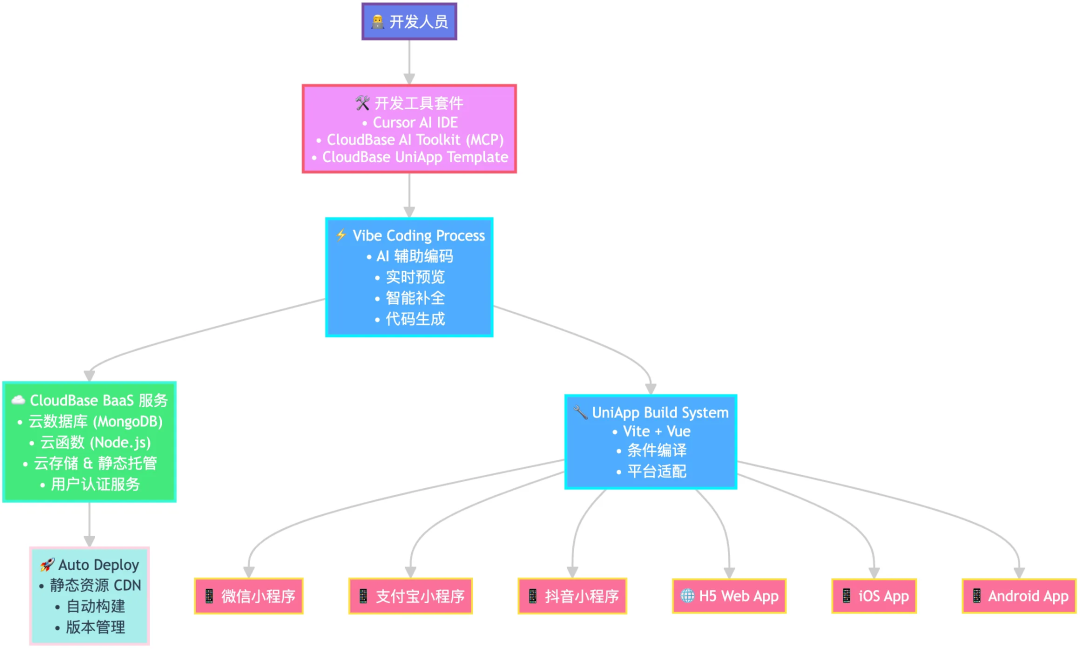 Technical architecture diagram
🎯 Tech Stack Selection
The tech stack used in the SoulChat project:
| Technical component | Role in the project | Reason for choice |
|---|---|---|
| CloudBase | Backend cloud service | Provides cloud database, cloud functions, real-time database and other services |
| CloudBase-uniapp template[2] | Cross-platform frontend dev template | Compiles to 6 platforms, reducing duplicate development |
| CloudBase-AI-ToolKit[3] | Development aid tool | Built-in cloud development best-practice rules, automatically creates database collections and deploys cloud functions |
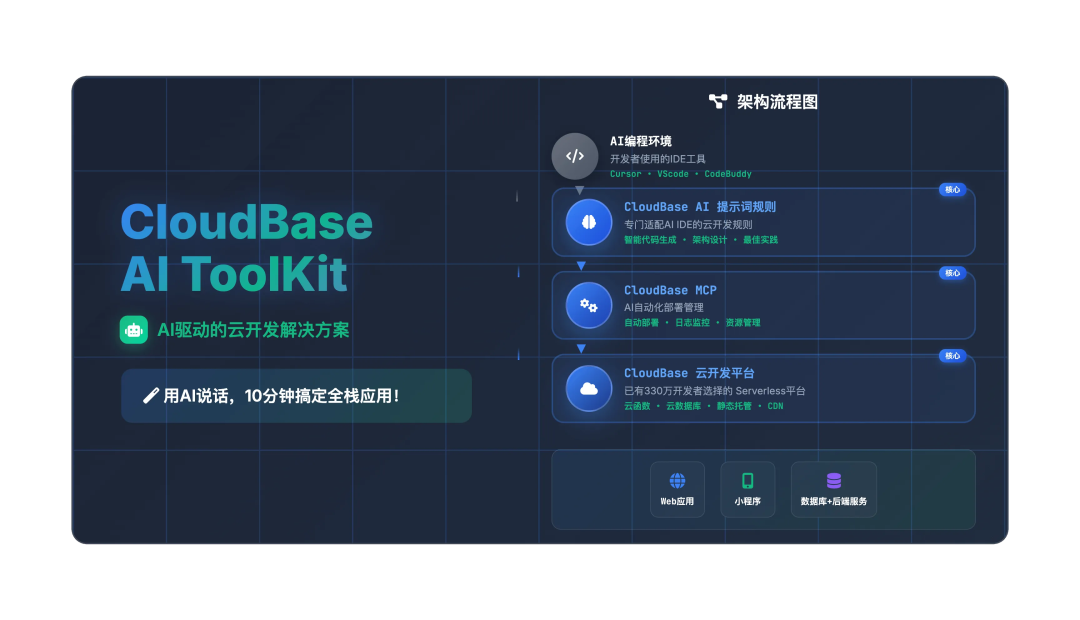 CloudBase-AI-ToolKit CloudBase-AI-ToolKit |
Architecture highlights:
- 🔄 All-in-one cloud: Frontend and backend share one unified CloudBase platform
- ⚡ Real-time communication: Message sync built on the CloudBase real-time database
- 🚀 Automated deployment: AI assists with resource creation and code deployment
🚀 Hands-on Development Guide
Step 1: Environment Preparation
1️⃣ Download the project template
Type this directly into the Cursor dialog:
Download a UniApp cross-platform app + cloud development setup into the current directory
This automatically downloads the official uni-app template provided by CloudBase AI ToolKit. The template ships with CloudBase best-practice rules and CloudBase MCP configuration.
2️⃣ CloudBase environment setup
Before development starts, we first need to sign in to the cloud development environment.
Enter "login to cloud development" in the AI dialog. On your first login, the browser will pop up the authorization page for the cloud development platform.
Login to cloud development
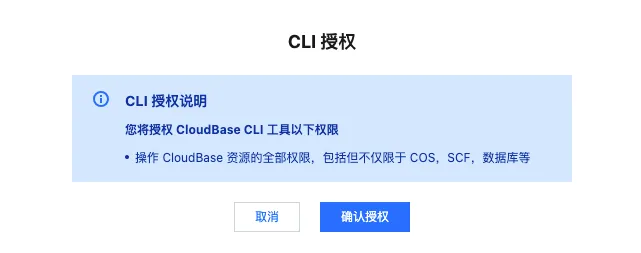 Login screen
After authorization, the available cloud development environments are shown, and we simply select the one we need.
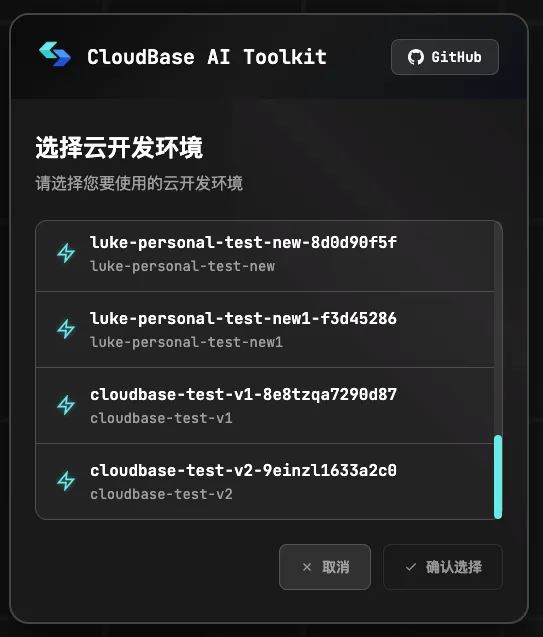 Environment selection
💡 Tip: A range of AI IDEs are supported, including Cursor, CodeBuddy, and others
3️⃣ Multi-platform domain configuration
Refer to the multi-platform secure domain configuration doc[4] to configure secure domains for each platform.
Step 2: Requirements Analysis and Design
An AI-assisted, structured development workflow:
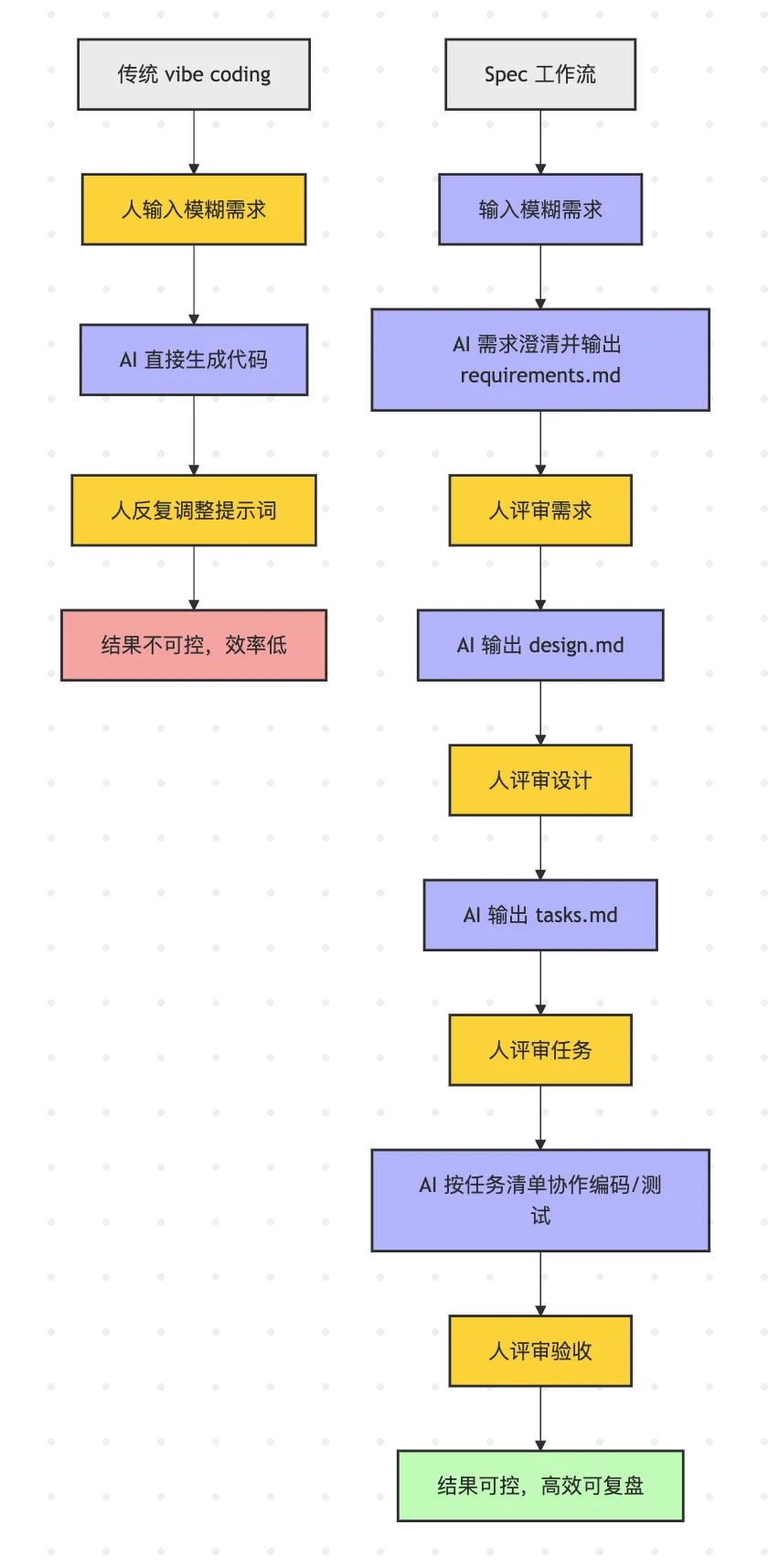 Comparison diagram
📋 Three phases of the development workflow:
Step 1: Clarify Requirements
Turn the initial idea into concrete feature requirements:
Based on the current CloudBase-UniApp template, develop an anonymous chat social app called SoulChat. Feature requirements:
- Provide phone-number + verification-code login
- When the user taps the match button, the system begins looking for other online users who are also matching
- After a successful match, the user can have real-time text chat with the other party, with instant send/receive on both sides
- The chat ends when either party leaves the room
The AI automatically generates detailed user stories and acceptance criteria:
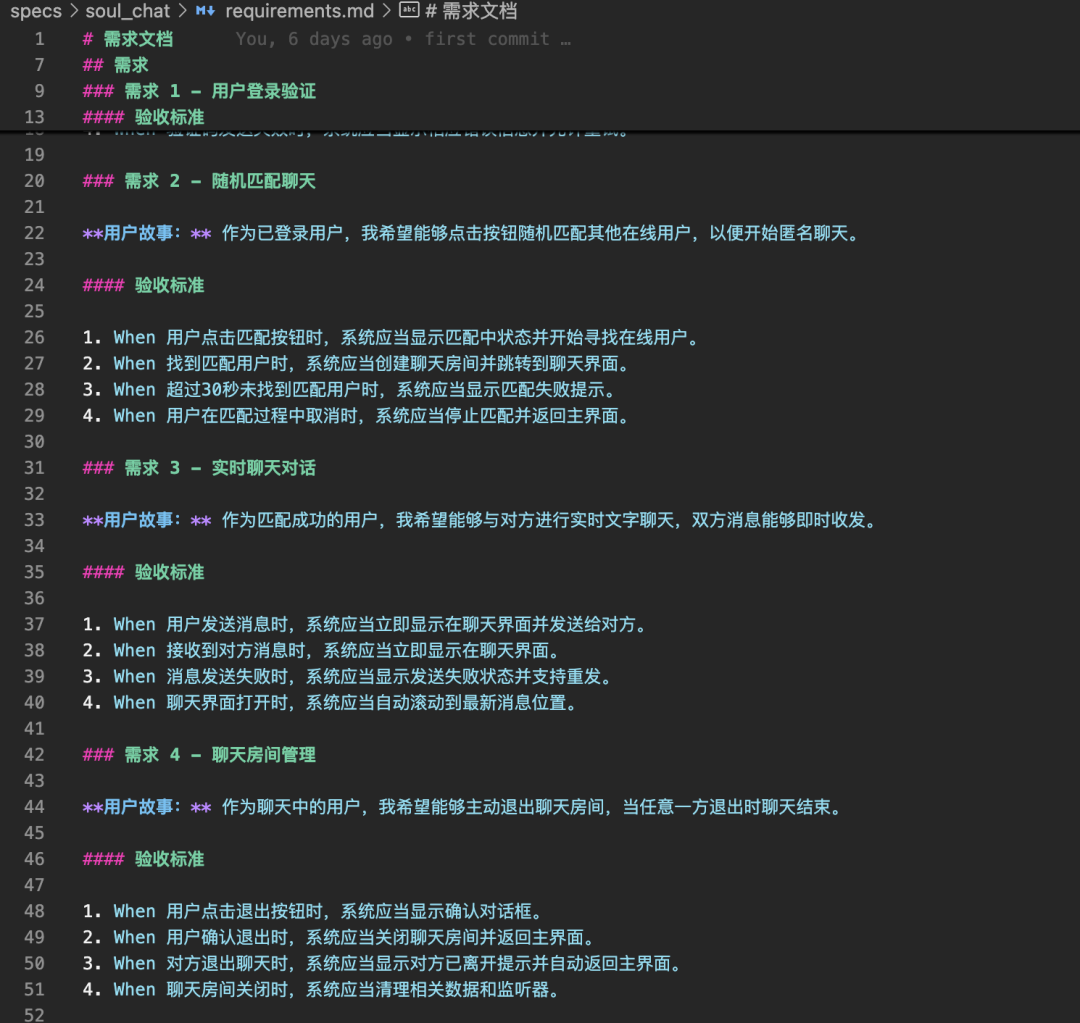 Requirement generation
Step 2: System Design
Based on the requirements doc, the AI helps with:
- 🏗️ Overall technical architecture design
- 🗄️ Database schema planning
- 🔌 API definition and design
- ☁️ Cloud function module division
For example, in a real-time chat system the AI generates the room management functions and the design of the chat message tables, and so on.
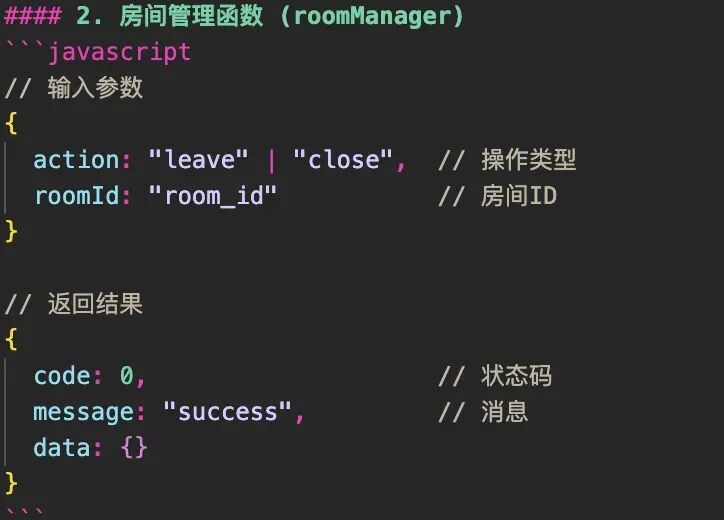 Room management function
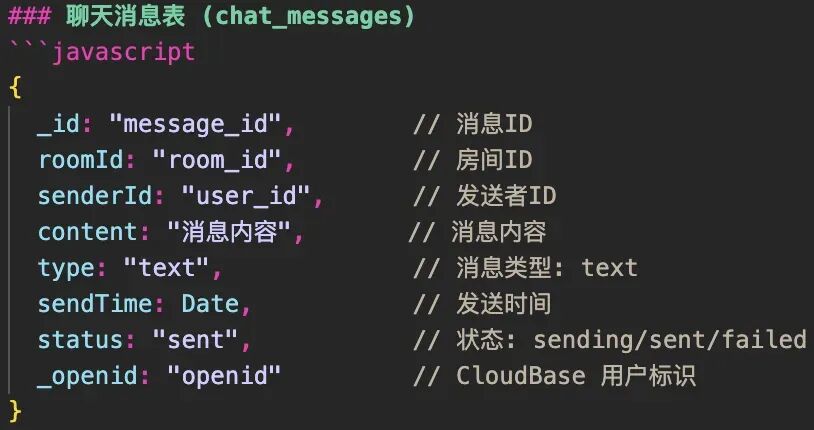 Chat message table
⚠️ Note: During development I noticed that when the AI iteratively generates code, it can sometimes drift away from the original design doc. In that case, ask it explicitly to correct itself and strictly follow the system design.
Step 3: Task Planning
Generate a detailed development task list with dependencies:
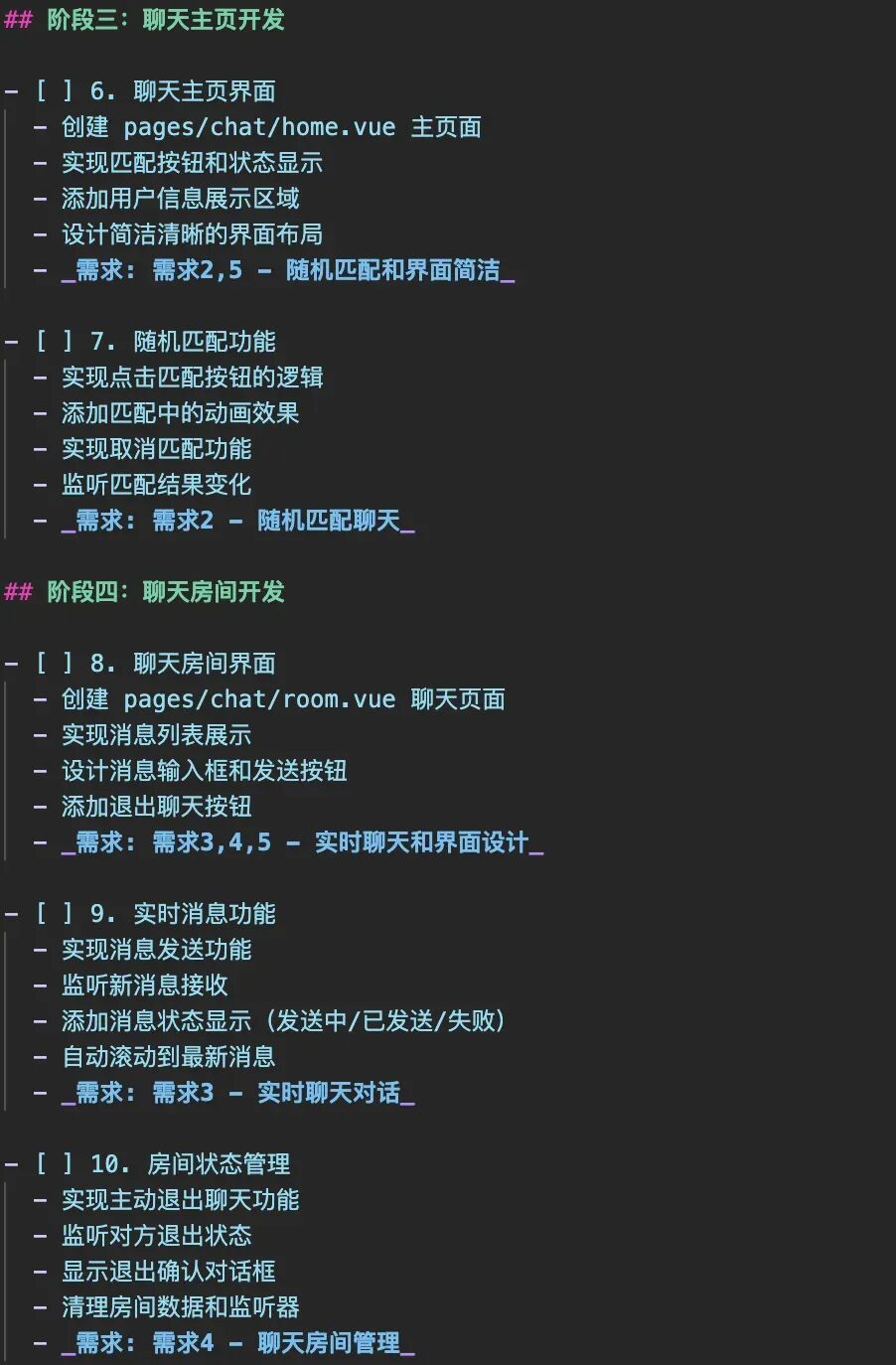 Task list
Step 3: Frontend UI Development
📱 Page feature implementation
Rapidly generate page code with AI assistance:
Based on the requirements doc and the base architecture design, generate the frontend page code for the SoulChat app. The pages should include the following feature modules:
- Home page: shows the app intro and the phone-number + verification-code login feature.
- Matching page: shows currently online users, match progress, and the start-matching button.
- Chat room page: displays chat messages, input box, send button, and message states (sending, sent, failed).
- UI style: a clean, clear design style.
Please ensure modular, maintainable components, and design the pages to work across multiple platforms with an optimized responsive layout.
Page implementation result: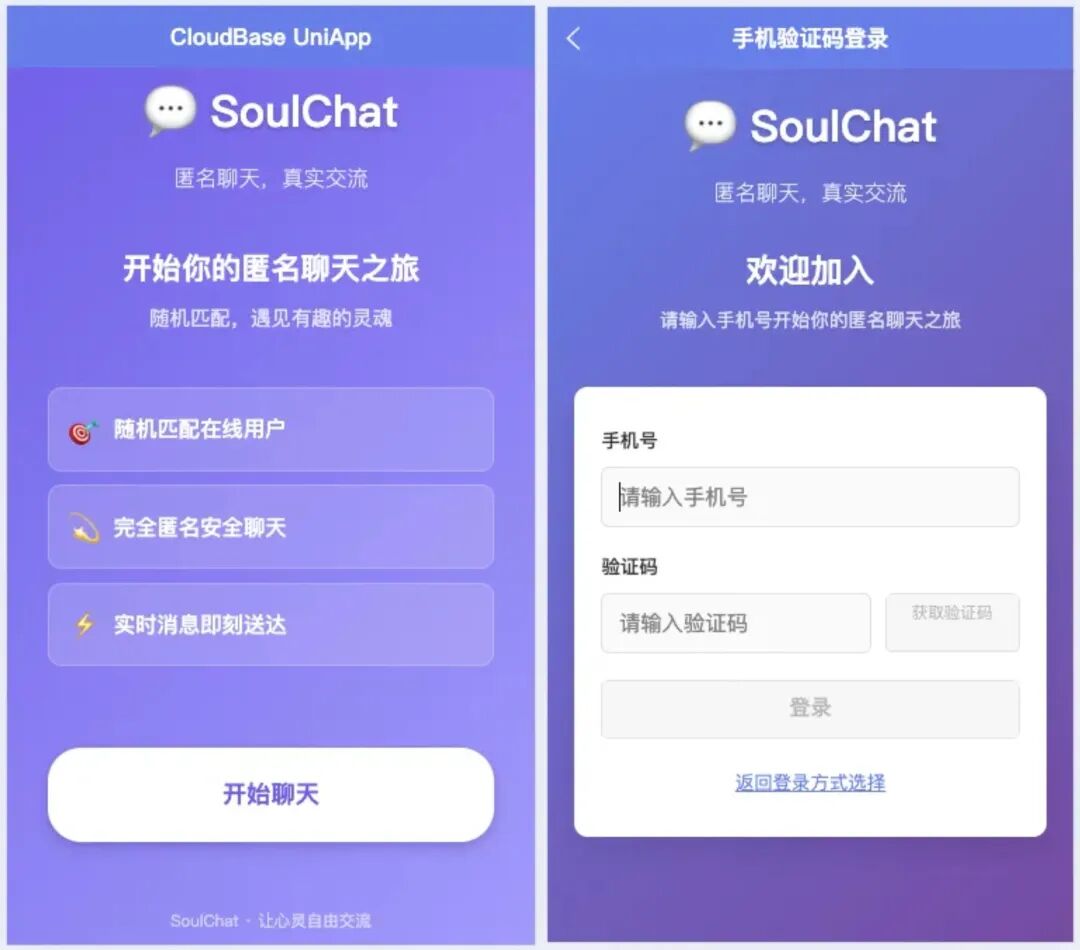
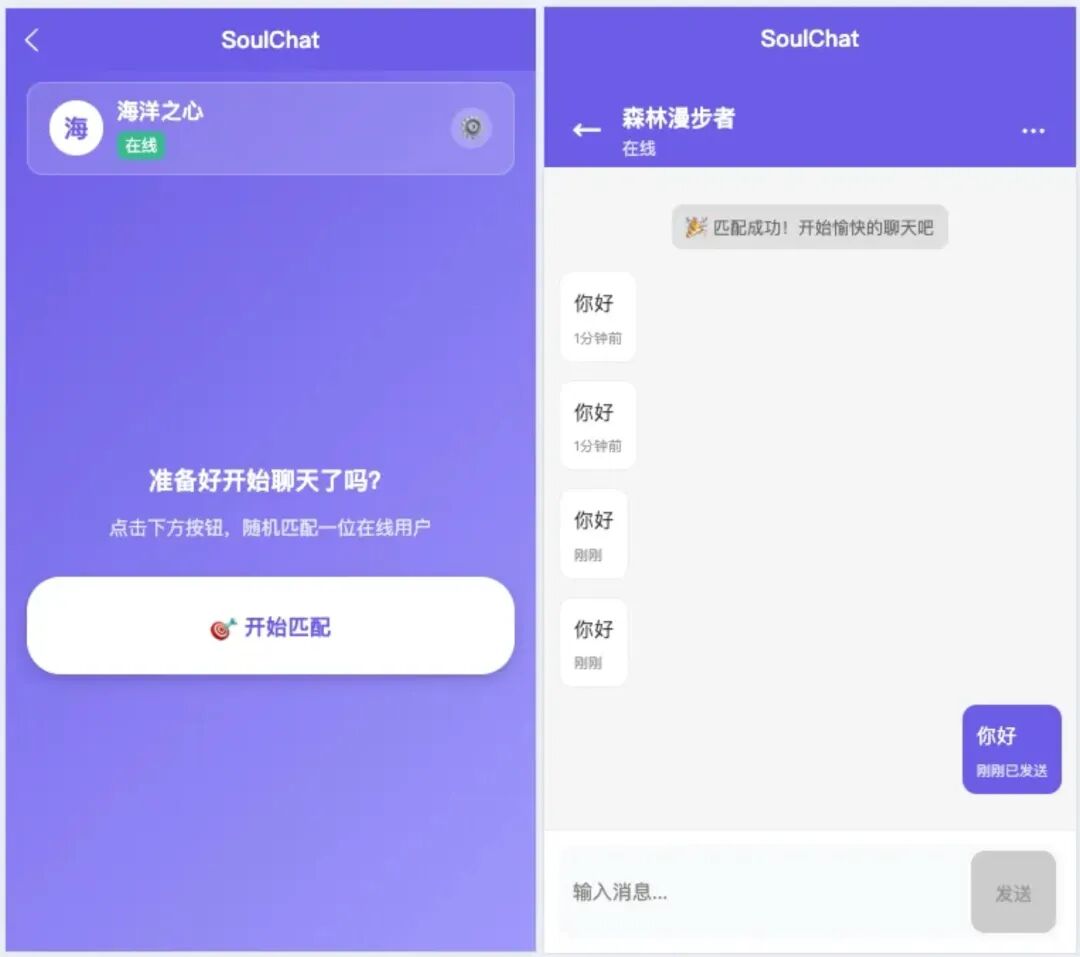 Chat page
The interface uses a modern design style with a smooth, natural interaction experience.
Step 4: Backend Service Development
🗄️ Database Schema Design
Based on business needs, four core data collections were designed:
| Collection name | Purpose | Main fields |
|---|---|---|
users | Basic user info | uid, nickname, status, etc. |
match_queue | Match queue management | userInfo, status, createTime, etc. |
chat_rooms | Chat room info | roomId, participants, status, etc. |
messages | Message record storage | roomId, senderId, content, etc. |
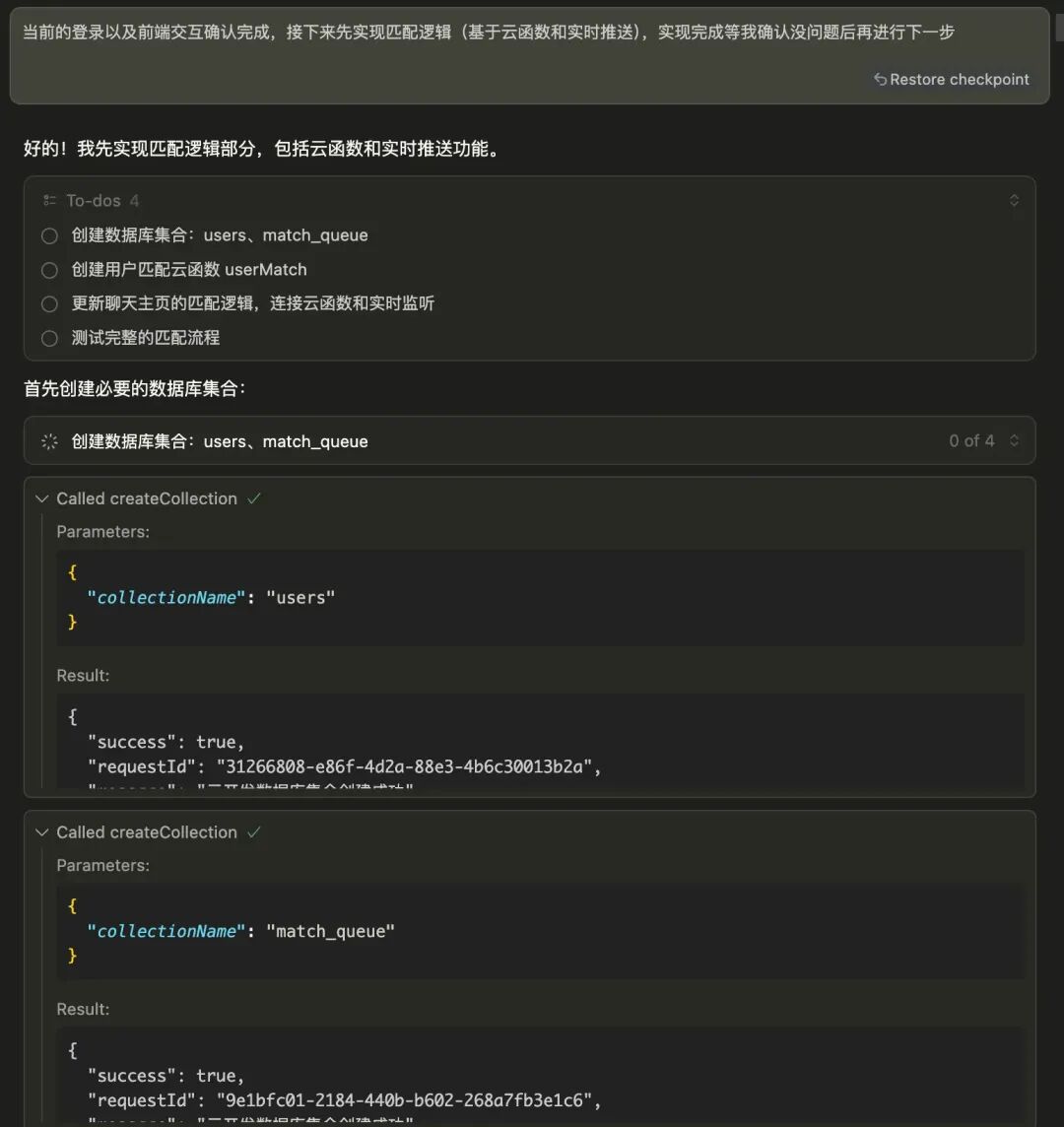 Database creation Database creation |
⚠️ Configuration point: Proper read/write permissions need to be set for the database collections so that the real-time listener feature works correctly.
☁️ Cloud Function Implementation
Core business modules:
userMatch- Handles the user matching logicmessageManager- Manages message send and receive
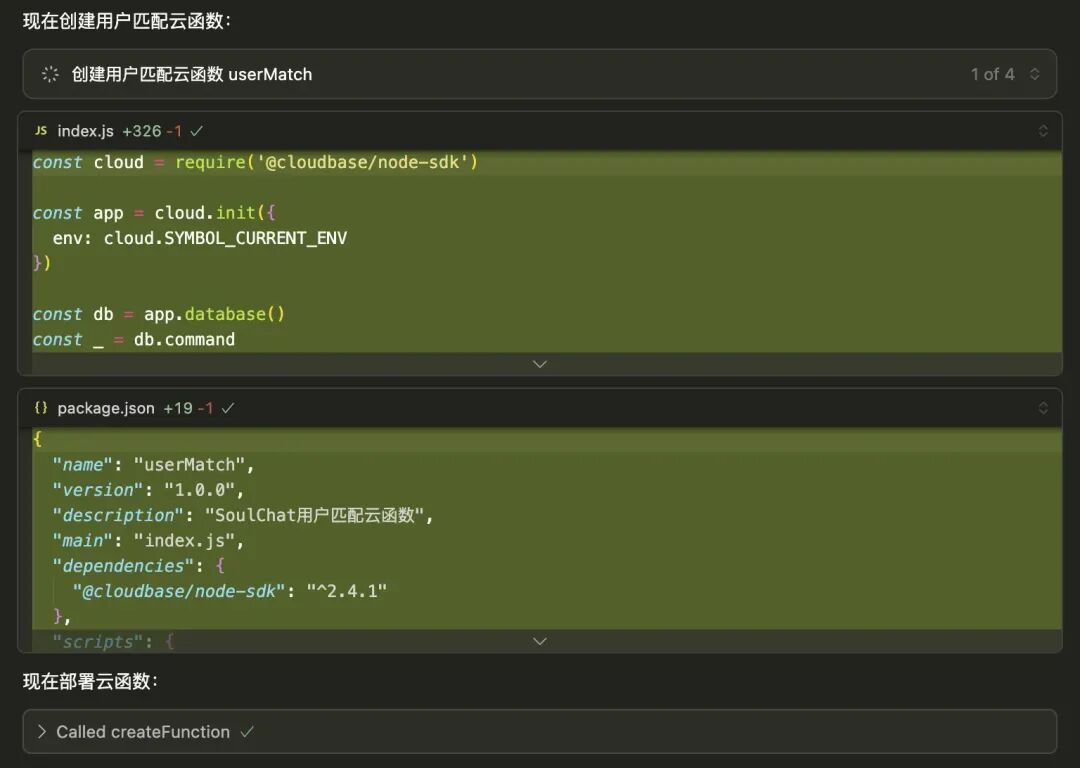 Cloud function deployment
With AI tooling, writing and deploying cloud functions is quick:
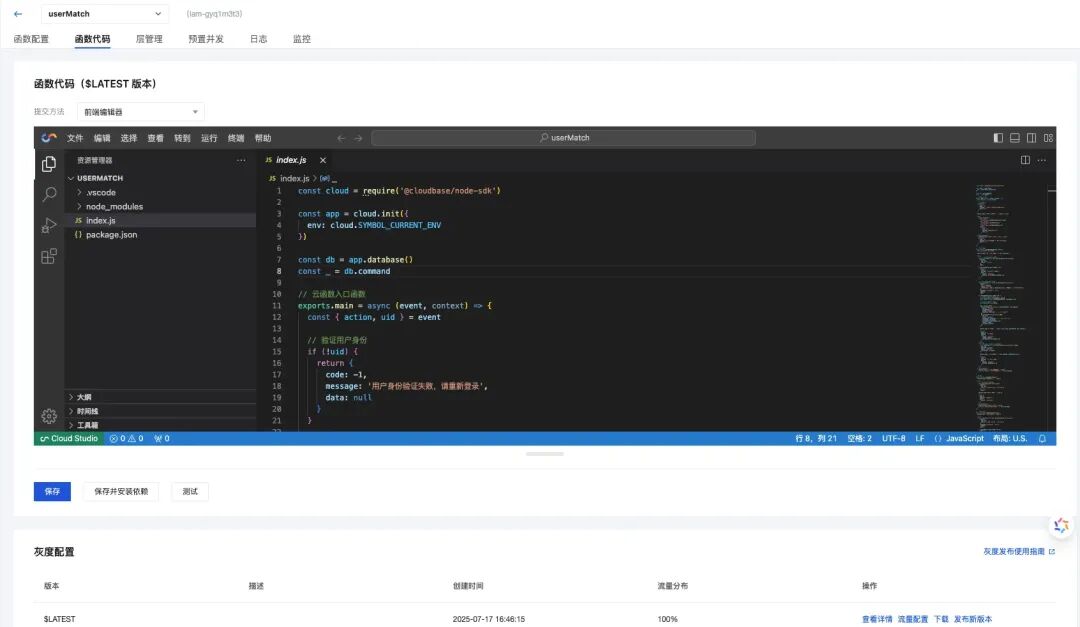 Deployment successful
💪 Core Highlights
🔥 Real-time Communication Architecture
```js
    // Use the CloudBase real-time database to watch for other users waiting to be matched
    const waitingUsers = await db.collection('match_queue')
        .where({
        uid: _.neq(uid),
        status: 'waiting',
        createTime: _.gte(new Date(Date.now() - 30000)) // Queue records within the last 30 seconds
        })
        .orderBy('createTime', 'asc')
        .limit(1)
        .get()
### 🌐 uni-app Adaptation Approach

```js
```js
    import cloudbase from '@cloudbase/js-sdk'
    import adapter from '@cloudbase/adapter-uni-app'

    // Use the UniApp adapter
    cloudbase.useAdapters(adapter,{uni: uni});

    // Unified CloudBase initialization
    const app = cloudbase.init({
      env: 'your-env-id'
    })
### 💬 Message Listener Handling

```js
```js
    try {
        const db = app.database()

        messageWatcher = db.collection('messages')
          .where({
            roomId: roomId
          })
          .orderBy('sendTime', 'asc')
          .watch({
            onChange: (snapshot: any) => {
                    //processing logic
                  }
                }
              },
            onError: (error) => {
              console.error('Message listener failed:', error)
            }
          })
      } catch (error) {
        console.error('Failed to start message listener:', error)
      }
* * *

## 📊 Results Showcase

### ⚡ Development Efficiency Comparison

Metric| Traditional development| AI-assisted development
---|---|---
**Development time**|  1-2 weeks| 2 days
**Code quality**|  Hand-written| AI-generated + optimized
**Deployment efficiency**|  Manual configuration| One-click deployment

### 🏆 Product Highlights

  * **Anonymous social:** Phone-verification login, auto-matching a chat partner
  * **Cross-platform interoperability:** Web, Mini Programs, and native apps communicate without barriers
  * **Real-time experience:** Messages sync instantly, no refresh needed

* * *

## 🎉 Summary and Outlook

### 💡 Core Takeaways

Through this **SoulChat** project, I deeply experienced the power of **CloudBase + AI**:

  1. **🎯 Automated requirements analysis** - Fuzzy ideas instantly become clear requirements
  2. **🏗️ Intelligent architecture design** - Automatically generates best-practice solutions
  3. **⚡ Visualized development process** - Task breakdown and progress tracking
  4. **☁️ Integrated deployment and operations** - Cloud resources configured automatically

### 💬 A Final Word

**AI is not here to replace developers, but to let us focus on creativity and business logic!**

Hand the repetitive work to tools, and keep the creative work for humans. That is the right way for developers to work in the AI era!

* * *

 _Finally, thanks for watching — see you next time!_ 👋

References[1]

SoulChat:  _https://github.com/yulinlin2020/soulchat_

[2]

CloudBase-uniapp template:  _https://github.com/TencentCloudBase/awesome-cloudbase-examples_

[3]

CloudBase-AI-ToolKit:  _https://github.com/TencentCloudBase/CloudBase-AI-ToolKit_

[4]

Multi-platform secure domain configuration doc:  _https://github.com/TencentCloudBase/awesome-cloudbase-examples/blob/master/universal/cloudbase-uniapp-template/README.md_